
AppSumo Black Friday Drop 5: 6 AI Content Tools Worth Your Time
AppSumo's final Black Friday drop features six content creation tools: Logically for academic research, Semdash for SEO, Neuron Writer for optimized content, Letterly for speech-to-text, Vocable for social planning, and Eureka for courses.

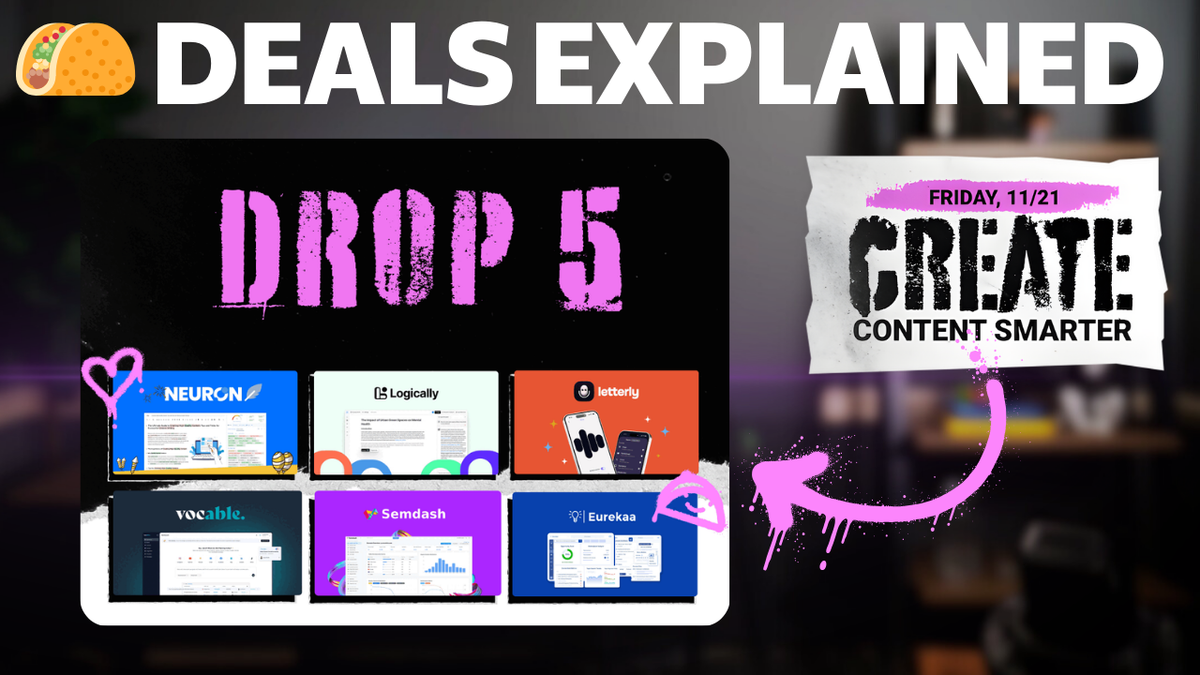
Introduction to AppSumo Black Friday Drop 5 [0:00]
The final drop of AppSumo's Black Friday 2025 season has arrived, and it's focused entirely on content creation tools. If you've been following along with my coverage this season, you know I've been testing every single tool from each drop to help you make informed decisions about where to spend your money.
This fifth and final drop brings six tools that cover the entire content creation spectrum—from academic research to SEO optimization, speech-to-text dictation, social media planning, and even course creation. These aren't random tools thrown together; there's a clear theme here around creating content smarter and more efficiently.
I've spent time with each of these tools, and in this review, I'll walk you through exactly how they work, what they're good at, and where they fall short. No hype, just practical information you can use to decide if any of these tools belong in your workflow.
Overview of the Six Tools [0:15]
Let me give you a quick rundown of what we're looking at today before we get into the details.
First up is Logically, which used to be called 4i. This is an academic-focused AI research assistant that combines document retrieval, reference management, and AI-powered writing. If you're doing any kind of research that requires citations and bibliography management, this one's worth paying attention to.
Semdash is positioning itself as a budget alternative to enterprise SEO tools like Ahrefs and SEMrush. At $69 for a lifetime deal versus hundreds or thousands per month for those other platforms, it's an interesting value proposition if the features hold up.
Neuron Writer is back—this was AppSumo's 2023 Tool of the Year. It's designed to help you create SEO-optimized content with competitor analysis and NLP term suggestions built in.
Letterly returns as the 2024 Tool of the Year. This speech-to-text tool transforms voice notes into structured content like emails, blog drafts, or lists, automatically cleaning up filler words and organizing your thoughts.
Vocable is an AI-powered content planner that can generate 30 days of social media content in minutes, including posts, carousels, and reels with built-in scheduling.
Finally, Eureka is an AppSumo Plus exclusive for course creators. It helps you research profitable course topics, analyze gaps in existing courses, and actually build and publish your courses.
Black Friday Deals Update [1:24]
Even though the drops are done, Black Friday is really just getting started. I'll have full coverage of other deals outside of the AppSumo space coming to this channel starting Monday, so make sure you're subscribed and have notifications turned on.
AppSumo themselves aren't done with Black Friday either. Starting November 23rd, everything site-wide gets 10% off. That discount runs until December 2nd for regular members, and if you're an AppSumo Plus member, it extends all the way to December 5th.
This means you can stack that 10% discount on top of these already-discounted lifetime deals, which makes the value proposition even more interesting for some of these tools.
Logically: AI Research Assistant [1:56]
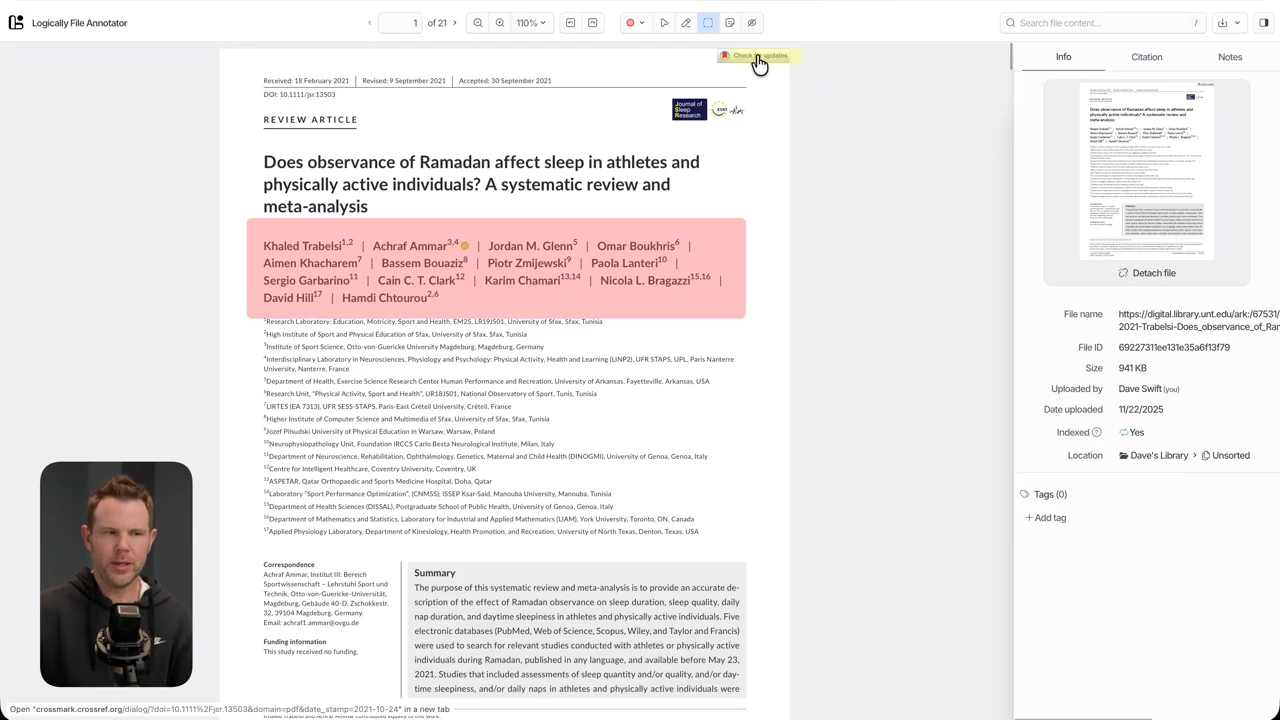
Logically (formerly 4i) is actually three tools bundled together that work in an intelligent, interconnected way. You get a document writer, a reference manager, and a research assistant—and the workflow between them makes sense.
How Logically Works
The typical workflow starts in the research assistant where you conduct academic-style research on specific topics. You can then save references from your research directly into the reference manager. The reference manager also accepts your own uploaded files like PDFs, so you can build a comprehensive library of sources.
When you're ready to write, you can create citations directly to content in your reference manager. The bibliography is generated automatically as you work, which is a significant time-saver if you've ever had to manually format citations.
Research Assistant Features
The research assistant offers three types of searches. First is document retrieval, which searches any documents you've already uploaded to your reference manager. Second is a semantic scholar search that accesses over 200 million peer-reviewed papers. Third is a deep research option for regular Google searches when you're not working on academic projects.
I tested it with a query about sauna and sleep connections. The search used Gemini Flash 2.5, though several other models are available. For standard research, they recommend Gemini Flash. For deeper work, Gemini Pro 1.5 or 2.5 are the recommended options.
My specific query didn't return published studies, but it did provide semi-related results. When you find a paper that interests you, clicking the arrow icon uploads it directly to your reference manager for further analysis.
Document Management and Annotation
Once a document is in your reference manager, you can read it within the platform or chat with it using AI. The reading experience is solid, with annotation tools that let you highlight text or specific areas. Any highlights you create are added to the chat interface where you can ask questions about highlighted content.
There's a useful "check for updates" feature that verifies you have the most recent version of documents—helpful when working with papers that might be revised or updated over time.
As you add more notes and comments, things can get cluttered, but there's a built-in search function to help you find specific annotations or references quickly.
Document Creation
When you're ready to write, Logically uses the Lexical editor, an open source project from Meta. It's a clean, functional editor with slash commands similar to Notion. You can easily add headlines, embed images, or insert code blocks.
The editor includes tab-to-complete functionality, similar to what you'd find in Cursor for coding. More importantly, you can use the @ symbol to reference documents in your library and insert citations in the correct format. The bibliography updates automatically as you add citations.
Pricing Tiers
There are three tiers available on AppSumo. Tier 1 only includes standard AI models—you don't get access to advanced AI. Tiers 2 and 3 include advanced AI, but it's rate limited to either 20 calls per three hours (Tier 2) or 50 calls per three hours (Tier 3).
If you're doing serious academic work or research-heavy content creation, the rate limits on advanced AI are worth considering carefully. For casual use, Tier 1 might be sufficient, but anyone doing professional research should probably look at Tier 2 or 3.
Semdash: SEO Tool [6:12]
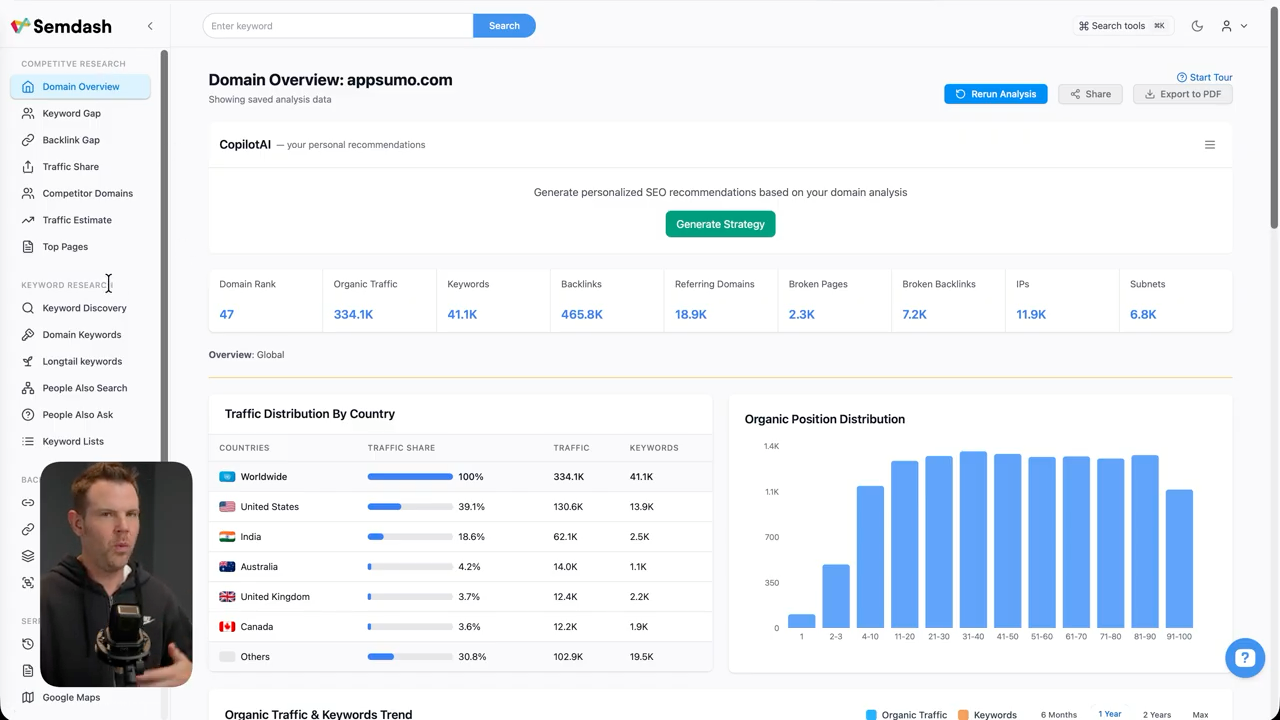
Semdash is positioning itself as a budget alternative to enterprise SEO platforms like SEMrush and Ahrefs. Those tools cost hundreds or thousands per month, while Semdash starts at $69 as a lifetime deal. The question is whether it can actually compete with those established platforms.
Tool Organization and Features
This is a deep tool with extensive features organized by category. There's competitive research that shows what other websites in your niche are doing. Keyword research helps identify topics worth covering on your site. Backlink research provides data about which sites link to you. The SERP checker lets you see search engine results pages at different points in time or from different geographic locations.
AI SEO tools are built in, along with lead generation features and integrations primarily focused on Google Search Console.
Competitive Research
The competitive research section is comprehensive. You can analyze competitors' content performance, see their top-performing pages, and identify gaps in their coverage that might represent opportunities for you.
One useful feature is the ability to track competitor rankings over time. This gives you insight into whether their SEO strategy is working and what kinds of content are moving the needle for them.
Keyword Research Tools
The keyword research section includes several tools. There's a keyword magic tool that generates keyword ideas based on seed keywords. A keyword gap analysis shows you keywords your competitors rank for that you don't. The keyword manager lets you organize and track keywords you want to target.
I found the keyword data to be reasonably accurate when I spot-checked it against other tools, though the search volume estimates occasionally differed slightly from what I've seen in Ahrefs.
Backlink Analysis
Backlink research shows which sites link to yours, the quality of those links, and trends over time. You can also analyze competitor backlinks to identify potential link-building opportunities.
The interface for backlink analysis is functional but not as polished as what you'll find in Ahrefs. It gets the job done, but power users might miss some of the more advanced filtering and visualization options.
SERP Checker
The SERP checker is interesting because it lets you see what search results looked like at different points in time. This is useful for understanding how Google's algorithm updates affected rankings in your niche.
You can also check SERPs from different geographic locations, which matters if you're targeting specific regions or countries.
AI Features
The AI section includes tools for generating content outlines, analyzing top-ranking pages, and identifying content opportunities. These features work, but they're not significantly different from what other SEO tools are offering at this point.
Integration with Google Search Console
The Google Search Console integration is straightforward and provides a convenient way to view your search performance data alongside Semdash's other features. This integration works smoothly and imports data reliably.
How It Compares
Having used Ahrefs extensively, I can say Semdash covers most of the essential SEO functions, but it doesn't match the depth and polish of enterprise tools. For someone just starting with SEO or managing a small number of sites, Semdash offers good value. For agencies or power users managing dozens of sites, you'll probably find limitations.
At $69 for a lifetime deal versus $100+ per month for alternatives, Semdash makes sense for a specific audience: people who need solid SEO tools but can't justify the cost of enterprise solutions.
Neuron Writer: SEO Content Creator [12:29]
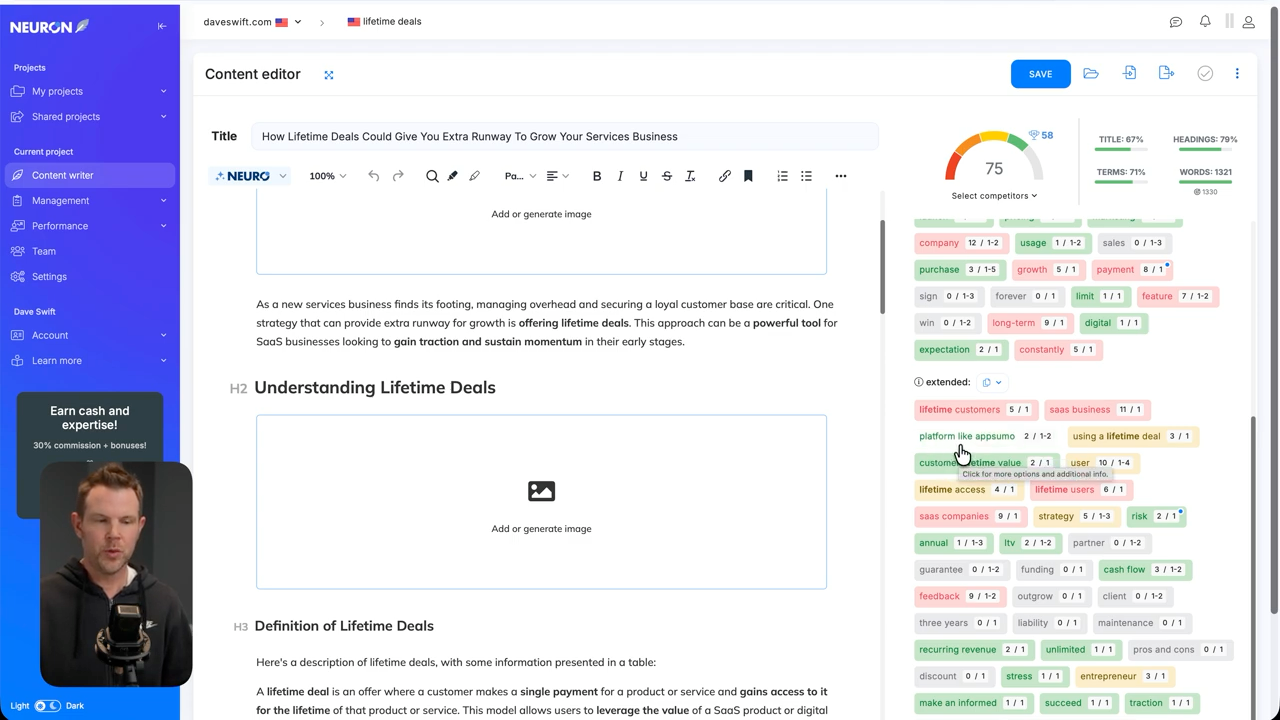
Neuron Writer was AppSumo's 2023 Tool of the Year, and it's back for this Black Friday. This tool is designed specifically for creating SEO-optimized content with built-in competitor analysis and NLP term suggestions.
Core Functionality
The basic workflow in Neuron Writer starts with a target keyword. The tool analyzes the top-ranking pages for that keyword, identifies common terms and topics, and provides guidance for creating content that could compete for rankings.
This isn't about keyword stuffing or gaming the algorithm. It's about understanding what topics and subtopics the top-ranking content covers, then creating comprehensive content that addresses those same areas (ideally better than existing content).
Content Creation Process
When you start a new article, Neuron Writer analyzes the top 30 or so results for your target keyword. It extracts common terms, questions, and topics that appear frequently in high-ranking content.
You then write your content in the editor, and Neuron Writer provides a content score that indicates how well your piece covers the important terms and topics. The goal isn't to hit 100%—it's to create comprehensive, useful content that naturally includes relevant terms.
NLP Term Suggestions
The NLP term suggestions are particularly useful. Rather than just suggesting keywords, the tool identifies semantically related terms and concepts that appear in top-ranking content. This helps you cover topics more thoroughly.
For example, if you're writing about "email marketing," the tool might suggest terms like "automation," "segmentation," "open rates," and "deliverability" based on what's working for top-ranking pages.
Competitor Analysis
The competitor analysis feature shows you the structure and key points of top-ranking content. You can see how long competing articles are, what subtopics they cover, and how they're organized.
This isn't about copying competitors—it's about understanding what users and Google expect from content on this topic, then creating something that meets or exceeds those expectations.
AI Detection Scoring
Neuron Writer includes an AI detection feature that analyzes your content and flags sections that might be identified as AI-generated. This is useful if you're using AI to assist with drafting but want to ensure the final piece doesn't read as obviously machine-written.
The detection isn't perfect (no AI detection tool is), but it provides a useful signal about which sections might benefit from additional human editing.
Integrations
Neuron Writer integrates with WordPress, Webflow, and several other major CMS platforms. You can write in Neuron Writer, optimize your content, and then publish directly to your site without copy-pasting.
Who Should Use This
Neuron Writer makes sense for content creators, marketers, and business owners who publish SEO-focused content regularly. If you're only publishing occasionally, you probably don't need a dedicated tool for this. But if you're creating multiple pieces of optimized content per month, Neuron Writer can streamline your process significantly.
Letterly: Speech-to-Text Dictation App [16:19]
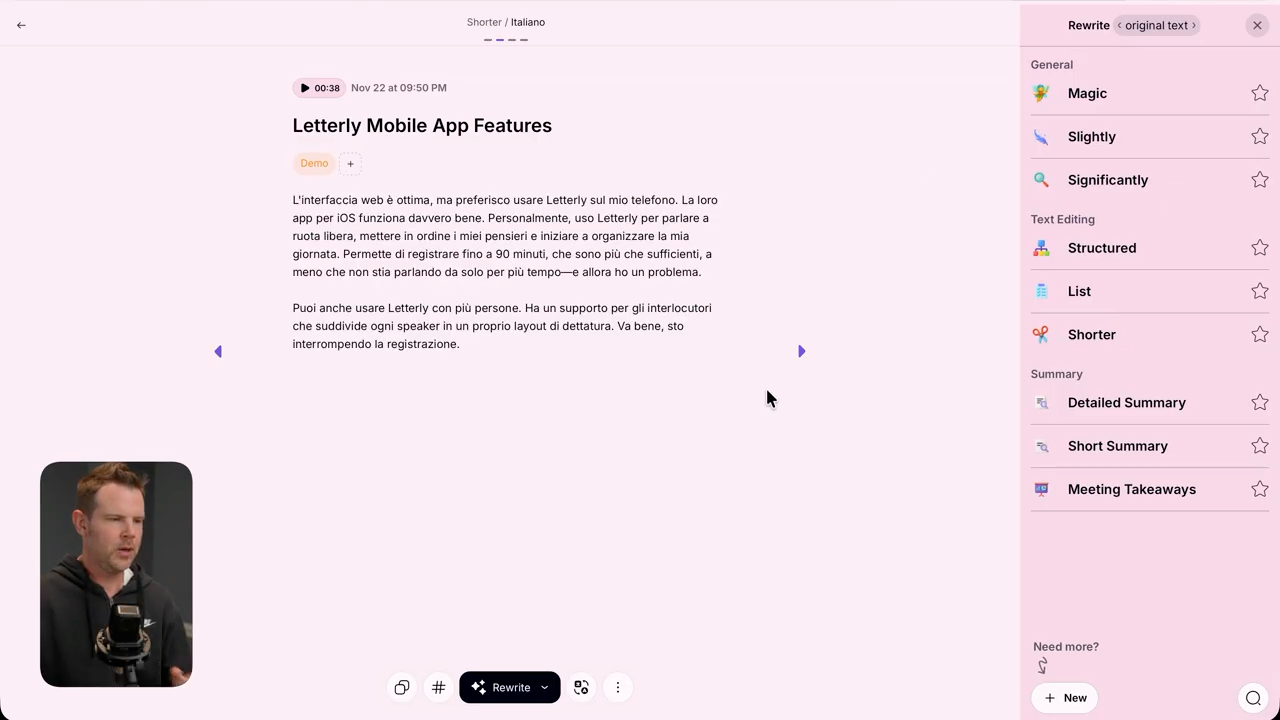
Letterly won AppSumo's 2024 Tool of the Year award, and after using it, I understand why. This isn't just another speech-to-text tool—it's designed to transform voice notes into structured, useful content.
How Letterly Works
The basic concept is simple: you record a voice note (rambling, stream-of-consciousness, however you naturally speak), and Letterly's AI processes it into structured content. This could be an email, a blog outline, a list, meeting notes, or whatever format makes sense for your input.
The key differentiator is that Letterly doesn't just transcribe your words—it cleans up filler words, organizes your thoughts into logical sections, and formats the output appropriately.
Practical Use Cases
I've found several practical applications for Letterly:
Email drafting: Record your thoughts about an email you need to send, and Letterly formats it into a proper email with appropriate structure and tone. This is particularly useful when you're mobile or don't feel like typing.
Meeting notes: Record your thoughts after a meeting, and Letterly organizes them into structured notes with key points, action items, and next steps clearly delineated.
Blog post outlines: Talk through ideas for a blog post, and Letterly creates a structured outline with main points and subpoints organized logically.
Task lists: Ramble through everything you need to accomplish, and Letterly creates a clean, organized task list.
The Quality of Output
What impressed me most was the quality of the cleaned-up output. I intentionally recorded rambling, unstructured voice notes with filler words and tangents, and Letterly consistently produced clean, well-organized text.
It's not perfect—you'll still need to edit and refine the output—but it gives you a solid starting point that's much better than raw transcription.
Where This Fits in Your Workflow
Letterly works best as a capture tool for the messy beginning of the content creation process. When you have ideas but don't want to sit down and type them out formally, Letterly lets you talk through your thoughts and get them into a usable format.
This is particularly valuable if you find that good ideas often come when you're not at your desk—during a commute, on a walk, or right before bed. Instead of trying to remember those ideas or jotting down incomplete notes, you can capture them fully in Letterly.
Limitations
The main limitation is that Letterly works best for certain types of content. It's excellent for emails, notes, outlines, and lists. It's less ideal for long-form content where style and flow matter significantly. You wouldn't use this to write a complete article, but you could absolutely use it to outline one.
Vocable: AI Content Planner [19:15]
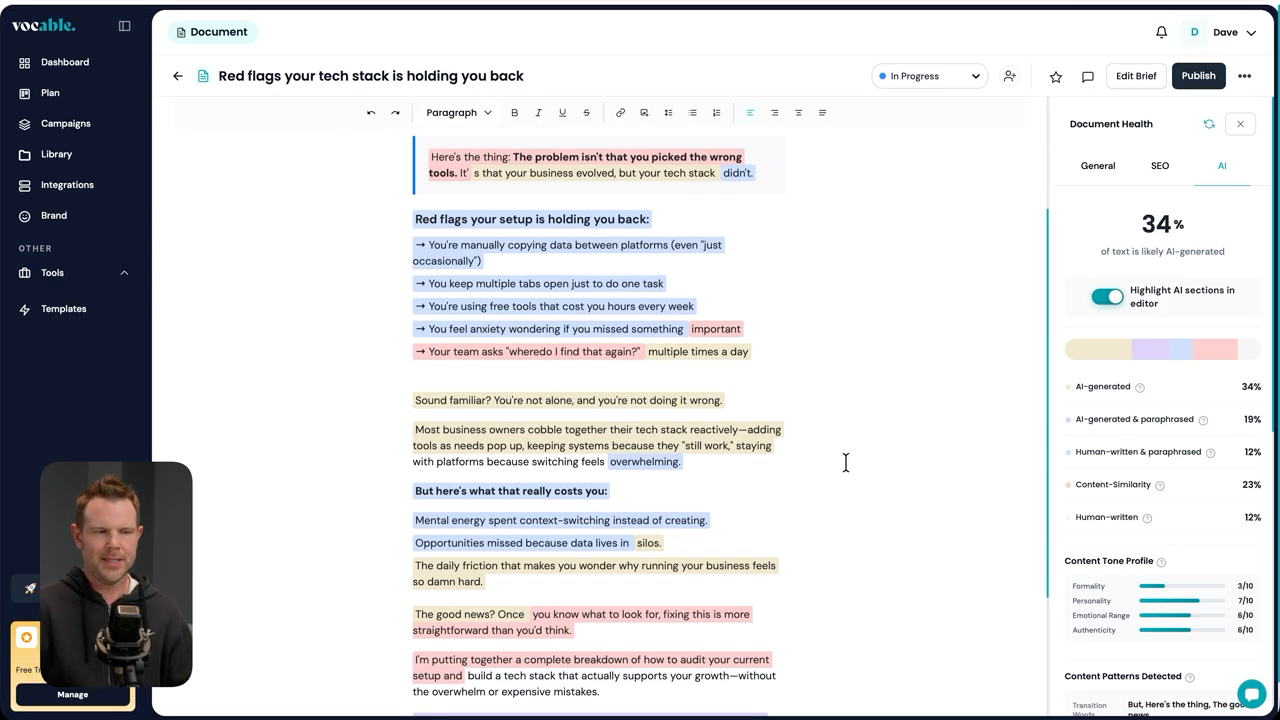
Vocable is an AI-powered content planner designed to generate social media content at scale. The pitch is that you can create 30 days of content in minutes, complete with posts, carousels, and reels.
Content Generation Process
The workflow starts by defining your brand, audience, and content pillars. Vocable then uses this information to generate content ideas aligned with your brand voice and target audience.
You can generate individual posts or entire content campaigns. For campaigns, Vocable creates a series of related posts that work together to achieve a specific marketing goal.
Content Types
Vocable supports multiple content formats:
Text posts: Standard social media updates for platforms like LinkedIn, Facebook, or Twitter.
Carousels: Multi-slide posts popular on Instagram and LinkedIn.
Reels/Videos: Short-form video concepts with scripts and suggested visuals.
The quality of generated content varies. Text posts tend to be solid starting points that require light editing. Carousel and video concepts need more refinement but provide useful creative direction.
Scheduling and Publishing
Vocable includes built-in scheduling, so you can plan your content calendar and automate posting. This integrates with major platforms including LinkedIn, Facebook, and X (Twitter).
The scheduling interface is straightforward and works reliably. You can set up queues for different platforms and let Vocable handle the posting schedule.
Team Collaboration
For teams, Vocable includes collaboration features. Multiple team members can contribute to content creation, review drafts, and manage the approval process before content goes live.
This is useful for businesses where content needs to go through review before publication, or when you have multiple people contributing to your social media presence.
The Reality of AI-Generated Social Content
Here's the honest assessment: AI-generated social media content is getting better, but it still requires human oversight and editing. Vocable provides a useful starting point that saves time compared to starting from scratch, but don't expect to generate content and publish it without review.
The value proposition depends on your current process. If you're spending hours per week planning and creating social content, Vocable can reduce that time significantly. If you already have an efficient content creation system, the benefit might be marginal.
Pricing Considerations
There are three tiers available. Tier 2 is where you get all the features unlocked. Tier 3 provides unlimited brands and unlimited AI-powered campaigns, which matters if you're managing multiple clients or business entities.
For most individual users or small businesses, Tier 2 is the sweet spot. Agencies or consultants managing multiple clients should consider Tier 3.
Eureka: Course Creator Tool [22:48]
Eureka is an AppSumo Plus exclusive tool designed for course creators. It helps with the entire course creation process from research and validation through to building and publishing your course.
Two Main Sections
Eureka is organized into two main areas: Research and Development.
The Research section helps you find profitable course ideas and gather information about what content to include. The Development section is where you actually build your course and prepare it for publication.
Course Research Tools
The course research functionality is impressive. You can search through over 260,000 courses across multiple platforms to identify opportunities.
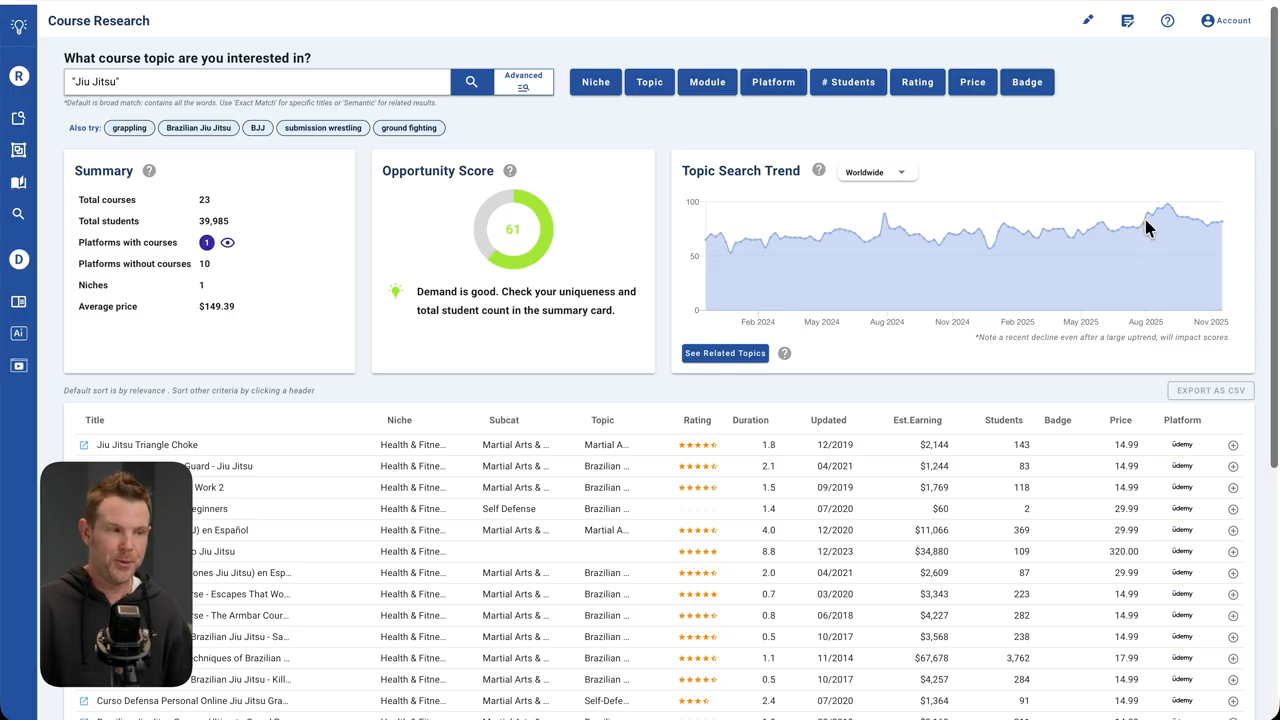
I tested this with "jujitsu" as an example. Eureka found 23 courses on the topic with about 40,000 total enrollments, all on Udemy. The average sale price was $150, which is surprisingly high for Udemy courses—most seem to sell in the $15-20 range.
Eureka assigns an opportunity score based on demand, competition, and other factors. For jujitsu, the opportunity score was good, indicating decent demand with manageable competition.
Trend Analysis
The trend data uses Google Trends to show interest over time. For my jujitsu example, interest was rising slightly, suggesting growing demand for content on this topic.
This historical perspective helps you avoid creating courses on declining topics or jumping into saturated markets right as interest peaks.
Competitor Course Analysis
For each course Eureka finds, you can view the complete outline, sales page copy, pricing, student enrollment numbers, and estimated earnings.
The gap analysis tool is particularly useful—it examines course curricula and identifies topics or subtopics that aren't covered, giving you ideas for creating a more comprehensive offering.
The review analysis examines student reviews to identify common complaints or wishes. This tells you exactly what to improve or add in your version of the course.
Platform and Book Research
Beyond courses, Eureka lets you research specific platforms (like CreativeLive, Coursera, or Skillshare) to see what performs well on each. There's also a book research tool if you're considering writing a book alongside or instead of a course.
Title and Keyword Planning
The title keyword planner helps you evaluate potential course titles for SEO value and uniqueness. You can see if other courses use the same or similar titles and get data on search volume for various phrases.
Course Creation
In the Development section, you create your actual course. You can use AI to generate section outlines and lesson structures, though I don't recommend letting AI write complete courses. The tools work best as starting points that you then refine based on your expertise.
Publishing Features
Eureka includes a course publisher ("rapid publisher") where you upload videos, add descriptions, and organize your course structure. Tiers 1 and 2 don't include video hosting—you'd need to host videos elsewhere or embed from platforms like YouTube. Tier 3 includes video hosting, which simplifies the publishing process.
There's even an AI quiz generator that creates quizzes based on your course content, which can boost student engagement and learning outcomes.
Who Should Consider Eureka
Eureka makes sense for people in three situations:
- You're thinking about creating a course but aren't sure what topic would be viable
- You're creating courses regularly and want to streamline the research and planning process
- You're teaching a subject where you want to ensure your course is more comprehensive than existing options
If you're already mid-way through creating a course and have validated your topic, Eureka probably won't provide as much value. Its strength is in the research and validation phase.
Conclusion [28:29]
I've now covered every single tool AppSumo released during this year's Black Friday drop sequence. Drop 5 brings a solid selection of content creation tools that cover different aspects of the content creation process.
My Overall Assessment
Logically fills a specific niche for academic researchers or anyone who needs proper citation management and access to peer-reviewed research. If that's not you, it's probably not worth the investment.
Semdash offers good value for people who need SEO tools but can't justify the cost of Ahrefs or SEMrush. It's not quite at the same level as those enterprise tools, but at $69 versus $100+/month, it doesn't need to be.
Neuron Writer remains a solid choice for anyone creating SEO-focused content regularly. The 2023 Tool of the Year designation was earned—this tool genuinely helps create better-optimized content.
Letterly deserves its 2024 Tool of the Year award. The ability to transform rambling voice notes into structured, useful content is genuinely valuable, and the execution is better than competing tools.
Vocable provides value if you're currently spending significant time planning social media content. The AI-generated content needs editing, but it's a time-saver compared to starting from scratch.
Eureka is excellent for course creators in the research and validation phase. The competitive analysis and gap identification features alone are worth the price if you're serious about creating courses.
What's Next
Tomorrow I'll be releasing my annual tier list where I rank all of the Black Friday deals from S tier down to F tier. That video will give you my final recommendations on which deals represent the best value.
If you found this review helpful, I'd appreciate it if you used my affiliate link when making purchases. It doesn't cost you anything extra, but it helps me continue creating these detailed, unbiased reviews.
Frequently Asked Questions
Q: Which tier should I get for Logically? A: If you need advanced AI models, get Tier 2 or 3. Tier 1 only includes standard AI. The main difference between Tier 2 and 3 is the rate limit on advanced AI calls (20 vs 50 per three hours). For serious research work, Tier 3 makes sense.
Q: Can Semdash really replace Ahrefs or SEMrush? A: For basic to intermediate SEO work, yes. For power users managing dozens of sites or doing advanced competitive research, you'll find limitations. It covers the essential functions well but doesn't match the depth of enterprise tools.
Q: Is Neuron Writer worth it if I already use Surfer SEO? A: They serve similar purposes. If you're happy with Surfer SEO, you probably don't need Neuron Writer. If you're considering an SEO content tool and don't have one yet, either option works well.
Q: Can I use Letterly for long-form content? A: Letterly works best for outlines, emails, notes, and shorter content. You can use it to outline long-form content, but don't expect it to produce complete, polished articles from voice notes.
Q: Does Vocable work with Instagram? A: The transcript shows integration with LinkedIn, Facebook, and X. Instagram wasn't specifically mentioned, so you should verify current platform support before purchasing if Instagram is critical for you.
Q: Do I need AppSumo Plus to access any of these tools? A: Only Eureka is AppSumo Plus exclusive. The other five tools are available to all AppSumo users.
Q: Which tool offers the best value? A: That depends on your needs. Letterly offers broad utility for many users. Semdash provides exceptional value if you need SEO tools. Eureka is excellent for course creators. The "best value" is whichever tool solves a problem you actually have.
Q: Can I stack the 10% site-wide discount with these deals? A: Yes, the 10% site-wide discount (starting November 23rd) applies to these deals, making them even more affordable.


