
Charla Review: Live Chat, Help Desk & AI Bot for $39
Charla packs live chat, a ticketing system, a knowledge base, and an AI chatbot into a single tool for just $39 on AppSumo. Here's whether it can genuinely replace Zendesk.

Charla
Charla is an all-in-one customer support platform that combines live chat, a ticketing help desk, a knowledge base, and an AI chatbot trained on your documentation.
Small business owners, SaaS founders, and agencies who need affordable customer support tooling across multiple websites without paying per-agent monthly fees.
Zendesk, Intercom, Crisp, LiveChat
What Is Charla and Why Does It Matter?
If you've ever priced out customer support software, you know the numbers get painful fast. Zendesk runs anywhere from $55 to $115 per month per agent, and most comparable tools follow a similar pricing model. Charla is a newer entrant that bundles live chat, a full ticketing help desk, a self-service knowledge base, and an AI chatbot into a single platform — currently available as a lifetime deal on AppSumo starting at just $39.
The deal structure is refreshingly simple. For $39 you get unlimited websites, unlimited conversations, and five support agents. Need more agents? Just stack codes. There's no convoluted tier system to navigate, which is a welcome change from the enterprise-style pricing most help desk tools lean on.
What makes Charla particularly interesting is the AI fallback. When your human agents are offline, the chatbot takes over and answers customer questions using your knowledge base articles. It's the kind of feature you'd expect from a much more expensive platform, and the fact that it's baked in here — not bolted on as an upsell — is a strong selling point.
Installing and Customizing the Chat Widget
Getting Charla onto your website is straightforward. There's a dedicated WordPress plugin, a Magento plugin, and a Shopify app for the most common platforms. If you're running something else — Ghost, Webflow, a static site — you can grab the JavaScript snippet from the "Install Widget" section in the sidebar and paste it into your site's code injection area.
Once the widget is live, you'll want to customize it. The default look is a blue chat bubble with Charla branding, but the AppSumo deal lets you remove that branding entirely. You can set your own hex color, upload a custom logo, choose from three icon styles, and position the widget on the left, middle, or right side of the screen. There's also a label option that adds a text tag next to the chat icon — handy for drawing attention to it.
One feature that stands out is the ability to exclude specific pages directly from Charla's interface. Most tools force you to handle this at the code level or through a CMS plugin, but here you just type in the URL you want to skip. Terms of service page? Checkout confirmation? Just add it to the exclusion list and the widget won't render there. It's a small touch, but it shows thoughtful design.
Chat Flows: Automated Conversations and Triggers
Chat flows are Charla's way of automating the initial interaction with visitors. Think of them as scripted conversation starters — a series of questions that fire before a human agent gets involved. By default, you get a "Collect Name + Email" flow that asks visitors for their contact details in case the conversation gets disconnected.
You can build custom flows with free-text or multiple-choice questions, which opens up some useful possibilities. A SaaS company might ask what department someone needs, a course creator could qualify leads with a quick question about their experience level, and an e-commerce store might route conversations based on whether someone has a pre-sale or post-sale question.
The trigger system is where things get genuinely powerful. You can fire chat flows based on three conditions: first visit to the site, return visits, or landing on a specific page. Combine that with a time-on-page delay and you can create some smart engagement sequences. Imagine someone browsing your pricing page for 60 seconds and a chat pops up asking if they have questions — that's the kind of proactive support that actually converts.
There is one architectural quirk worth noting. Chat flows are created at the organization level, but triggers are configured per property (per website). This means the same flows are available across all your sites, which is great for consistency but means you need to be careful that client-specific messaging doesn't accidentally fire on the wrong website. There's also no way to mark flow questions as required — a visitor can skip the email prompt entirely and keep chatting, which could be frustrating if you need that information to provide support.
Live Visitors and the Chat Experience
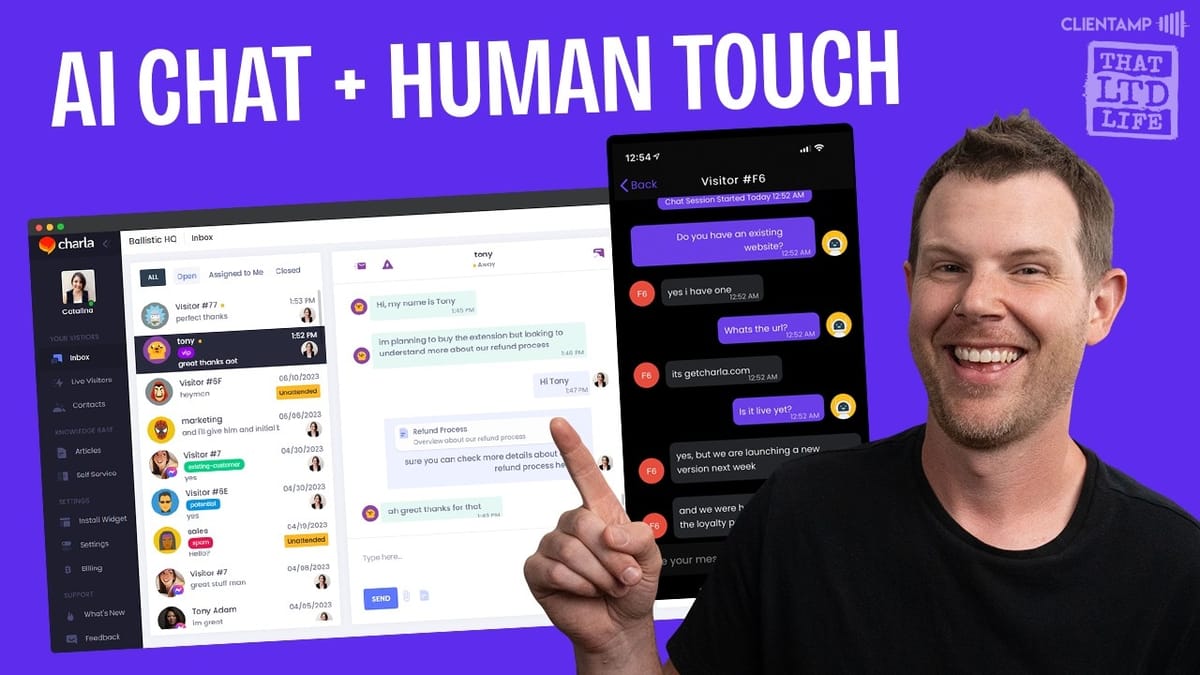
Charla's inbox is where all incoming conversations land. It's a clean, three-column layout: visitor list on the left, the active conversation in the center, and a context panel on the right. The right panel toggles between a visitor profile (email, phone, tags, location, OS, notes), a knowledge base article picker, saved replies, and chat history.
The live visitors view is a nice addition. You get a real-time dashboard showing who's on your site, what device they're using, which page they're viewing, and whether they've visited before. You can jump into a chat with any visitor directly from this screen, and switching between properties (if you manage multiple sites) is a single click.
A few features deserve a callout. You can send knowledge base articles directly in a chat — they show up as clickable links the visitor can open and read in full. Saved replies let you fire off stock responses with one click, which is a huge time-saver for common questions. And there's an inline note system that lets agents leave conversation-specific notes visible only to teammates.
That said, the note feature comes with a word of caution. When you toggle notes on, the input field turns yellow, but it's easy to forget it's active. You could end up writing what you think is a message to the customer but is actually just a private note — or worse, accidentally send something to the customer you meant to keep internal. It's a useful tool, but it requires discipline.
Performance is the other concern. There's a noticeable three-to-four-second delay when switching between views — open conversations, closed conversations, different properties. The loading animation (a little skateboarding character) is charming once you know what it is, but the lag itself is frustrating for a tool you'd use all day.
Ticketing System: Email-Based Help Desk
Beyond live chat, Charla doubles as a traditional email-based help desk. The setup works through email forwarding: you create a support address on your domain (like support@yourdomain.com), configure it to forward to the alias Charla provides, and set up the reverse so outgoing replies come from your domain. Charla handles the SPF records so deliverability stays clean.
The ticketing interface mirrors the chat layout, with the conversation thread in the center and profile details on the right. It's functional and gets the job done for basic support workflows.
However, there's a significant gap in how chat and tickets interact. If you're in a live chat with a customer and realize their issue needs to be escalated to a ticket, there's no button to convert that conversation. You'd have to manually create a new ticket, re-enter the details, and the entire chat history wouldn't carry over. For a tool that houses both features, this disconnect feels like an oversight. It's the kind of integration you'd expect to be table stakes.
The ticketing system also doesn't support saved or canned replies, which is a strange omission given that the chat side has them. If you're handling volume across both channels, that inconsistency adds friction to your workflow.
Knowledge Base and AI Chatbot
Charla's knowledge base is simple but effective. You get a visual editor for creating articles, the ability to organize them into categories, and options to surface them directly inside the chat widget so visitors can self-serve without ever engaging an agent. There's even a custom CSS option if the default styling doesn't match your brand.
Articles can be set as public or private, which matters because they feed directly into Charla's AI chatbot. When you enable the AI feature (currently marked as experimental), the chatbot trains itself on your knowledge base and can handle customer queries when agents are offline — or you can leave it on all the time.
This is genuinely useful. If you've ever used Zendesk's AI support, you know the concept: a customer reaches out, the bot provides relevant answers from your documentation, and many issues get resolved without a human ever getting involved. Charla brings that same capability to a $39 lifetime deal, which is remarkable.
The setup is dead simple — toggle the AI on, choose whether it trains on public articles, private articles, or both, and you're done. One word of caution: don't train it on private documentation that contains sensitive information. There's nothing stopping the bot from surfacing those details in a customer conversation. Stick to training it on the same material your support team would reference publicly and you'll be in good shape.
AppSumo's Guarantee and What You Should Know
Charla is listed as a marketplace deal on AppSumo, not a "Select" deal. The distinction matters because of AppSumo's We Got Your Back guarantee. With Select deals, AppSumo Plus members can get up to 100% store credit (50% for non-Plus members) if the product shuts down within 12 months. Marketplace deals like Charla don't carry that protection.
This isn't necessarily a red flag — some vendors simply choose the marketplace route rather than going through AppSumo's full vetting and marketing process. But it's something to weigh when you're deciding how much to invest. At the $39 price point, the financial risk is minimal, especially compared to what you'd spend on a single month of most competing tools.
The bigger concern is data portability. Charla currently has no export option for your chat history, tickets, or customer data. If you build up years of support history inside the platform and later need to switch, you'd be starting from scratch. For a help desk tool, historical context is critical — new agents need to reference past conversations, and customers expect continuity. Hopefully an export feature is on the roadmap, but as it stands, this is the one thing that would give me pause before going all-in.
Final Verdict: Is Charla Worth It?
Charla earns an 8.3 out of 10, and at this price point, it's genuinely hard to argue against picking it up. You're getting four distinct tools — live chat, a ticketing help desk, a knowledge base, and an AI chatbot — bundled into one platform for less than what most competitors charge for a single month.
The strengths are clear: unlimited sites and conversations, easy installation, solid customization options, smart chat flow triggers, and an AI chatbot that trains on your own documentation. For small businesses and agencies managing multiple client sites, the multi-property support alone makes it worth considering.
The weaknesses are real but manageable. Performance is sluggish with noticeable loading delays. There's no way to convert a live chat into a support ticket. The ticketing system lacks canned replies. Chat flow questions can't be marked as required. And the absence of a data export option is a legitimate long-term concern.
If you're currently paying monthly for Zendesk, Intercom, or a similar tool and your support needs are straightforward, Charla could save you thousands over time. Just go in with your eyes open about the limitations, and treat the lack of an export option as the one real risk factor.
Watch the Full Video
Prefer watching to reading? Check out the full video on YouTube for a complete walkthrough with live demos and commentary.


