
ContextMinds Review: AI Mind Mapping Meets SEO Research
ContextMinds blends mind mapping with built-in SEO data and AI suggestions, giving content creators a unique way to brainstorm and validate topics in one workspace.

ContextMinds
A mind mapping tool with built-in AI topic suggestions and real-time SEO keyword data to help you plan and validate content ideas.
Content creators, bloggers, SEO professionals, and marketing teams who need to brainstorm topics and validate them with keyword research.
Miro, MindMeister, Whimsical, SurferSEO
What Is ContextMinds?
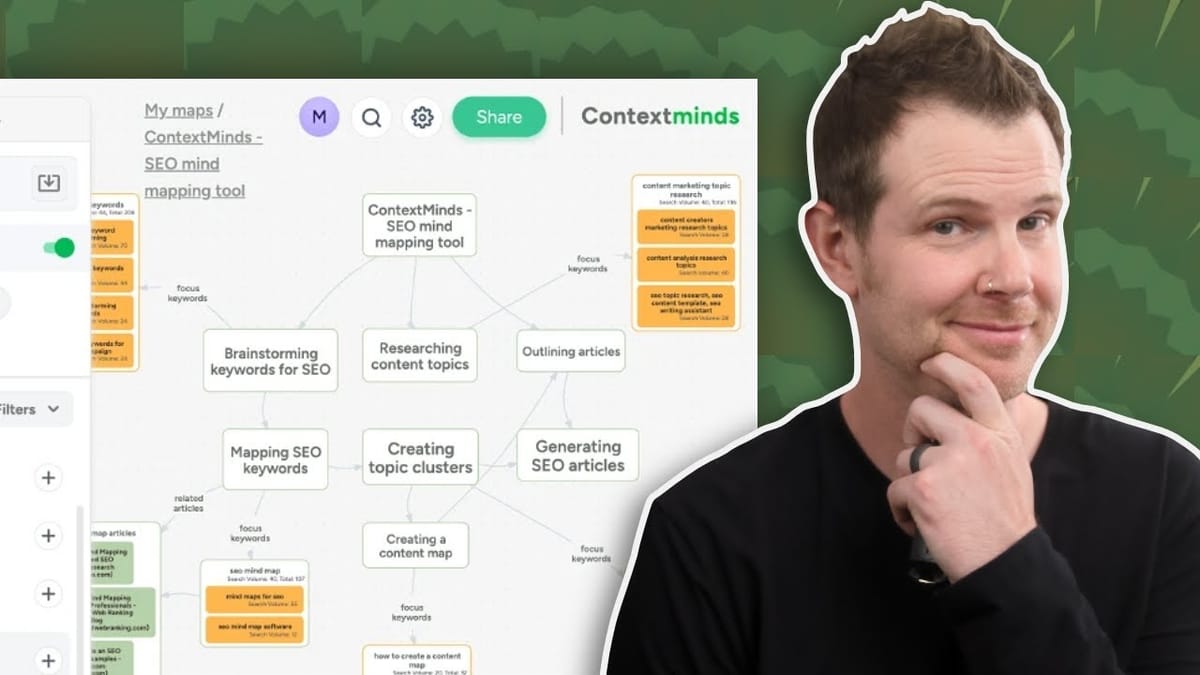
ContextMinds is a whiteboarding and mind mapping tool with a twist — it has AI-powered topic generation and SEO keyword research baked directly into the interface. Instead of jumping between a brainstorming tool and a keyword research platform, you can do both from a single canvas.
The tool is currently available as a lifetime deal on AppSumo, with plans starting at $69 for a single license. All tiers share the same core features; the difference is simply higher usage limits as you stack codes. If you go all the way to a five-code stack, you unlock unlimited everything — AI suggestions, SEO lookups, and internal usage — which makes it especially appealing if you're running an agency or working with multiple clients.
Creating and Organizing Mind Maps
Getting started is straightforward. You create a workspace, organize maps into folders (with nesting support), and then build maps around a central topic. The canvas itself is infinite — you can scroll out to 50% zoom and still have plenty of room to grow your map.
Each map starts with a main concept in the center. From there, you add new ideas as connected bubbles, just like any conventional mind mapping tool. You can leave detailed notes on individual concepts, nest sub-ideas within a parent concept, and even label the arrows connecting one idea to another. Double-clicking an arrow lets you name the relationship, while a single click opens a note-taking panel for that connection.
There's also color-coding support. You can tag concepts with custom labels — say, "best" in purple or "later" in green — to visually organize your ideas at a glance. It's a small feature, but it makes a big difference when your map starts growing beyond a handful of nodes.
AI-Powered Topic and SEO Suggestions
Here's where ContextMinds separates itself from a standard mind mapping tool. When you toggle on the Suggestions panel in the left sidebar, the tool generates a list of related topics based on your central concept. These suggestions pull from two sources: ChatGPT-generated ideas and what ContextMinds calls "general topics" drawn from broader data.
You can filter between these sources depending on what you need. The AI-generated suggestions tend to be more specific and actionable — things like "Using WordPress Plugins" or "WooCommerce Integration" — while the general topics cast a wider net. If any suggestion catches your eye, one click adds it directly to your mind map as a new connected concept.
What makes this genuinely useful is that you're not stuck inside a chat interface. Instead of scrolling through a ChatGPT conversation trying to remember which ideas you liked, you're pulling suggestions into a visual workspace where you can rearrange, group, and connect them. It turns brainstorming from a linear process into something much more spatial and interactive.
Keyword Research and SEO Data
The keyword suggestions panel is where ContextMinds really starts to justify its price tag. Select any concept on your map, switch to the Keywords tab, and the tool pulls in real SEO data — keyword difficulty scores, monthly search volumes, and competition metrics.
The data comes from two sources: Keywords Everywhere and SpyFu. Having both side by side is genuinely helpful because they often tell slightly different stories. For example, Keywords Everywhere might report 390 monthly searches for "custom WordPress theme," while SpyFu shows 540 searches and over 420 monthly clicks. Seeing both perspectives in one place can meaningfully change how you prioritize a topic.
You also get a breakdown of organic versus paid click distribution. If 90% of clicks for a keyword come from organic search, that tells you the topic isn't heavily contested by advertisers — a good signal if you're relying on SEO rather than PPC. Below the metrics, ContextMinds shows you the articles currently ranking for that keyword, and you can even pull in Reddit discussions for additional context.
Questions, Headings, and Additional Research Tools
Beyond topics and keywords, the suggestion panel offers several other research angles. The Questions tab surfaces trending queries about your selected concept — essentially the "People Also Ask" data from Google — alongside ChatGPT-generated questions. Clicking on any question shows you the search engine results and existing content that addresses it, which is incredibly useful for understanding content gaps.
The Headings tab gives you heading ideas for structuring your content, while the Articles tab pulls in search results for your concept's keyword. There's also a Maps tab showing public mind maps other users have created on similar topics, and a User Concepts tab displaying individual cards from those maps.
One particularly handy feature: you can pin any piece of research — a keyword stat, an article link, a question — directly to a concept as a note. This means your mind map doesn't just hold your ideas; it becomes a repository of the research backing those ideas. When it's time to actually write the content, everything you need is attached to the relevant concept.
Map Settings, Sharing, and Export Options
Each map has its own settings page accessible from the gear icon. You can toggle which data panels appear — useful if you don't need keyword metrics cluttering up a purely creative brainstorm. The export options are solid: PDF, PNG, and HTML (for embedding on a website via iframe).
Sharing works in two ways. You can generate a public URL for view-only access, or invite specific people via email. Just remember to toggle the map to public first if you're sharing a link. Privacy is on by default when you create a map, which means your content won't appear in other users' suggestion feeds — a thoughtful default for anyone working on competitive topics.
You can also upload files directly to concept cards — Excel spreadsheets, research documents, whatever your team needs. Storage limits range from 5 GB on a single plan up to 100 GB on higher tiers, so there's room for substantial reference material.
Pricing and AppSumo Deal Breakdown
The lifetime deal starts at $69 for a single code, which maps to their Pro plan. You get 6,000 topic and keyword lookups per month, 1,500 web and AI article suggestions, and 1,500 AI prompt responses. For a solo content creator, that's a generous allocation — break it down by working days and you've got plenty of daily headroom.
If you need team access, you'll want at least a double stack, which adds extra workspaces and user seats. The sweet spot for agencies or power users is the five-code stack at the top, which unlocks unlimited everything — unlimited AI suggestions, unlimited SEO data, and unlimited internal usage.
For context, standalone SEO tools like Ahrefs or Semrush run $99 to $199 per month. ContextMinds isn't a full replacement for those platforms, but if your primary need is topic ideation backed by keyword data, a one-time payment in the $69–$345 range is hard to argue with.
Final Verdict: Score 7.8/10
ContextMinds earns a solid 7.8 out of 10. The combination of mind mapping and SEO research in one tool is genuinely useful, and the AI suggestions do a good job of accelerating the brainstorming process. For content-driven businesses — which is most businesses these days — it fills a real gap between pure ideation tools and pure research tools.
That said, there are a few rough edges. The mind mapping itself is fairly basic: you get bubbles, connections, and color coding, but no freeform drawing, stickers, or rich illustrations. If you want a full creative whiteboard, tools like Miro or Whimsical will serve you better. The color palette could also use more contrast — some of the lighter tag colors are difficult to read, especially for anyone with low vision.
The canvas snapping behavior takes some getting used to as well. By default, concepts snap to a grid as you move them, which gets jarring once you have a dozen or more items on screen. Holding the Option key (Alt on Windows) lets you place items freely, but it's not obvious until you know about it.
Overall, ContextMinds is a smart tool for anyone who regularly plans content and wants SEO validation built into their workflow from the start. The lifetime deal pricing makes it an easy bet for solo creators, and the five-code unlimited stack is worth serious consideration for teams and agencies.
Watch the Full Video
Prefer watching to reading? Check out the full video on YouTube for a complete walkthrough with live demos and commentary.


