
MsgBubble Review: Is This AppSumo Chat Tool Worth It?
MsgBubble bundles live chat, scheduling, invoicing, and review management into a single platform, but a rough launch and persistent bugs make it hard to recommend over competitors like AnyChat and Charla.

MsgBubble
An all-in-one customer communication platform offering live chat, text messaging, appointment scheduling, invoicing, review management, and a basic website builder.
Local service businesses and agencies that want a single tool for client communication, scheduling, and lightweight CRM functionality.
AnyChat, Charla, Breezy
What Is MsgBubble?
MsgBubble is a lifetime deal available on AppSumo that positions itself as an all-in-one customer communication hub. At its core, it provides live chat for your website, but it also bundles in appointment booking, review collection and display, invoicing, a form builder, an AI chatbot, and even a basic website builder.
The tool is heavily rooted in text messaging, which sets it apart from competitors like AnyChat and Charla. You can connect your own Twilio account or purchase text messaging credits directly from MsgBubble, though that messaging cost is an ongoing expense not included in the lifetime deal.
It's an ambitious feature set for a single platform, and as you'll see throughout this review, that ambition comes with some significant trade-offs in polish and reliability.
Plans and Pricing
MsgBubble's entry-level tier starts at $49 on AppSumo, which gets you in the door with the basic feature set. As with most AppSumo deals, there are several tiers to consider if you need more capacity.
Agencies and service providers will want to look at tier two or tier three for additional sub-accounts to manage client projects. Tier four at $400 unlocks unlimited customers, unlimited team members, and 15 sub-accounts. The top tier at tier five maintains those unlimited allowances and bumps sub-accounts up to 40.
For context, AnyChat was charging just $87 for their agency plan with very similar features. MsgBubble does offer an ongoing subscription option at $5.99 per month, which feels more sustainable than some unlimited lifetime deals. But at the higher AppSumo tiers, you're paying significantly more than competitors for a product that, as we'll cover, still has a lot of rough edges.
A Rough Start
First impressions matter, and MsgBubble's was not great. After installing the chat widget on a test website and completing the initial contact form, the very first thing that appeared was a 404 error page. The message did go through on the backend—it showed up in the MsgBubble dashboard—but the end user saw nothing but an error.
This was the third chat widget tool reviewed in about a week, and MsgBubble had by far the worst onboarding experience. It's worth noting that 404 errors and server issues popped up repeatedly throughout testing, not just during setup. When your product's primary job is facilitating customer communication, breaking the experience on the very first interaction is a serious red flag.
Messaging and Text Setup
The messaging system is the centerpiece of MsgBubble, and it's designed around text-based communication more than traditional web chat. You have two options for sending texts: use MsgBubble's built-in messaging plan or connect your own Twilio account.
If you go the MsgBubble route, you'll need to complete a business verification process that includes uploading a valid photo ID. This is understandable from a compliance standpoint—carriers require it to prevent spam—but it does add friction and raises privacy considerations. The Twilio integration is probably the safer bet if you're already running an online business and have an existing account.
One notable quirk: when replying to a message that came in via web chat, MsgBubble defaults to sending the reply as a text message rather than a web chat response. That's a strange default that could confuse customers who initiated contact through your website and suddenly receive a text from an unknown number.
CRM and Customer Management
MsgBubble doubles as a lightweight CRM with a customer management section and deal tracking. Contacts are organized in a standard list view, but you can switch to a Kanban-style workflow view to move deals through your sales pipeline.
The pipeline stages are customizable—you can rename existing stages and add new ones. During testing, a custom "Proposal" stage was added and it appeared correctly in the workflow view. However, these custom stages don't show up as filter options in the messages section, which limits their usefulness when you're trying to quickly sort through conversations.
Compared to dedicated CRM tools, MsgBubble's offering is fairly basic. It covers the essentials of tracking contacts and moving them through a pipeline, but don't expect deep automation, reporting, or the kind of customization you'd get from a purpose-built CRM. It's adequate for a small service business managing a handful of deals at a time.
Scheduling and Calendars
MsgBubble includes appointment scheduling with integrations for Google Meet and Microsoft Teams for video calls. You can create multiple calendars, set default appointment time slots, and even charge for appointments through a Stripe integration.
Here's the problem: when you add a calendar in MsgBubble, it doesn't sync with your existing Google or Microsoft calendar. Your appointments only live inside MsgBubble, meaning you have to manually check the platform to see your schedule. There's no subscribe link to pull appointments into your primary calendar, and no way to check for conflicts with your existing commitments.
For a scheduling tool in 2024, the lack of two-way calendar sync is a significant miss. Every major scheduling platform—Calendly, Cal.com, SavvyCal—syncs bidirectionally with your calendar to prevent double-bookings. Without this, you're essentially maintaining two separate calendars and hoping nothing overlaps.
Sales and Invoicing
The sales section handles invoicing and estimates. You can create invoices by adding line items, quantities, and amounts, then send them directly to customers. There's also an estimate option accessible from a dropdown menu.
A QuickBooks integration is available for syncing invoices to your accounting software, which is a nice touch for businesses already in that ecosystem. Unfortunately, there's no integration with Xero or FreshBooks, which limits the appeal for businesses using those platforms.
One area that needs clarification is the fee structure. MsgBubble charges 3.4% plus $0.30 per online transaction, and since payments are processed through Stripe (which charges its own 2.9% plus $0.30), it's unclear whether MsgBubble's fee replaces or stacks on top of Stripe's standard processing fee. The documentation and AppSumo deal page don't make this clear, and if those fees are additive, you're looking at over 6% per transaction—which is steep.
Review Collection and Display
MsgBubble can aggregate your reviews from multiple platforms including Google My Business, Facebook, Yelp, Amazon, and Trustpilot. Once collected, you can display these reviews on your website using embeddable widgets.
The review funnel feature lets you gate feedback before directing customers to public review sites. People who rate you highly get prompted to leave a review on Google or Facebook, while those who give lower scores are directed to a private feedback form. While this practice is common, it's worth knowing that platforms like Google explicitly discourage review gating and it could put your business listing at risk.
Visually, the review display widgets are functional but plain. The overall aesthetic feels dated—serviceable for a basic local business site, but not polished enough for agencies working with brand-conscious clients who want their customer touchpoints to look premium.
The Website Builder
MsgBubble includes a built-in website builder, which is an ambitious addition for a communication-focused tool. It comes with a few demo templates for industries like home remodeling, spa services, and automotive.
The builder itself is fairly basic. You get page headings, text blocks, images, HTML embeds, buttons, and lists as your building blocks. Editing is inline for text, which is convenient, but the drag-and-drop behavior is inconsistent—elements often snap to the bottom of the page rather than dropping where you place them.
The default styling has issues too. The demo template featured black-on-black text on hover, making content unreadable until you dig into the color settings. MsgBubble branding appears in the footer with no obvious way to remove it. And attempting to create a landing page resulted in repeated 500 server errors.
Honestly, building a website builder is a massive undertaking, and it shows here. If you need a website builder for local business clients, something like Breezy (if still available as a lifetime deal) would be a far better choice. The good news is that MsgBubble's other features can integrate with your existing website, so you don't have to use their builder.
SEO Reports
MsgBubble includes a basic SEO reporting tool that provides a technical audit of your website. It checks for common issues and suggests improvements to help with search engine discoverability.
The reports cover broad fundamentals—meta descriptions, page titles, and standard technical SEO factors. Nothing here is groundbreaking, and you can get similar reports from dozens of free tools online. But if you're hosting your site entirely within MsgBubble and don't have access to other SEO tools, having something built in is better than nothing.
The website builder does integrate SEO settings throughout, allowing you to add meta descriptions and titles to your pages. It's a small but appreciated detail for a platform targeting local businesses that may not have dedicated SEO tools in their stack.
Widgets and Embeds
The widgets section is where MsgBubble provides the integration points for your existing website. You can embed forms, review displays, appointment booking, and the chat widget on any site by copying a snippet of code.
The appointment booking widget is straightforward—a clean form that gets the job done, though it carries MsgBubble branding throughout. The review display comes in both slider and list formats for embedding on your site.
The chat widget itself, which is arguably MsgBubble's flagship feature, has some visual issues out of the box. The icon isn't centered within its bubble, and the padding around it feels off. These are small details, but for a tool whose entire purpose is to sit on your website and represent your business to customers, the lack of visual polish is noticeable. During testing, there was also a bug where scrolling couldn't reach the code block for the review list widget, making it impossible to copy the embed code.
AI Chatbot
MsgBubble offers an AI-powered chatbot that you can toggle on alongside the web chat widget. The setup is simple: enable web chat, enable the chatbot, and optionally configure it to send a text message to you when the AI can't handle a customer's question.
Customization is limited to a basic prompt field where you provide instructions for the chatbot's behavior. The default prompt is generic—"You're a helpful chat assistant. Respond professionally"—and it auto-fills your business name. There's no mention of which AI model powers the chatbot, no option to train it on your specific knowledge base, and no advanced configuration beyond that single instruction field.
The text notification fallback is a thoughtful feature for businesses that want AI handling routine questions while keeping a human in the loop for complex issues. But without the ability to feed the chatbot your FAQs, product details, or service information, its usefulness is limited to very basic interactions.
Forms and Integration Guide
The form builder uses a drag-and-drop interface with standard field types: text boxes, radio buttons, and other common form elements. Building forms is straightforward, but the default styling makes forms extremely wide with no option to constrain their width within MsgBubble itself. If you're embedding the form on your site, you can wrap it in a container to control sizing, but linking directly to the form means visitors see an uncomfortably wide layout that may hurt conversion rates.
The integration guide is actually one of MsgBubble's more useful sections. It provides direct links to all your customer-facing tools—review collection funnels, appointment booking, office check-in kiosks, and the chat widget—so you can preview exactly what your customers will see.
The office check-in feature is worth highlighting for brick-and-mortar businesses. It offers both a simple check-in form and a more advanced appointment kiosk mode where walk-ins and scheduled appointments are handled separately. MsgBubble also supports certain physical card readers for in-person payments, which could be valuable for salons, repair shops, and similar service businesses.
The Messaging Experience
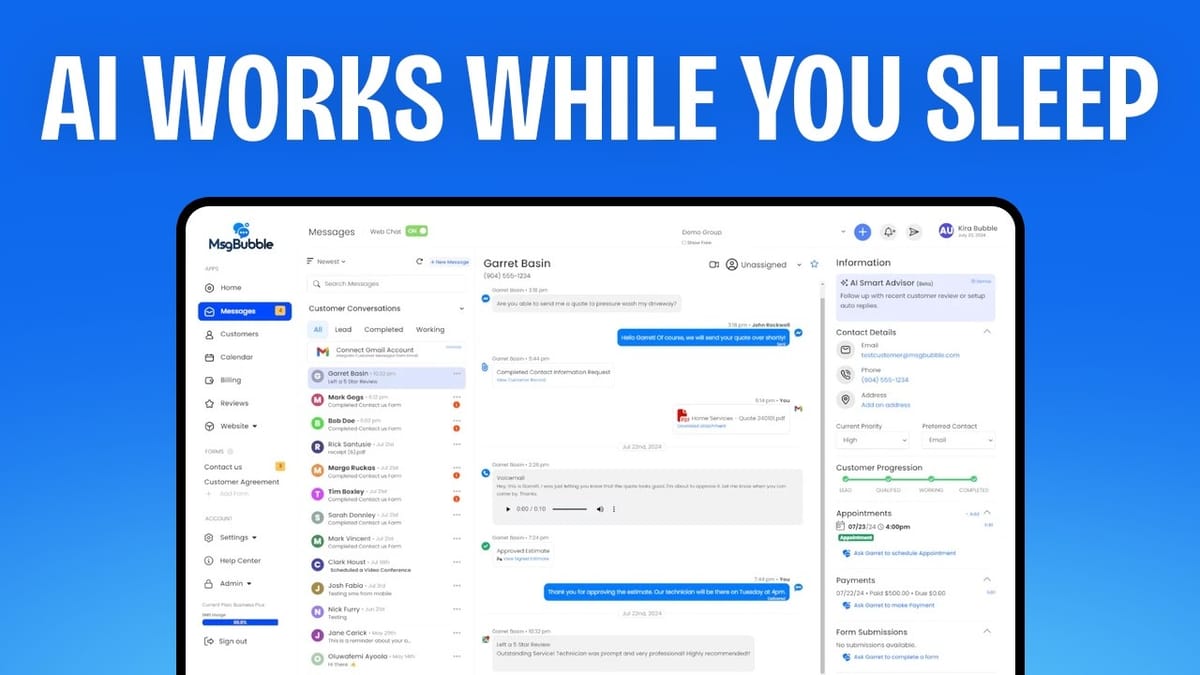
The messages section is where you manage all customer conversations. Contacts are listed on the left with filtering by pipeline stage, and individual conversations open on the right with a sidebar showing related data like appointments, payments, and form submissions.
Notably missing is the kind of visitor information that's become standard in live chat tools—IP address, device type, browser, location, and current page. Without this context, you're going into every conversation blind. The internal comment feature is positioned unusually in the middle of the chat screen rather than in a dedicated area, which feels awkward.
Reply options include text, email, web chat, text-to-voice, and internal notes. But the platform consistently defaults to text messaging even when the conversation originated via web chat, which creates a jarring experience for customers. During testing, the web chat also exhibited reliability issues—closing and reopening a tab broke the conversation thread, and new messages didn't appear in the dashboard without a manual page reload. For a tool built around real-time communication, these are fundamental problems.
What MsgBubble Does Well
Despite the lengthy list of issues, MsgBubble does have a niche. If your business is heavily reliant on text messaging for customer communication, this platform is better suited than competitors like AnyChat or Charla, which focus more on web-based chat and support tickets.
The Gmail integration for email communication works well, and the CRM pipeline—while basic—gives you a centralized place to track deals alongside conversations. The combination of invoicing, scheduling, and communication in a single tool has appeal for solo operators or small service businesses that want to minimize the number of platforms they manage.
The office check-in and appointment kiosk features are genuinely useful for physical locations, and the review aggregation from multiple platforms saves time if reputation management is part of your workflow.
Final Verdict: 5.3 out of 10
MsgBubble earns a 5.3 out of 10. The ambition is there—an all-in-one communication, scheduling, invoicing, and review platform is a compelling pitch. But the execution falls short in too many areas to recommend it with confidence.
The bugs are the biggest concern. 404 errors on first contact, 500 errors when creating landing pages, missing scroll areas, broken chat sessions, and phone number formatting issues all point to a product that needed more time before launch. The web chat—arguably the tool's core feature—was unreliable during testing.
Design-wise, the interface feels dated. The chat widget, review funnels, and booking forms all lack the visual polish you'd want when putting something in front of your customers. The website builder is functional but clunky, and the calendar's lack of external sync is a dealbreaker for serious scheduling use.
If you need a solid chat and support tool, AnyChat delivered a nearly flawless experience at just $87 for the top tier. For something lighter, Charla is another strong option. MsgBubble might find its audience among text-message-heavy businesses willing to wait for improvements, but right now, the competition is offering more for less.
Watch the Full Video
Prefer watching to reading? Check out the full video on YouTube for a complete walkthrough with live demos and commentary.


