Sync.com Review: Unlimited Cloud Storage with Easy Sharing
Sync.com offers unlimited cloud storage with simple file sharing and end-to-end encryption. This review tests sync speed, sharing options, and team features. Covers real daily use, pricing, and how it compares to Google Drive and Dropbox for privacy-focused storage.

Sync.com
Cloud storage platform with unlimited storage, file sharing, team collaboration, and custom-branded file portals.
Freelancers, agencies, and small teams who need reliable cloud storage with simple sharing and client-facing file portals.
Dropbox, Google Drive, OneDrive
Why Sync.com Over Dropbox or Google Drive?
If you've ever run out of storage on Dropbox or fumbled sharing permissions on Google Drive, you already know the pain points that Sync.com is built to solve. It's a cloud storage provider that does two things exceptionally well: it gives you truly unlimited storage on its team plans, and it makes sharing files so straightforward that you won't have to send a single apologetic follow-up email.
Sync.com isn't trying to reinvent the wheel. It's a cloud storage service at its core, but it nails the fundamentals — fast uploads, intuitive sharing controls, and a clean interface that stays out of your way. Where it really stands apart is on pricing for unlimited storage and in how effortless it makes collaboration, especially if you work with clients.
Sync.com Plans and Pricing
Sync.com has a plan for just about every use case. If you just want to kick the tires, there's a free plan with 5 GB of storage — enough to get a feel for the interface and workflow. For individuals who need more room, paid plans go up to 6 TB for $20 per month.
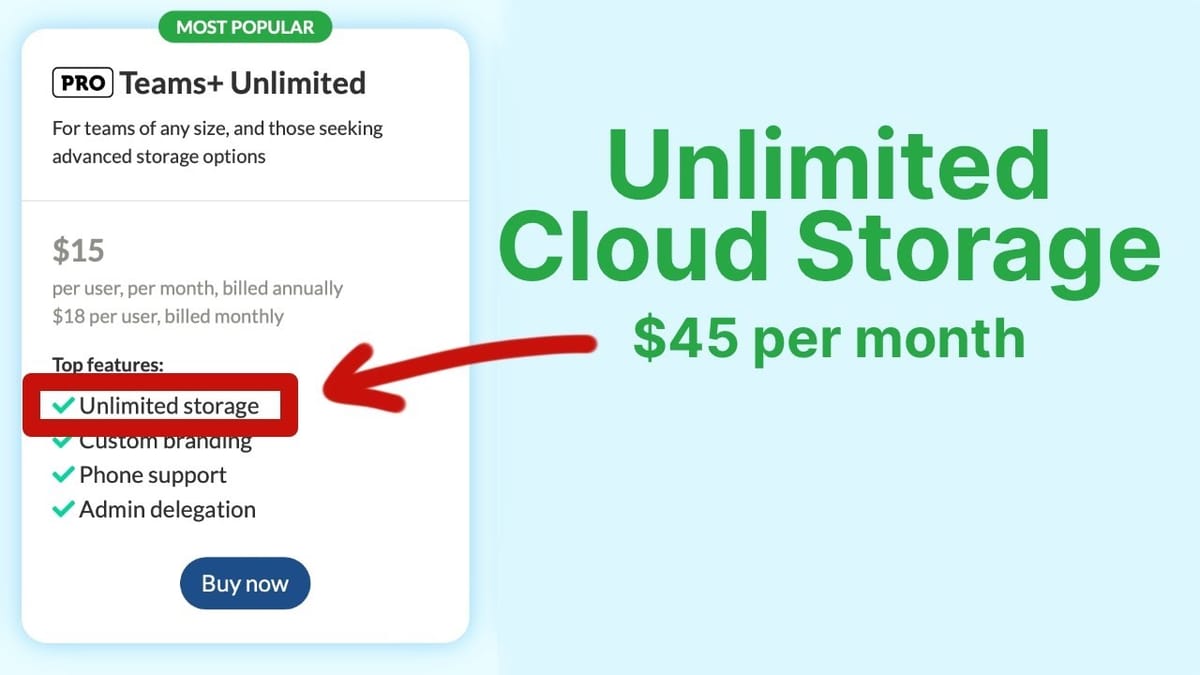
The real sweet spot is the Pro Teams Unlimited plan. At $15 per user per month (with a minimum of three users), you get genuinely unlimited storage. Even if you're a solo operator, you're looking at $45/month for unlimited cloud storage, which is a steal when you compare it to the cost of storage elsewhere. This tier also enables custom branding, which is one of Sync.com's standout features for anyone who works with clients.
Getting Started: Uploading and Organizing Files
The Sync.com web interface is refreshingly snappy. Creating a new folder happens instantly — no loading spinners, no lag. You can drag and drop individual files or entire folders, and uploads run in the background while you keep working. It supports all the file types you'd expect: documents, images, videos, PDFs, and more.
Navigation is clean and familiar. Breadcrumbs at the top keep you oriented, and opening a file gives you a built-in preview without needing to download it first. If you've used any major cloud storage platform before, you'll feel right at home within minutes.
File Sharing That Actually Works
Sharing is where Sync.com really shines compared to competitors. When you create a share link, it's immediately accessible to the recipient — no extra permission toggles to remember. That alone eliminates the most common frustration with Google Drive.
Beyond the basics, you get granular control over every shared link. You can disable downloads so recipients can view but not save files. You can enable or disable comments, including anonymous comments. You can set expiration dates on links or cap the number of downloads. These options are all available per file or per folder, giving you exactly the level of control you need without overcomplicating things.
For team-level sharing, Sync.com also offers shared folders that live directly in each team member's account. Everyone with at least a free Sync.com account can access shared folders without needing a direct link — the folder just appears in their dashboard.
Desktop and Mobile Apps
Sync.com has native apps for Mac, Windows, iOS, and Android. The desktop app installs quickly and creates a local Sync folder that mirrors your cloud storage. Any file you drop into that folder automatically uploads, and any changes you make in the web app sync back down to your machine.
Sharing from the desktop is just as easy. A menu bar icon lets you search for any file and generate a share link without opening a browser. New folders and files created locally appear in the web interface almost instantly — the sync is genuinely fast and reliable.
The mobile app gives you full access to your files on the go. You can view, edit, rotate, and share files, star items for quick access, and upload photos or documents directly from your phone. It's a complete experience, not a stripped-down afterthought.
Version History and Vault Storage
Every file on Sync.com has a full version history. If someone on your team makes a change you're not happy with, you can pull up the revision log, see exactly who edited the file and from which device, and restore a previous version with a single click. For teams collaborating on documents, this is a genuine safety net.
The Vault feature is another clever addition. It lets you store files in the cloud without syncing them to your local devices. Think of it as cold storage for files you don't need day-to-day but don't want to delete. Other platforms offer selective sync, but it usually involves digging through settings to choose which folders stay local. Sync.com's approach is far simpler: drag it into the Vault and it's off your hard drive but always accessible from the web or mobile app.
Teams, Roles, and Security
Sync.com's team management features are robust without being overwhelming. From the admin panel, you can invite users, assign roles, and control permissions down to a granular level — including whether someone can edit files, manage links, or purge the trash. You can even enforce two-factor authentication across your entire organization.
The Events tab provides a full audit log of every action taken on your account. You can see who uploaded, downloaded, shared, or modified files and when. For teams that handle sensitive data or need to maintain compliance, this kind of visibility is essential.
There's also a centralized Sharing tab that shows every file and folder your organization has shared — internally and externally. Instead of hunting through folders to figure out what's public, you get a single dashboard view of all active share links.
Custom Branded File Portals
This is one of Sync.com's most underrated features, especially for freelancers and agencies. On the Pro Teams Unlimited plan, you can upload your logo and set custom brand colors that apply to all of your shared links and file portals.
The real power here is in client-facing file collection and delivery. Need clients to upload brand assets, copy, or project files? Create a folder, enable upload permissions on the share link, and send it over. Your client sees a clean, branded portal where they can drag and drop files — no FTP credentials, no third-party transfer tools.
It works just as well in the other direction. If you deliver video projects, design files, or any other work product, you can set up a branded download folder that looks professional and keeps everything in one place. It beats having files scattered across Dropbox, Google Drive, and whatever other service your client decided to use that week.
Final Verdict: Is Sync.com Worth It?
Sync.com nails the fundamentals of cloud storage — fast uploads, reliable sync, and an interface that doesn't get in your way — while adding genuinely useful features like unlimited storage, branded portals, and dead-simple sharing. If you've been frustrated by storage limits on Dropbox or permission headaches on Google Drive, Sync.com is a refreshing alternative.
The Pro Teams Unlimited plan is the standout value here. At $15 per user per month for unlimited storage, custom branding, and full team management, it's hard to beat on price alone. Even as a solo user at $45/month, the unlimited storage and client portal features make it worthwhile if file management is a core part of your workflow.
Watch the Full Video
Prefer watching to reading? Check out the full video on YouTube for a complete walkthrough with live demos and commentary.
Frequently Asked Questions
What is Sync.com?
Sync.com is a cloud storage service focused on privacy and security. It offers end-to-end encrypted file storage and sharing with unlimited storage options for individuals and teams.
Is Sync.com more secure than Google Drive?
Sync.com uses end-to-end encryption, meaning even Sync cannot access your files. Google Drive encrypts data in transit and at rest but Google can technically access your files for indexing.
How much does Sync.com cost?
Sync.com offers plans starting with a free 5GB tier. Paid plans with 2TB or unlimited storage are competitively priced compared to Google Drive and Dropbox, often with annual discounts.
Does Sync.com work on all devices?
Yes, Sync.com has apps for Windows, Mac, iOS, and Android. It also offers a web interface for accessing files from any browser without installing software.
Can Sync.com replace Dropbox?
For basic file storage and sharing, Sync.com can replace Dropbox with better privacy. However, Dropbox has more third-party integrations and collaboration features that power users may miss.