AppSumo Black Friday 2026 Teaser: 5 Deals for Plus Members (and When Everyone Else Gets Them)
Five AppSumo Black Friday teaser deals from $49 for Plus members. Prices rise $10 per tier on Nov 13, and the deals open to everyone on Nov 16.

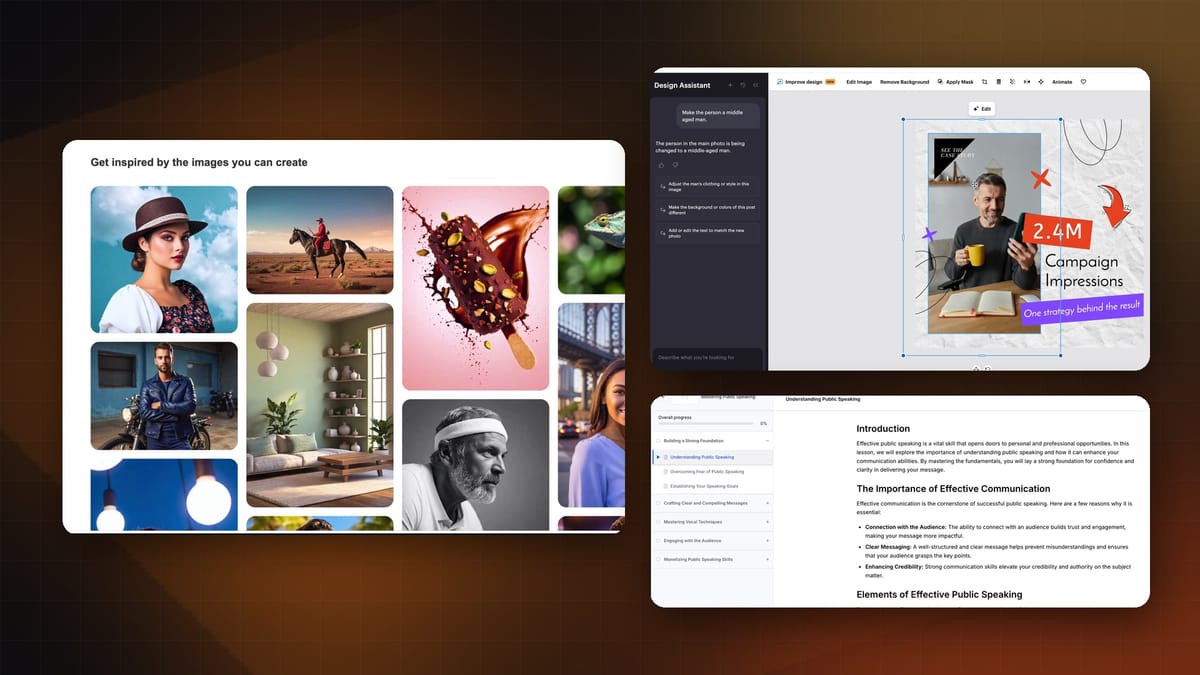
If you pay for Canva every month, look at VistaCreate in AppSumo's Black Friday teaser. It's $99 one time for 10 seats, and I'd say it gives you 80% of what Canva does, maybe more. That's a pretty incredible value. If you want to sell an online course, Klasio is a great tool and a very easy way to get your first one built.
Black Friday is kicking off right now at AppSumo with five teaser deals, and they're only for AppSumo Plus members at first. If you're not a Plus member, that's okay. All five deals open to everyone a few days later, so this is still useful to you. You just need to know the dates.
The dates (these matter)
There are three dates, and the price changes along the way:
- Wednesday, November 11, 8:00 AM Central: the teaser deals go live for AppSumo Plus members.
- Friday, November 13, 8:00 AM Central: each tier goes up $10. It's still Plus members only.
- Monday, November 16, 8:00 AM Central: the deals open to everyone, at the higher price.
So if you're not a Plus member, set your alarm for Monday the 16th. If you are a Plus member, the lowest price is the one you see before Friday morning.
Want to become a Plus member? Here's my link: AppSumo Plus.
The prices below are the starting prices on the deal pages before any code, so expect them to be $10 higher per tier from Friday on.
The five deals at a glance
| Deal | Starting price | What you get |
|---|---|---|
| VistaCreate | $99 | One plan, 10 account seats, 60-day refund window |
| DepositPhotos | $49 per code | 100 stock credits and 100 AI image credits, one time |
| wpDataTables | $59 | A WordPress plugin for tables |
| Klasio | $79 (Starter) | Course platform; bigger plans add storage and lower the commission |
| Boost.space AgentOS | $79 (Tier 1) | One agent, 50,000 operations per month |
I dig deepest into VistaCreate, DepositPhotos and Klasio. wpDataTables gets a quick tour of what it can do, and Boost.space AgentOS is a look at the documentation, because I didn't have access to it.
VistaCreate: a one-time replacement for a Canva subscription
Watch: 0:46
VistaCreate is an excellent replacement for something like an expensive Canva subscription. With Canva, you usually pay per user, per month. With VistaCreate, I'd say you get 80% of the functionality, maybe more, and you pay once.
I've been a paying Canva subscriber in the past. I'm not right now, but I get it. Canva is a beautiful tool and a lot of people like using it. So I'm not saying you have to switch. Just think about it, because the AppSumo deal gets you 10 account seats for a one-time fee of $99. That's a pretty incredible value.
Maybe you tried VistaCreate a few years ago and didn't think it held up to Canva. They've made it a lot better. I was impressed with it the first time I tried it a few years ago, and it has gotten really, really good since.
Editing a template with the design assistant
Watch: 1:42
VistaCreate has a ton of templates, just like you'd find in Canva. I opened an Instagram post template that had a young woman in the photo. I'd rather have a middle-aged man in the picture (I don't know why, but maybe that's my audience), so I used the new design assistant.
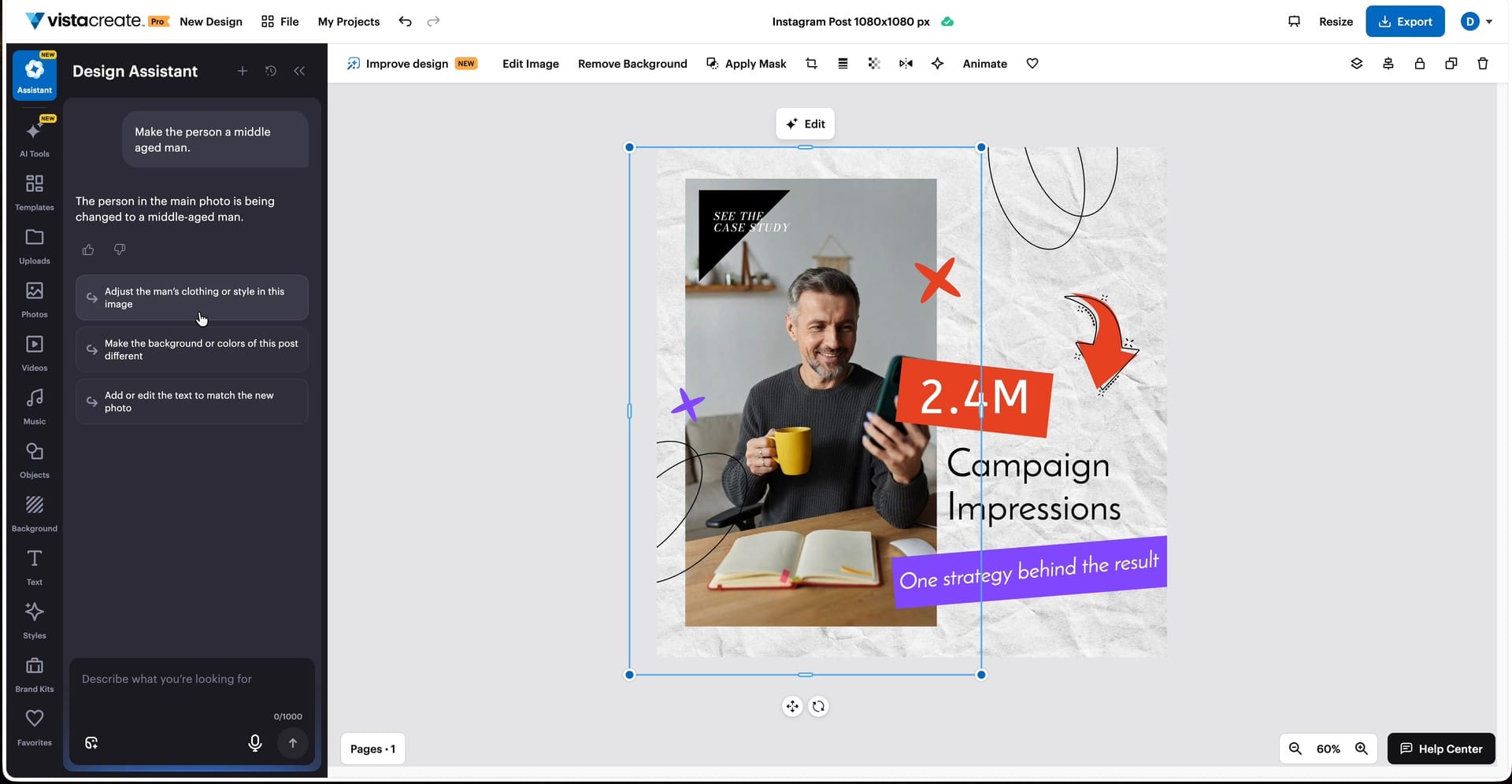
You just tell it what to change. I typed "make the person a middle-aged man," sent the prompt and grabbed a cup of coffee. It takes 10 or 20 seconds, and then the person is replaced. It looked amazing.
From there, the assistant suggests follow-up prompts, like adjusting the man's clothing style or changing the background colors. You can do anything you want to the design. If you want to remove the background from an image, click the edit button and remove it.
For now, the thing to know is that VistaCreate is $99 and really good, especially if you work with a team and want to cut your overall monthly costs.
Designing from scratch with a prompt
Watch: 2:47
Browsing templates isn't the only way in. You can also use the designer to create something from scratch.
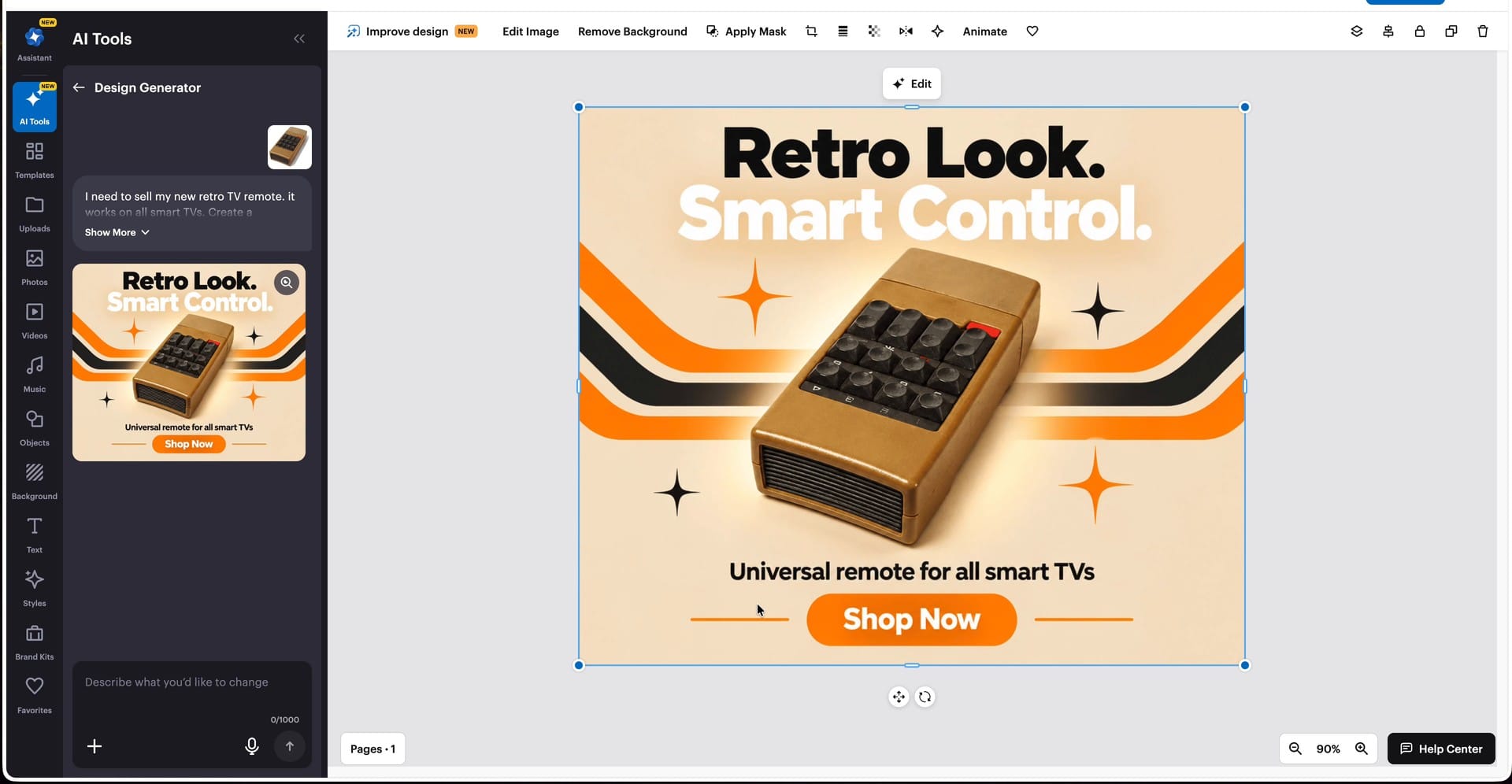
For this one, I made up a product as a joke: retro TV remotes that look just like old-school remotes, 3D printed, but working on modern smart TVs. I was going to sell them on Instagram and make millions. (No, I don't actually make these.) I asked VistaCreate to create the social media marketing for it.
The useful part is that you can upload your own product photo, and VistaCreate builds the design around it. I uploaded a photo of the remote, added the result to my design, and it looked sick. "Universal remote for all smart TVs." I would buy that. If you could control your Apple TV with one of those, you'd get one too.
When you're done, exporting is easy. You can download the design in whatever format you like, or send it straight to Facebook Ads Manager or your Instagram business account. If you work with other people, you can create a team and collaborate on the images.
Designers are cooked, man. I feel bad saying it, because that design looks so good, and it would take a really long time to mock up by hand.
My call: $99 and really good, especially for teams that want to cut a per-seat monthly bill.
DepositPhotos: 100 stock credits and 100 AI images for $49
Watch: 4:06
DepositPhotos has been on AppSumo every Black Friday for what feels like a decade at this point. It's kind of nostalgic to see it show up again year after year. If you want to go back a few years, here's my DepositPhotos review from 2019.
Let's be clear about what $49 buys. It doesn't get you a lifetime of DepositPhotos. You get 100 stock photo credits and 100 AI image credits, one time. They don't refill, but they also never expire. For a lot of people, that'll probably last until next Black Friday.
If you want more, you can buy more codes: two codes are $98, three are $147 and four are $196.
AI image generation
Watch: 4:50
DepositPhotos isn't just stock photos anymore, and the image generation is quite good. You can use models like Nano Banana, and there's another interesting one called Bria. What I think is cool about Bria is the licensing. DepositPhotos describes it as a licensed-data model for brand-safe image generation, for commercial use across web and print.
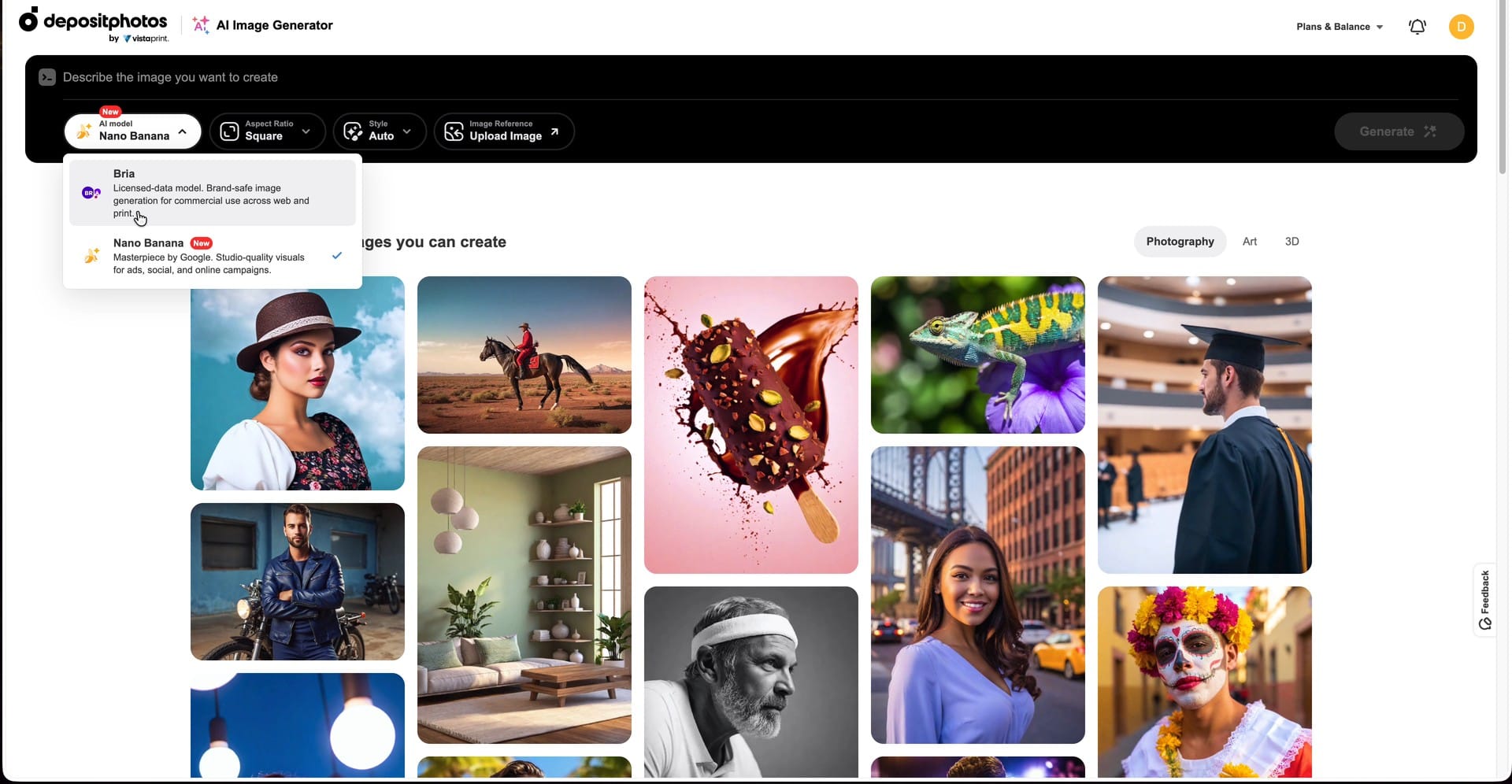
There are example images with their prompts, so you can copy one and change it however you like. I ran the same prompt as one of the examples to see if I'd get the same image. I didn't. It came out quite different, but very nice looking and visually pleasing.
It does have an AI-esque look to it, which I don't personally hate these days. AI is getting so good, and it has a gorgeous, larger-than-life kind of appeal.
Stock photos still hold up
Watch: 5:50
Something about old-school stock photography is hitting me in the feels these days. It's just so real.
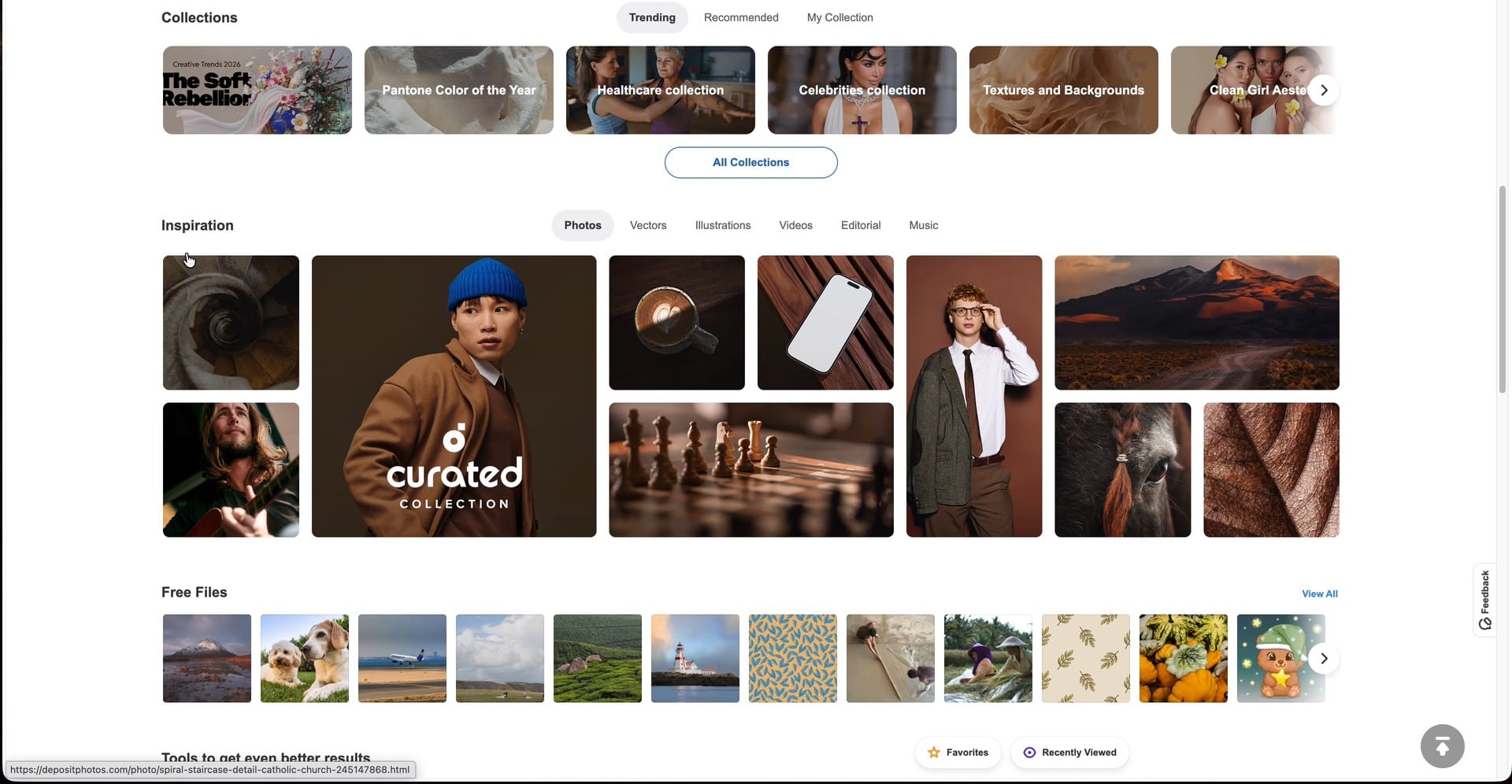
DepositPhotos organizes the library nicely. There are inspiration sections, like the curated collection, where you can click in and see a bunch of photos with a similar look. If you're scrolling for blog post image ideas, I think that's still a great way to do it.
Yes, AI has its place, and you get those credits with the purchase too. But these photos definitely don't look AI generated. They're real people. You could probably prompt something close, but there's something more human about a real photo. For one thing, they've got the right number of fingers.
My call: the stock photos still hold a lot of value, and $49 will probably last you until next Black Friday.
wpDataTables: one for the WordPress lovers
Watch: 6:43
Next up is one for the WordPress lovers. They're still out there, trust me. wpDataTables is a WordPress plugin, and it's $59 on AppSumo. If you've got any tabular data you want to show the people visiting your website, this is a great opportunity to do it.
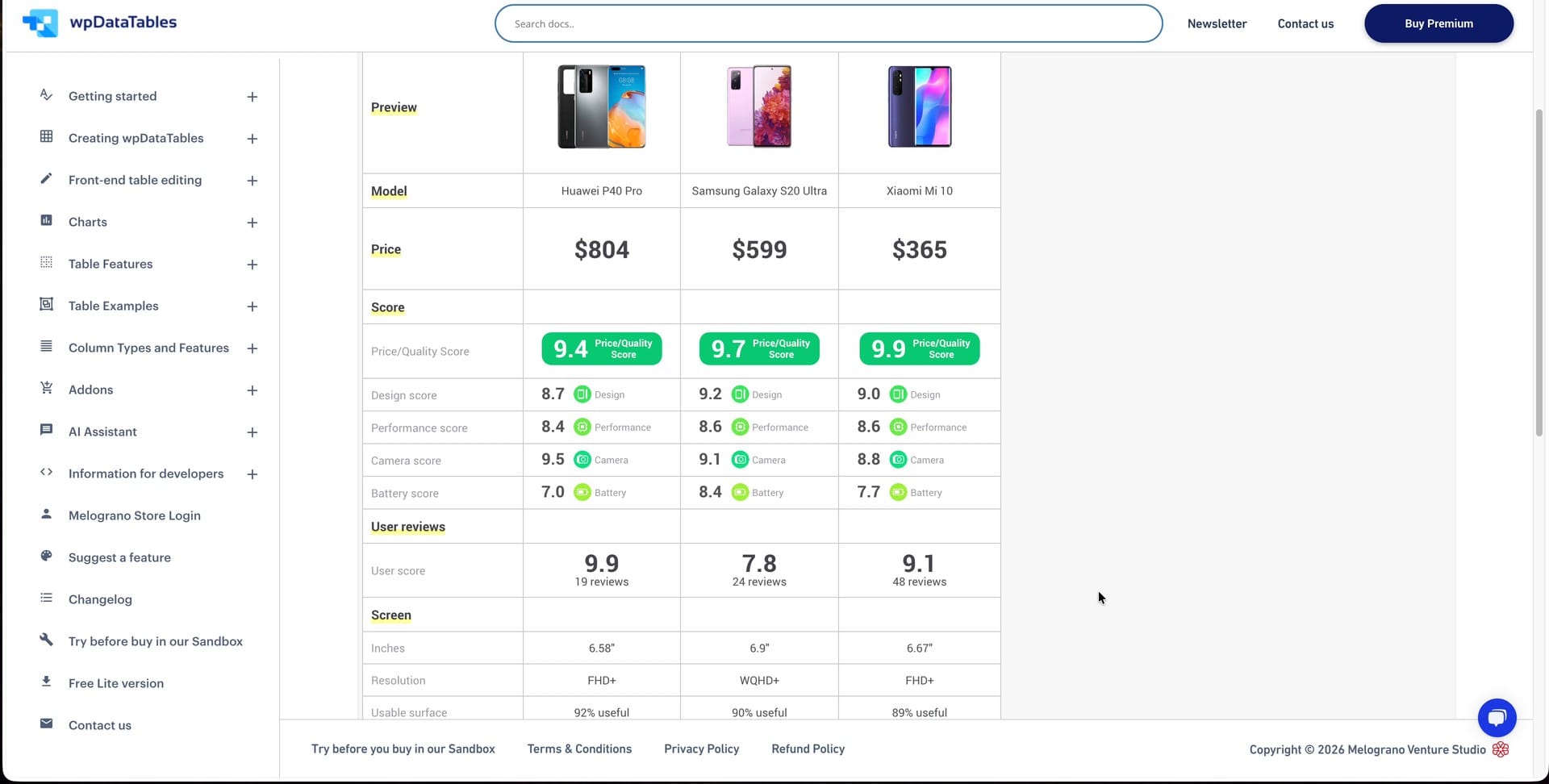
The demos give you a good idea of what it can do:
- Pricing tables. There are pricing table examples right on the demo page.
- Amazon comparison tables. If you run a review site and compare different tech or products on Amazon, this is a really nice way to lay them out. They look really good.
- Table-style product listings. Maybe you want the products on your e-commerce site in more of a table layout, so people can browse through them that way.
wpDataTables integrates with WooCommerce and Advanced Custom Fields, and there are a bunch of add-ons available too. It also works with Divi and Avada.
My call: if you're a WordPress user and you need tables on your website, definitely check out wpDataTables. Look at the deal page for which features and add-ons each tier includes before you buy.
Klasio: a course platform that could replace your LMS
Watch: 7:41
Klasio could replace your LMS (learning management system), but honestly, it does so much more than that. I have an account, and I've been playing around with it.
Here's what's in the box:
- Recorded courses
- Live cohorts, so you can teach people live
- Webinars
- One-to-one coaching
- E-commerce built in, so you can get paid and sell digital downloads
It's a really extensive platform that definitely deserves its own full-length review.
Pricing, storage and the commission
Watch: 8:11
Plans start at $79 for Starter, and there are a bunch of plans above that depending on how many people work in your business and how many students you plan to host. Pick the one that fits you.
The thing a lot of people want to know about is video storage, because you upload your course videos to Klasio. How much storage you get depends on the plan you buy. On the deal page, Starter comes with 50 GB and the top plan, Business+, has 750 GB.
I should point out that Klasio also takes a bit of your income. On the $79 Starter plan, the commission is 3%. On the top plan, it drops to 1%. Keep that in mind when you compare the plans.
If you need SCORM support (importing standard e-learning packages), that's only on Business+, which is $699. It's not on the $79 plan.
Who it's for
My general recommendation for all-in-one tools like this: they're great for people getting started. You don't have to worry about collecting a dozen different tools. You dive in, create your product and figure out if you can sell anything. From there, you can move somewhere else if you like, or stay put if you're happy.
Building a course
Watch: 9:22
Here's how creating a course works:
- Go to Products, then Courses, and create a new course.
- Pick the type. A recorded course is digital, self-paced learning, your conventional online course. A cohort-based course includes live interaction. I'm an async kind of guy, so I went with recorded.
- Give the course a title. I made one called "Mastering Public Speaking." I've done very little public speaking in my life, but that didn't stop me from creating an online course on it.
- Add your objectives: what students will be able to do after they finish the course. Klasio suggests three to five.
- Build the curriculum, either by writing it out manually like you normally would, or with AI.
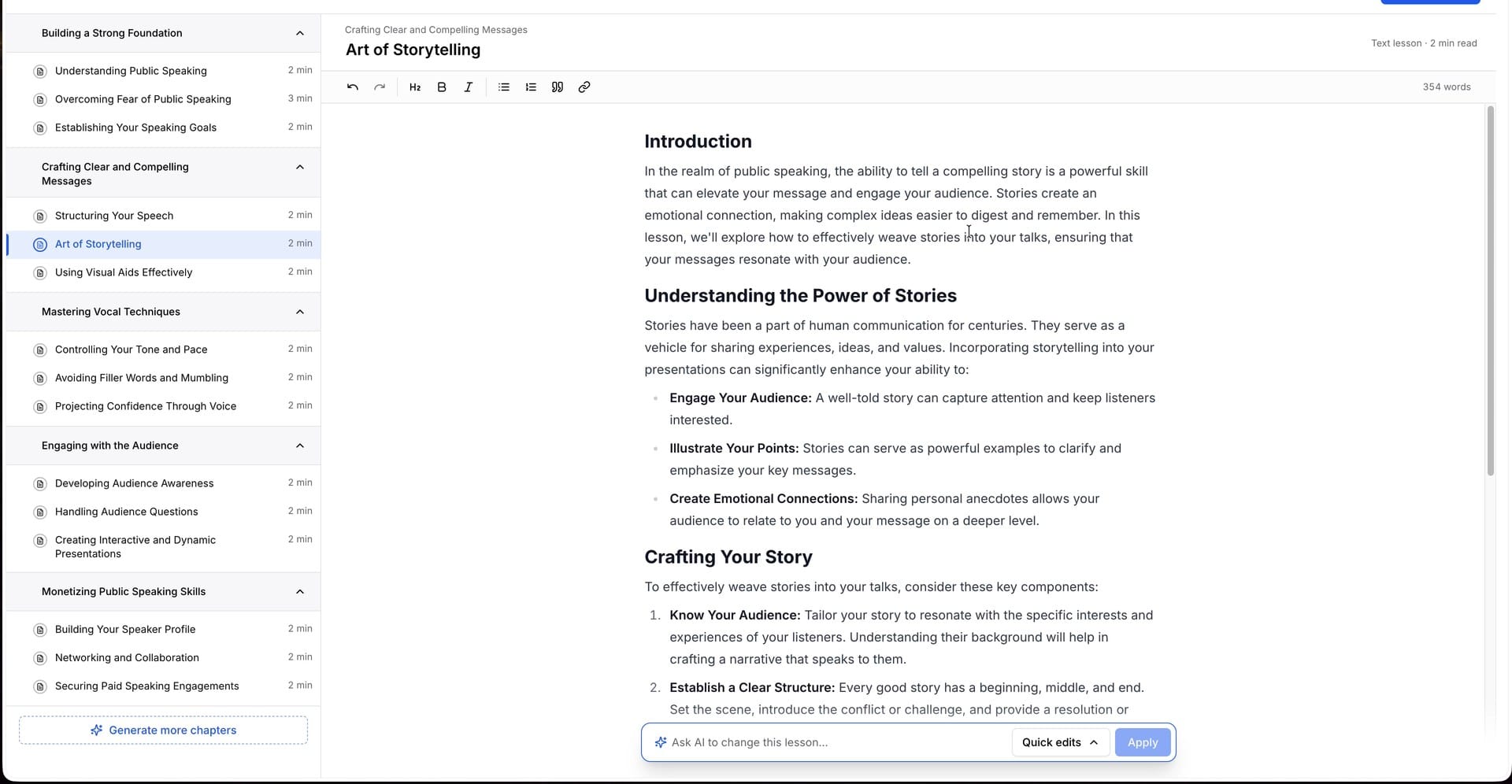
I don't like AI-assisted course creation. If you have a course, the information you want to give people should come from you as a human. A lot of people are using ChatGPT or Claude these days, and they can ask for AI-generated content themselves. I tried it anyway, because I know a lot of people want to see what it looks like.
My prompt was "Create a course to help people speak confidently and land public speaking gigs." Klasio built the whole course outline: an introduction and all the topics. It doesn't generate videos, so you still record those yourself.
Once it's done, you click where you want the cursor and start typing. The editor is simple: headings, bold, italic, bulleted lists and links. You can also ask AI to make the course longer or change specific parts of a lesson. When you're finished, hit Create Course and it's ready.
What students see
Watch: 11:25
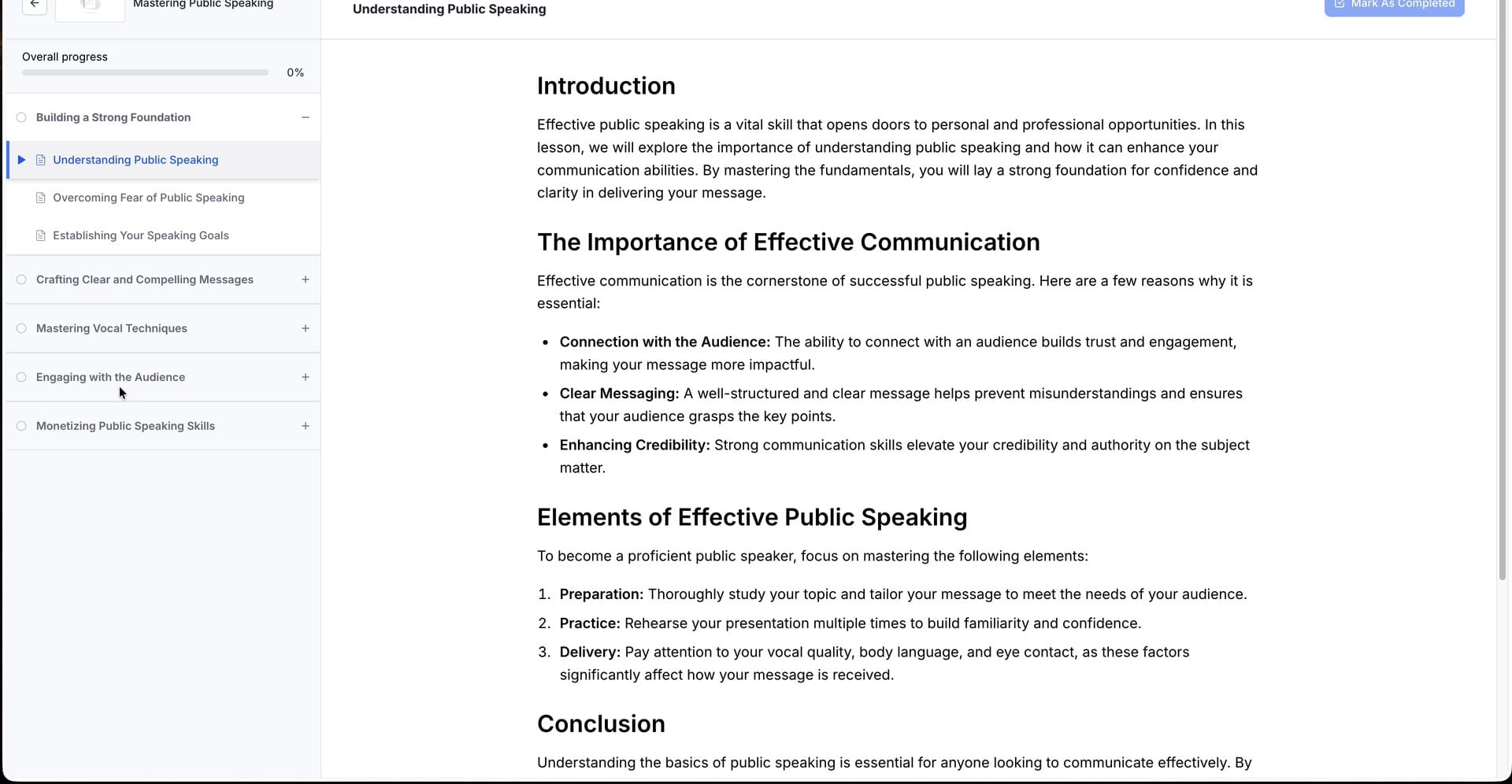
Preview the course as a student and you get a very typical course layout: modules down the left with lessons inside them, and you click from module to module or lesson to lesson. The content is very easy to read. I'm very happy with it, and it's simple to get going.
When you're ready to make money, you can put a price on the course, build a website and make it available for people to buy.
My call: a great tool and a very easy way to create an online course, especially your first one. Watch the commission on the lower plans.
Boost.space AgentOS: AI agents that work on your data
Watch: 11:51
The last deal of the teaser is Boost.space AgentOS. Boost.space was on AppSumo a few years ago. It's a very interesting tool, but it didn't end up being one I used every day. Now they're back with the AgentOS edition.
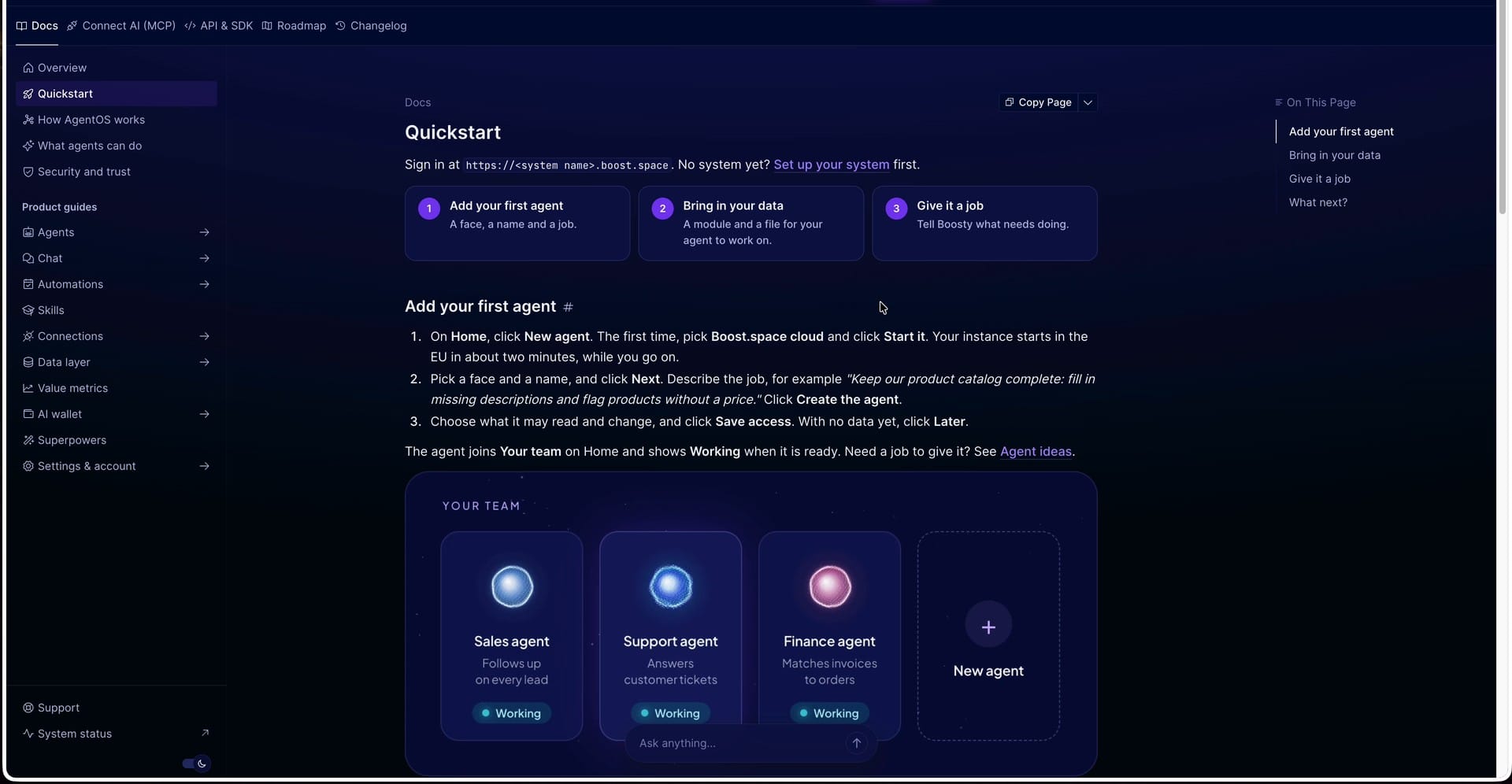
I want to be upfront: I didn't get access to AgentOS. Everything here is my understanding of how the product works from their documentation, not hands-on testing.
From the quick start guide, it works like this:
- Add your first agent and give it a name and a job.
- Bring in your data (a module and a file for the agent to work on).
- Give it a job and let it do the actual work.
It's very much an autonomous agent assistant. You give each agent a role, then let it loose on your data to do the work you need done. The examples in the docs are a sales agent that scores leads, a support agent that triages tickets and a finance agent that matches your invoices.
You can also bring AgentOS to your own AI. If your tasks and data are organized inside Boost.space, you can connect Claude, ChatGPT, Cursor or anything else that supports MCP, such as Hermes Agent.
Tier 1 is $79 for one agent and 50,000 operations per month. That's a monthly allowance, not a lifetime pool. Boost.space is also running a launch webinar on November 16.
My call: it looks very interesting, especially if you're looking for a tool to fill this role, but I'd have to dig in a lot more before I had a strong opinion one way or the other.
What to do next
If you're a Plus member, buy before Friday morning at 8:00 AM Central, when every tier goes up $10. If you're not, the deals open to everyone on Monday, November 16 at 8:00 AM Central. Either way, start with the deal that replaces something you already pay for. New to AppSumo? Use code DAVE10 for 10% off.
These are only the first releases of AppSumo's Black Friday, and things are just getting started. I'll have more videos on these deals, so subscribe on YouTube if you want to follow along. If something catches your eye and you want my opinion on it, or you'd like to see a full video on it, now's the time to ask. Leave a comment on the video and tell me which one.
Get Dave's Toolbox
The tools I actually use, every Tuesday. Free. No spam.
No cost. No spam. Unsubscribe anytime.