Pixl Nub: What the Focus Robot Does Today, What's Missing, and Who Should Back It
Pixl Nub tracks focus, heart rate and breathing with radar. What works on my pre-production unit, what's missing, the privacy check, and the $249 math.

I would only back the Pixl Nub right now if you work for yourself, you struggle with focus, and $249 is money you can spend without worrying about this month's bills.
I've had a pre-production Nub on the shelf behind my desk for almost two weeks. The technology inside it is really cool. It can read your heart rate and your breathing from across the room with radar, and nothing touches you. But honestly, right now it doesn't do a heck of a lot. Today it is a really expensive Pomodoro timer.
Pixl Robotics promises it will do much more by the time it ships. So this guide covers what Nub does today, what the Kickstarter page promises that I couldn't use yet, what I found when I checked where my data goes, and how I'd decide whether it's worth $249.
Disclosure: Pixl Robotics sent me this pre-production unit for free. They aren't paying me at all for this. If you back Nub through my link, Pixl Nub on Kickstarter, I may earn a commission at no extra cost to you. The video this article is based on was sponsored by MacPaw for Eney, its AI assistant for Mac (more on that at the end).
What is the Pixl Nub?
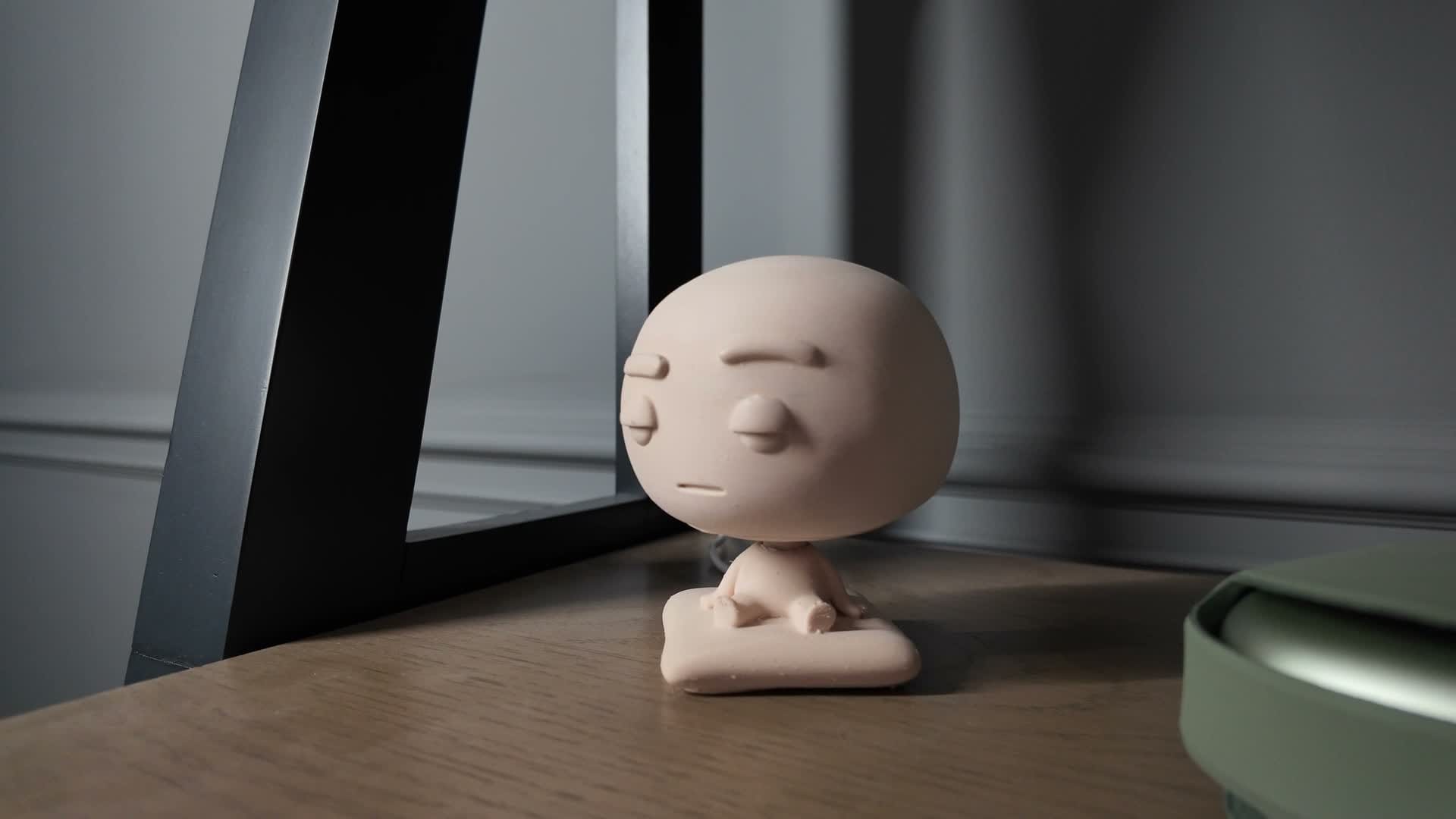
Nub is a little robot that sits on your desk or shelf and keeps track of how you're actually focusing.
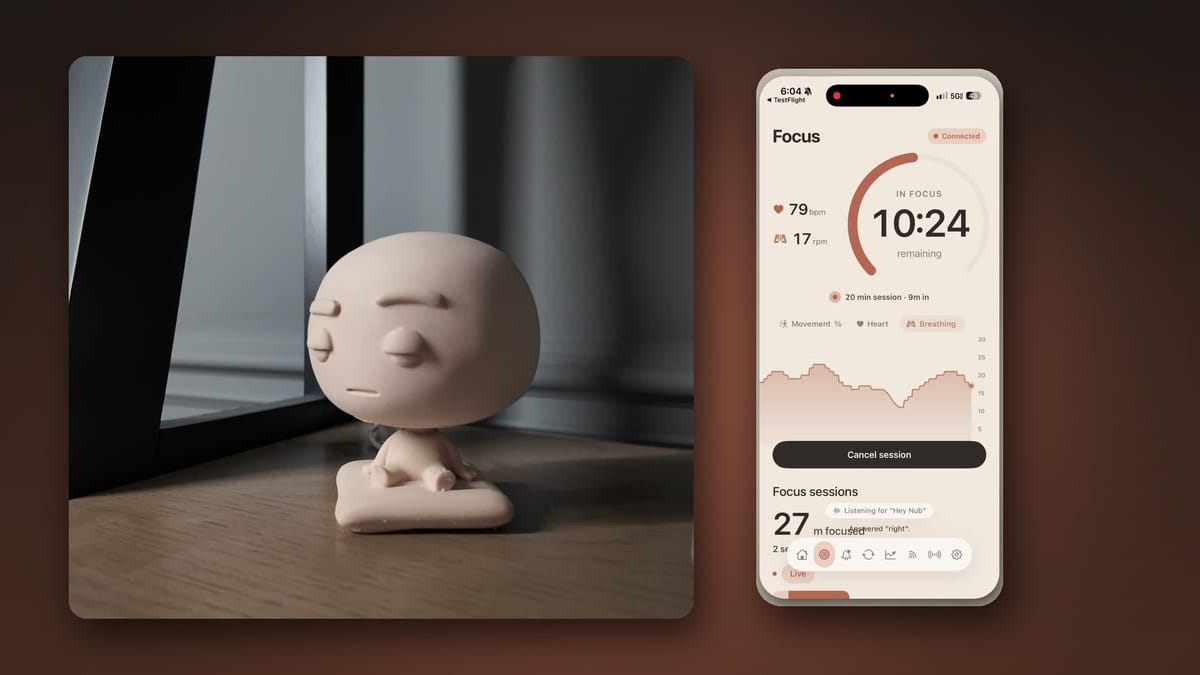
It's about 13 centimeters tall. There is no screen and no camera on it, and the robot itself has no microphone. It senses you with radar and connects to your iPhone over Bluetooth. Everything you see shows up in the Nub app on your phone.
There are actually two radars inside:
- One reads your heart rate and breathing.
- The other notices when you're there and when you've moved, so if you keep getting up and getting distracted, it tracks that too.
There's no battery to charge. Nub runs on USB power, so it has to stay plugged in. I have a power cable sticking out of the back of my shelf, and I don't like how that looks. But it's better than having to worry about charging yet another device.
Nub also has two little motors that turn its head. When someone walks in and interrupts you, it's supposed to turn and stare at them, intimidatingly I suppose. It's not that intimidating. Mine looks more like a little evil demon in the background, and it could honestly be a bit cuter. Pixl has talked about offering different skins, so check the Kickstarter page if the look matters to you.
What Nub does today: focus sessions
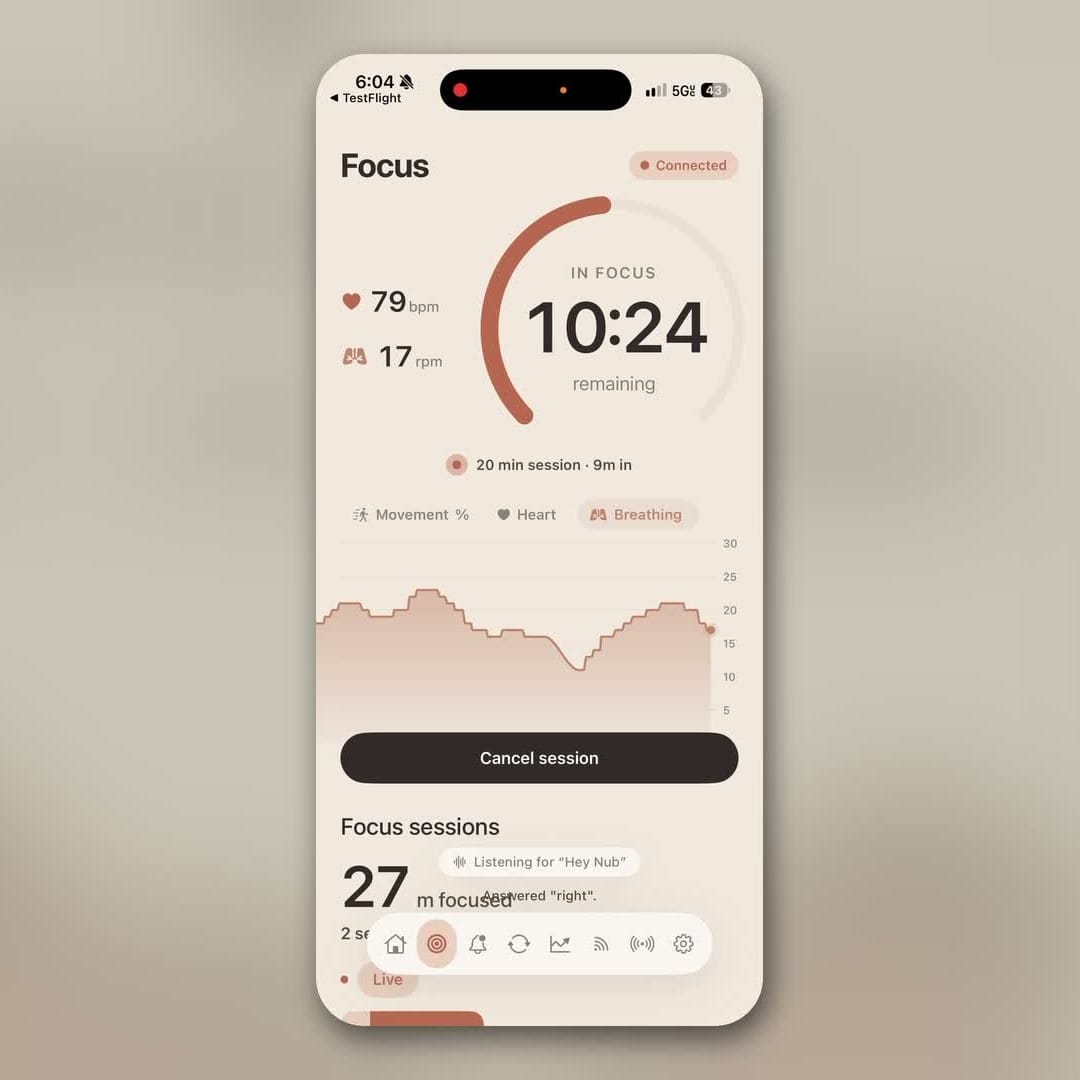
Right now, the one thing Nub really does is run a focus session.
If you haven't used a Pomodoro timer, the idea is simple. You decide you're going to focus on one thing for a set period of time, say 25, 45 or 60 minutes, and you work until the timer runs out.
With Nub, you open the app and say, "Hey Nub, start a focus session." Nub then keeps track of you until the timer ends. If you don't give it a number of minutes, it defaults to 20. I believe you can change that default in the app.
While the session runs, your phone shows:
- the time you have left,
- your heart rate,
- your breathing rate,
- a live chart of both while you work.
Seeing your heart rate update with nothing strapped to your wrist is kind of cool and kind of creepy.
How accurate are the heart rate and breathing numbers?
I'm not sure exactly how accurate they are, and I haven't checked them against a medical device. There has to be some variance. Even wearables don't track your heart rate perfectly, depending on how much you move.
My first question was whether the radar is safe to have pinging off me every time I start a session. I looked up the technology Pixl is using. It turns out it is safe. This is the same kind of radar people use for sleep tracking, measuring breathing and heart rate while someone sleeps.
That also tells you when it works best. If you sit at a desk and stay fairly still, you'll probably get pretty good results. If you work on a walking pad, Nub might not be the most accurate device for you.
I think of it like the body fat reading on a smart scale at home. The number isn't as accurate as a proper medical scan, but it can show whether you're trending forward or backward. With Nub, the exact numbers almost don't matter. What matters is whether they're heading the right direction. Are you working calmly? Are you focused? Are you moving around too much, or could you stand to fidget a little more?
I treat these numbers as trends, not exact readings.
Reading the session summary
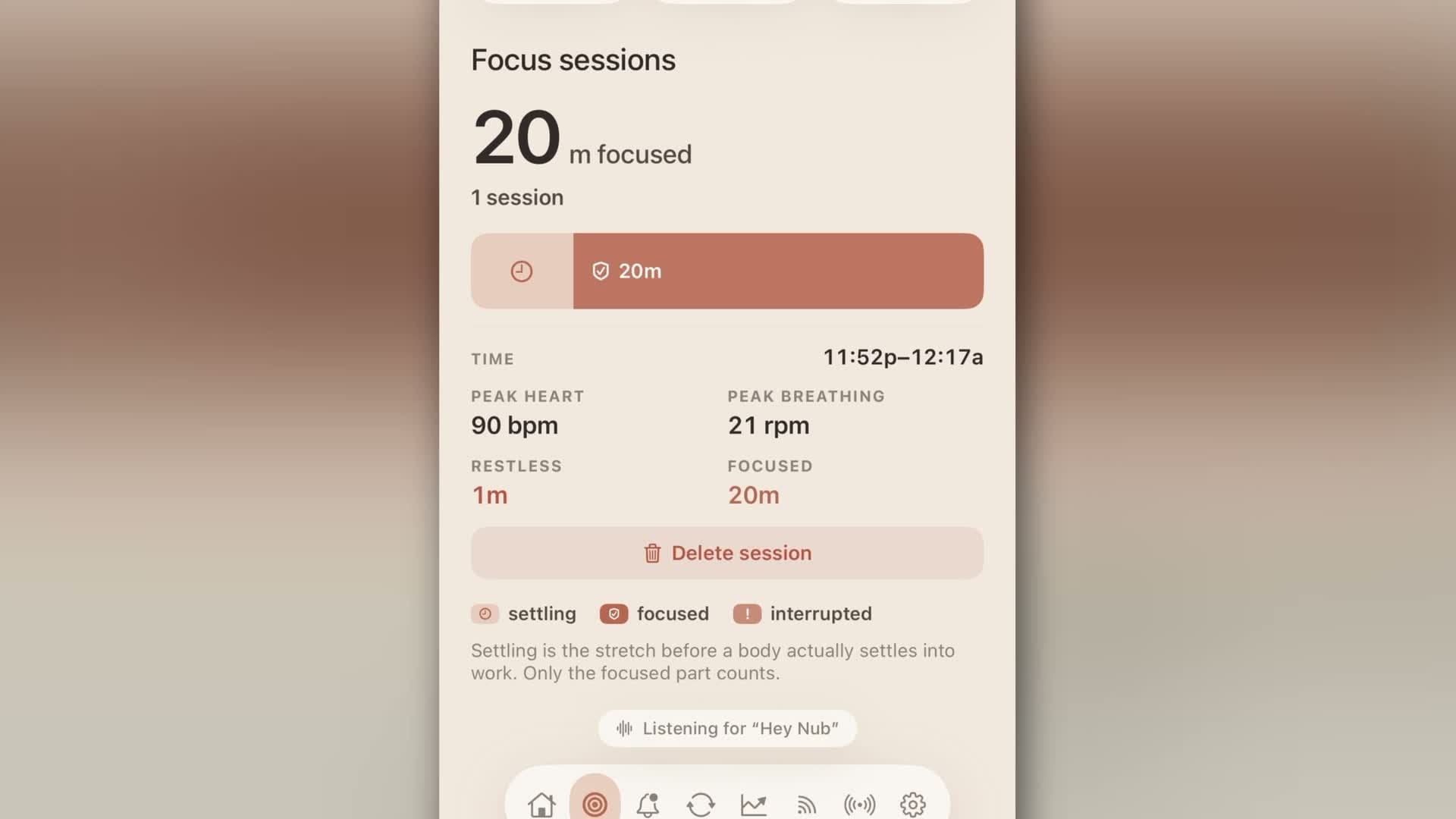
When a session ends, the app shows a summary screen. In one of my sessions, I focused for 20 minutes, my peak heart rate was 90 beats per minute (surprisingly high), and my peak breathing rate was 21.
One of my favorite metrics is movement. It basically tracks how much you fidget. There's a restless line, and in one session I was restless just 1% of the time, with 2% movement on average. Turns out I'm pretty still.
The app also splits each session into three parts:
- Focus: time spent working.
- Interrupted: time someone or something pulled you away.
- Settling: the stretch before you actually get into the work.
Settling confused me at first, so I read into it. Your session doesn't count as focused the moment you hit start. Nub gives you a grace period to get dialed in, get into flow, the zone, whatever you want to call it.
Even when you're not in a session, Nub is supposed to track how long you've been sitting at your desk.
What isn't working yet
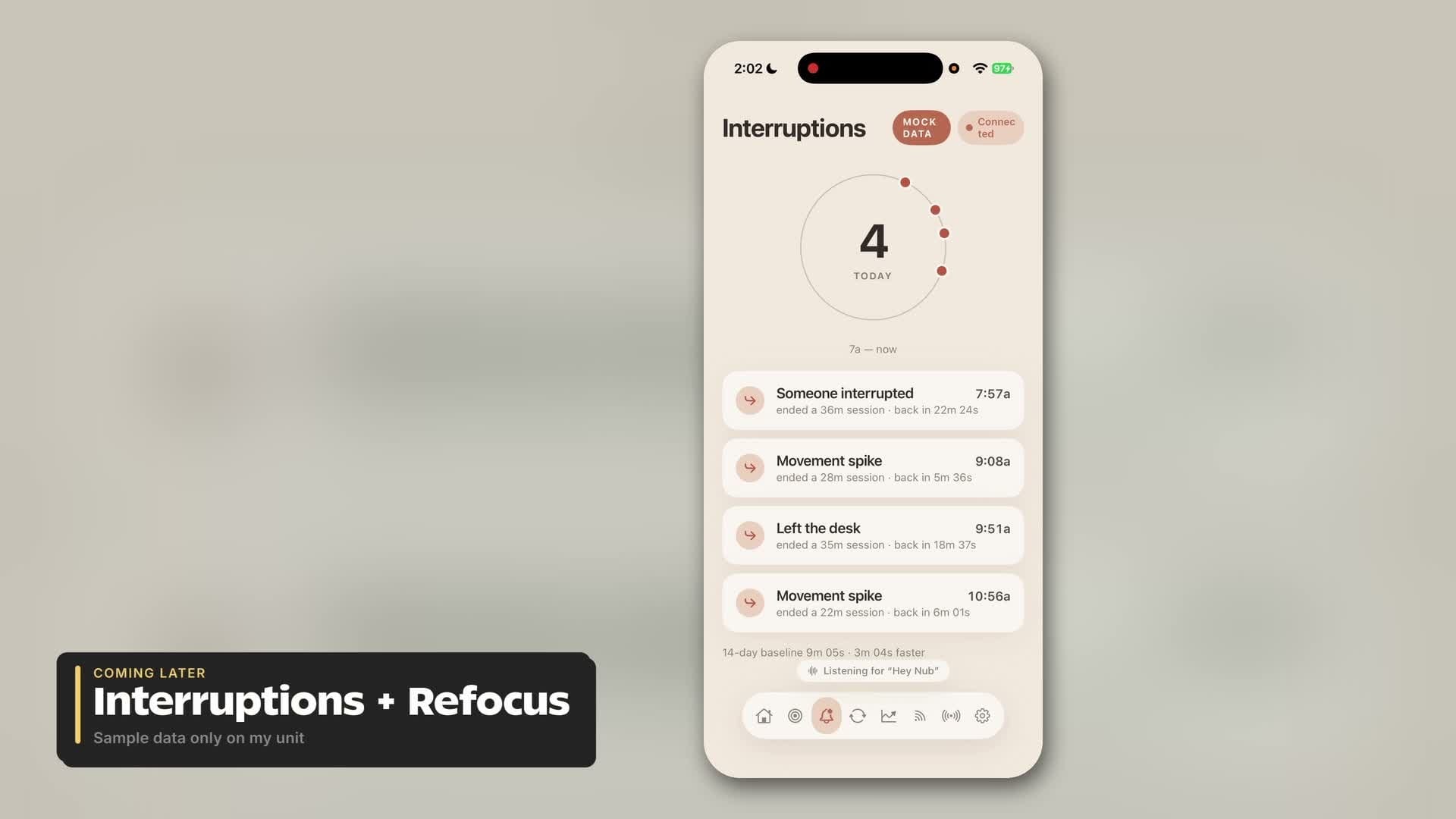
Just being brutally honest: right now, Nub tracks focus sessions, and that's it.
There are two more tabs in the app:
- Interruptions is supposed to log every time someone comes in and pulls you away from your work.
- Refocus is supposed to show how long it takes you to get back to work after an interruption. I love that idea.
Out of curiosity alone, I'd like to know how often I get distracted during the day. But on my unit, both tabs only show sample data, labeled as mock data in the app. The feature isn't there yet. Hopefully Pixl Robotics delivers it.
The bigger gap is the phone lock. The Kickstarter page promises Nub can lock you out of apps like TikTok and Instagram while you're in a focus session, and Pixl's own FAQ calls it the feature most backers come for. It's not in my app. I went through every setting looking for it and there's no option. I started a focus session and could still open TikTok and Instagram, no problem.
Maybe that's still coming. I emailed Pixl the week before I recorded and asked when the mock-data features would be ready, and I hadn't heard back by the time I recorded.
So if you're backing Nub for the phone lock or the interruption tracking, know that neither worked on my pre-production unit.
The hardware: great tech, rough unit
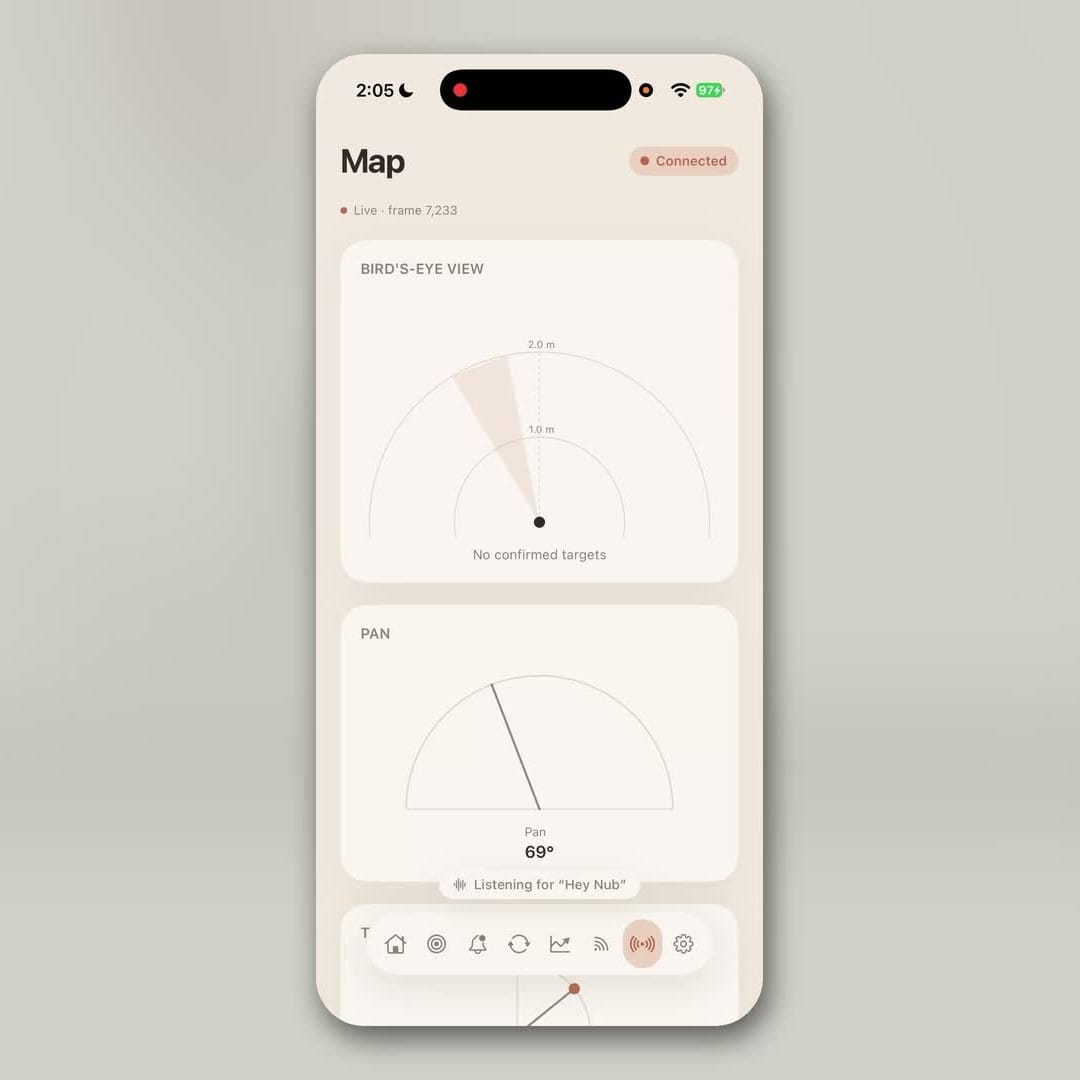
The coolest thing about Nub is the technology. There's a live radar sitting behind me, and the app has a dashboard that shows exactly what it's doing. It knows if someone is there, kind of like Santa Claus. It knows how far away they are, and it can track their heart rate and breathing. There's even a map from above: the dot is me, and if I move, it follows me.
The rough part is the hardware. Mine looks 3D printed. There are marks on the front, some discoloration, and a dark spot right above the eye. If I had paid for this, I'd be a little disappointed in the quality. But I knew going in that it wasn't the finished version, and Pixl told me the version that ships is going to look much better.
It's also kind of loud. You can hear the motors, and it moves its head quite a lot. Sometimes it seems like it can't find you, or it's looking around to see what else is going on, and the head just moves side to side.
That doesn't happen constantly, but it happens often enough to matter if you're very sensitive to noise. For the wrong person, Nub could be less of a focus device and more of a distraction. I'm kind of impervious to that. I'm a dad, and I've got kids making noise all the time. But if you're the kind of person who notices the fan in a MacBook Pro, it may be worth waiting until Pixl makes it quieter, or it may just not be worth it for you.
Is the Pixl Nub private?
When a random robot shows up in the mail and you set it up to stare at you with radar, it's fair to wonder whether it's quietly collecting more data than it says. So I checked.
My AI assistant pulled a copy of the software off the robot and went through it. Here's what it found:
- There's no camera code at all.
- The robot's storage was empty, with no recordings and no radar history.
- In my testing, it only talked to my iPhone over Bluetooth.
- There's a Wi-Fi chip in it, but it has never been used. I think that's because the off-the-shelf part Pixl uses has Wi-Fi built in. So it could phone home at some point in the future.
- There's no microphone on the robot.
After that, I'm not concerned about using it.
The microphone is your phone's
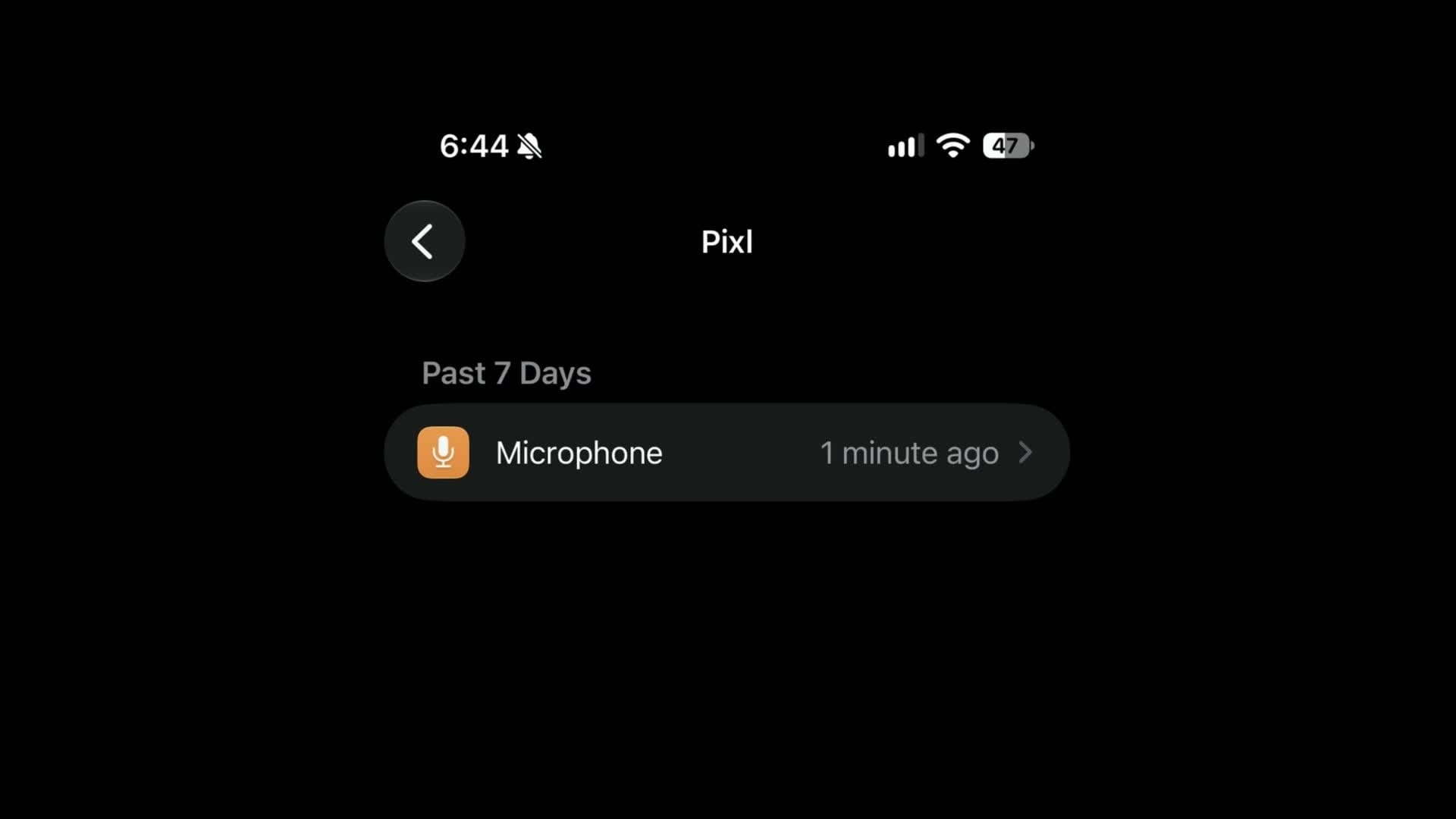
When you say "Hey Nub," it's your iPhone listening, not the robot. I turned on the iPhone's App Privacy Report to see what the Nub app was doing. It was only using my phone's microphone, to start a session. In my test, it showed the app listening for about 35 minutes, which was the whole focus session.
Pixl's FAQ says a version with a built-in microphone will be an option when it ships. Whether you trust a robot on your desk with a mic is up to you.
I'm mixed on it. Today, to start a session you have to pick up your phone, open the app, and then say, "Hey Nub, start a focus session." It would be cool to just say it into the air and have the session start. I'd love for Nub to work on its own. Right now it's really a radar that attaches to your phone, and that makes it a bit less practical.
"Cloud Connected"
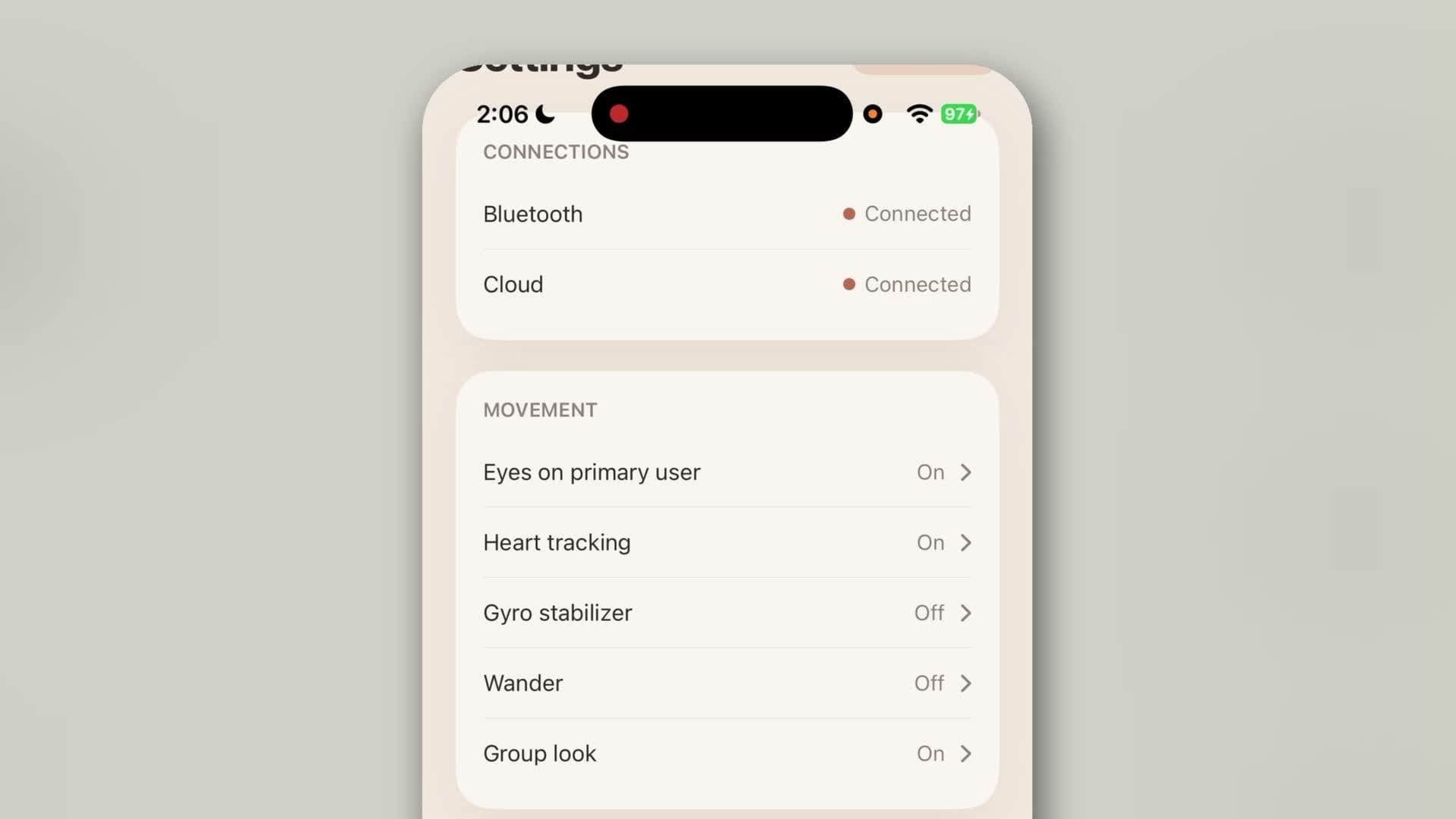
Pixl says Nub uses third-party AI to decide how to react to your voice and your stats, but it doesn't say which company. My settings screen also says "Cloud Connected," even though I never signed up for anything.
So I checked the App Privacy Report again. In the almost two weeks I've had Nub, the only thing listed was microphone access. The app wasn't calling out to the web at all. As far as I can tell, it isn't using my iPhone in any malicious way, and it hasn't contacted anything on the internet, even though the screen says Cloud Connected.
Of course, that can change with any update.
How to check it yourself
If you back Nub, turn on the App Privacy Report once you set it up. On your iPhone, go to Settings → Privacy & Security → App Privacy Report.
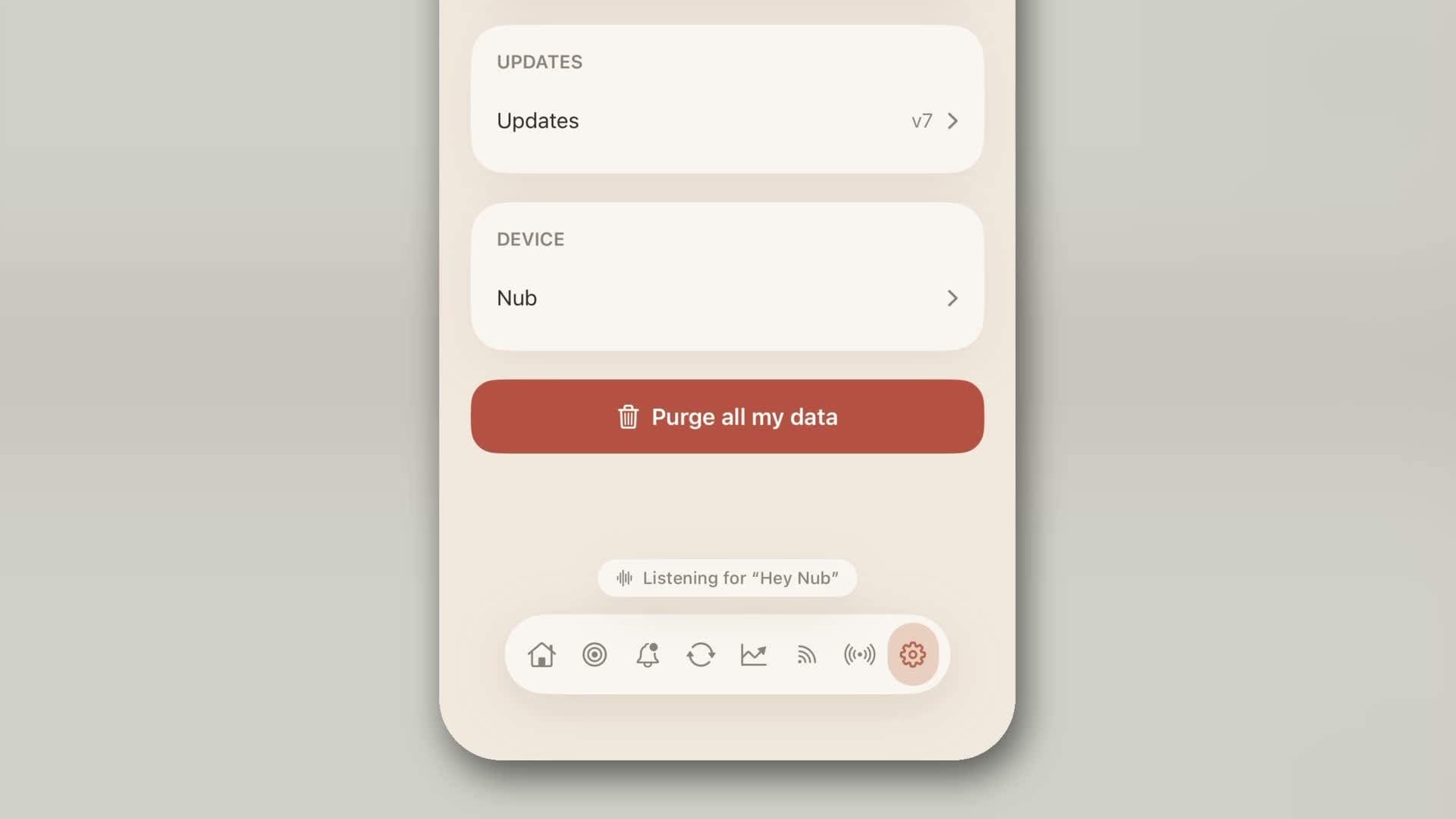
There's also a Purge All My Data button in Nub's settings, which I like. If you want to get rid of everything, you can.
How much does the Pixl Nub cost?
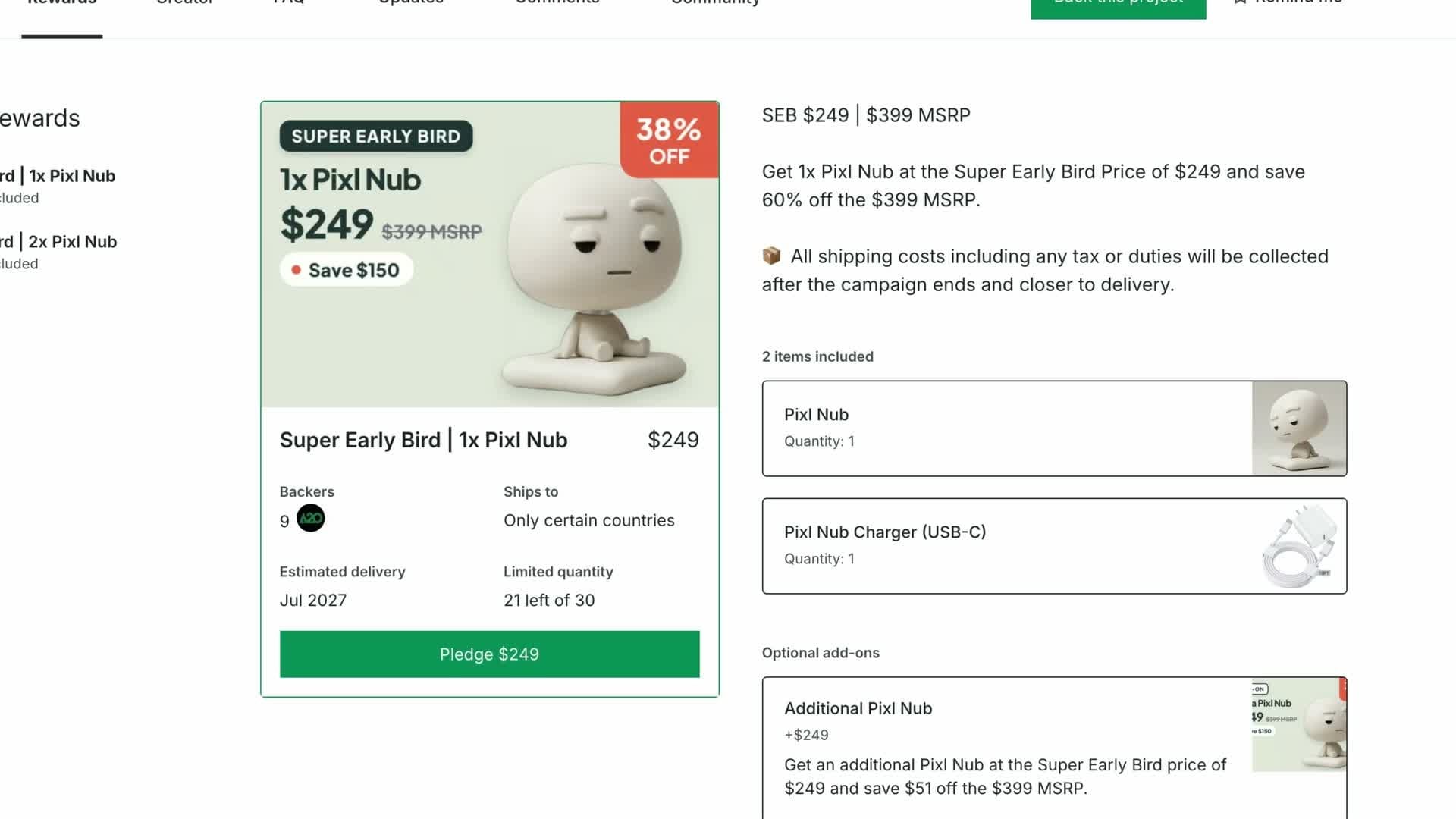
These are the prices from when I recorded in the middle of November 2026:
- $249 early bird price on Kickstarter, through December 15, with shipping and tax added.
- $299 for the next tier up.
- $399 is the full price Pixl is planning.
Pixl says deliveries will begin in July 2027, so it's quite a ways out.
Kickstarter also says rewards aren't guaranteed. You're backing a project, not buying a finished product. Check the campaign page for current prices and dates before you pledge: Pixl Nub on Kickstarter.
Is Nub worth $249?
For what it does today, it's extremely expensive. Honestly, it's expensive for what it promises to do later, too. But this might surprise you: I think it can still be worth it, depending on who you are, what you do, and how much you value your time.
Here's how I think about it. Say my time is worth $50 an hour. At $249, Nub has to buy me back about five hours of focused time to pay for itself. If it helps me refocus on the work that matters and I get five extra productive hours over a month, it has paid for itself, and the next month it's earning me money.
That's a very different way of thinking about a gadget. And it doesn't apply to everyone. If you work an on-the-clock desk job, being more focused doesn't put more money in your pocket. I get it.
So I think Nub makes more sense if you:
- work for yourself,
- work in a small business where you have some equity and want to add more value,
- work on commission or something along those lines.
If you're paid a fixed rate, $249 is going to be an expensive desk toy.
Who should back it, and who should wait
Back Nub if you struggle with focus, you want numbers that show how you're actually doing, and you have some spare money. It's not the worst thing you could spend a little extra on. Nub is interesting, and backing it now helps a small team build what's coming next.
Wait if you want something completely finished, dead silent, or with heart rate numbers that are medically approved. For that, I'd wait to see what version two, three, or maybe even four brings.
And if you do back it, set it up with the App Privacy Report turned on from day one, and check again after each app update.
If you've tried something that actually helped your focus, I'd love to hear about it. Tell me in the comments on the video.
The video version of this article was sponsored by MacPaw for Eney, an AI assistant for Mac.
Get Dave's Toolbox
The tools I actually use, every Tuesday. Free. No spam.
No cost. No spam. Unsubscribe anytime.