Loose AI Video Cuts? Check Your Transcription Model First
AI video cuts feel loose? Your agent cuts on word timestamps. I tested four transcription models on my own footage to see whose timing holds up.

When people compare AI video editing setups, they compare the editing tools: FFmpeg, Remotion, HyperFrames, DaVinci Resolve. I almost never see anyone talk about the transcription, and that's what the agent uses to decide every cut.
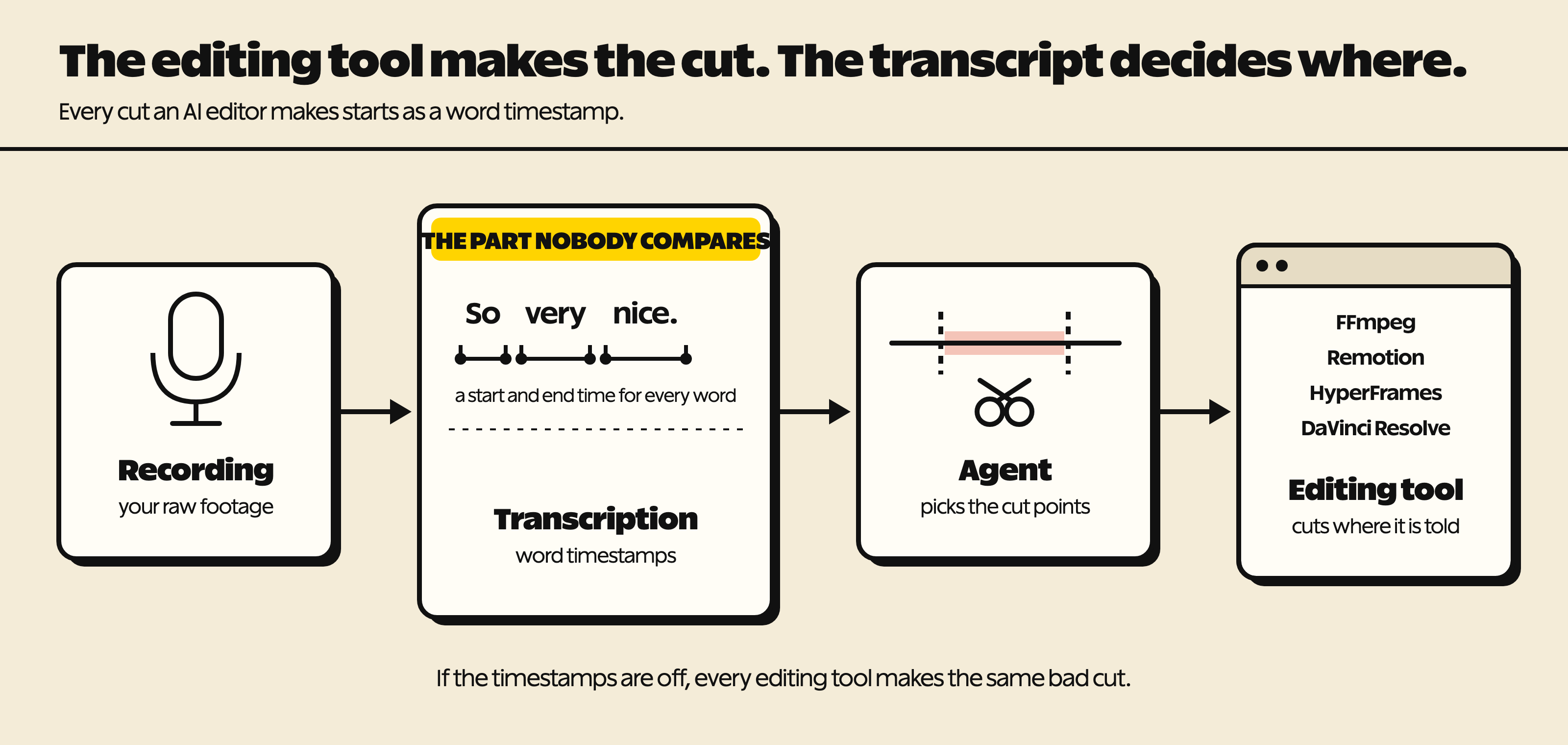
The editing tool doesn't decide where to cut. It cuts where it's told. The agent reads a transcript with word-level timestamps (the start and end time of every word), picks cut points from those times, and hands them to the editing tool. If the timestamps are off, every tool on that list makes the same bad cut.
Why AI cuts feel loose
A complaint I see on social media all the time is that AI cuts are too loose. I think a lot of that comes down to the transcription model.
Here's how it happens. If the model says a word ended before it really did, a cut at that time chops off the end of the word. I've had this happen with my own editing agent. One edit note captured a sentence ending as "...machine to do it o|". The agent can't hear that. Your viewer can.
The usual fix is padding: leave a little extra audio after every cut so nothing gets chopped. That works, but padding is what makes a cut feel loose. The worse the timestamps, the more padding you need, and you pay for it on every cut, including the ones the model got right.
What a bad timestamp looks like
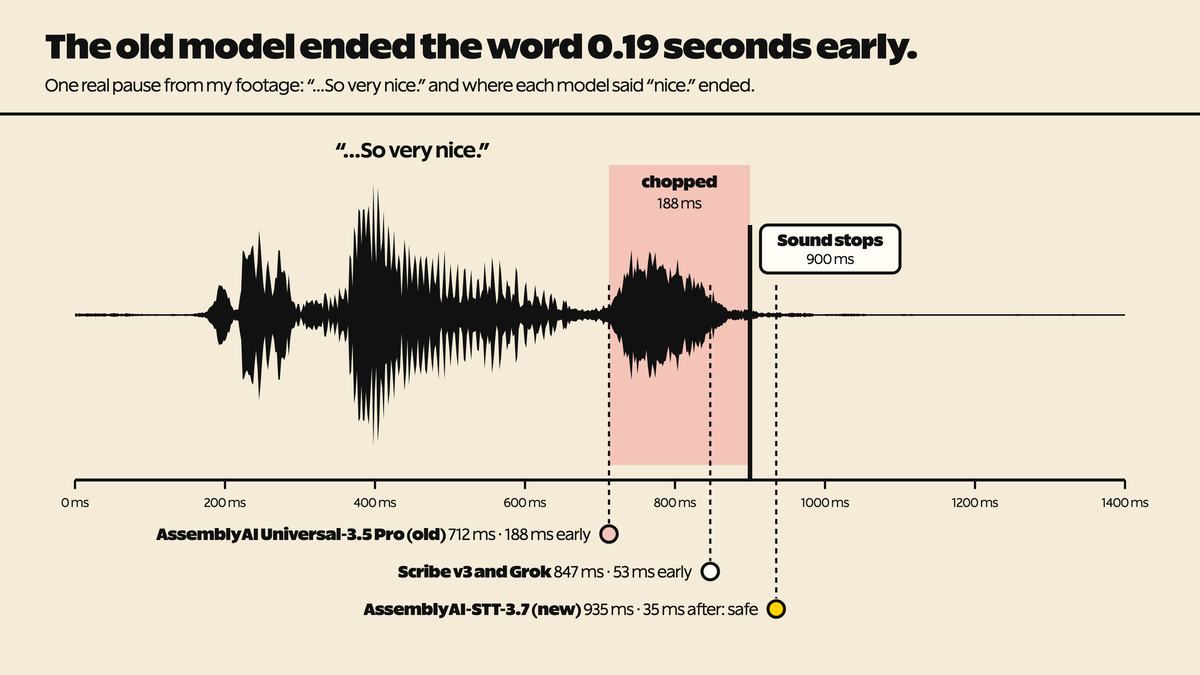
Here's one real pause from my footage. I said "So very nice." and stopped. In this 1.4-second window, the sound ends at 900 ms.
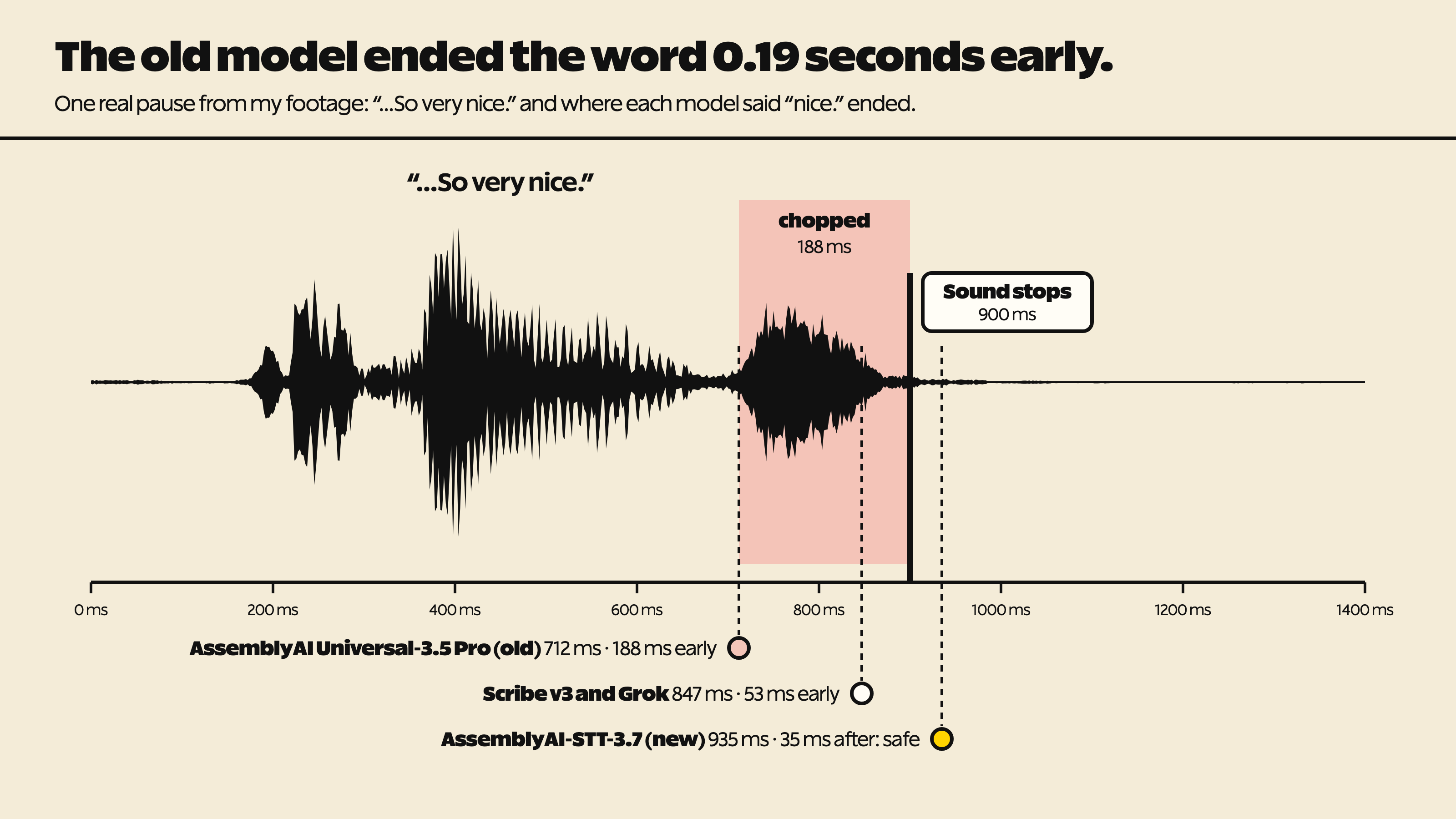
AssemblyAI-STT-3.7 says "nice." ended at 935 ms, 35 ms after the sound stopped. That's a safe place to cut. ElevenLabs Scribe v3 and Grok both said 847 ms, 53 ms early. AssemblyAI's previous model, Universal-3.5 Pro, said 712 ms. That's 188 ms early, and a cut there chops the end of "nice."
Here are both cuts. The difference is small (about a fifth of a second at the very end of "nice"), so headphones help.
How I tested four models
I ran four transcription models on the raw 78-minute screen recording from my BetterClaw video (one speaker, studio mic). My agent found every real pause of a second or more in the actual audio waveform. There were 170. At each one, it checked two things. Did the model say the last word ended before I actually stopped talking? That chops the end of the word. Did it say the next word started after I actually started? That chops the start.
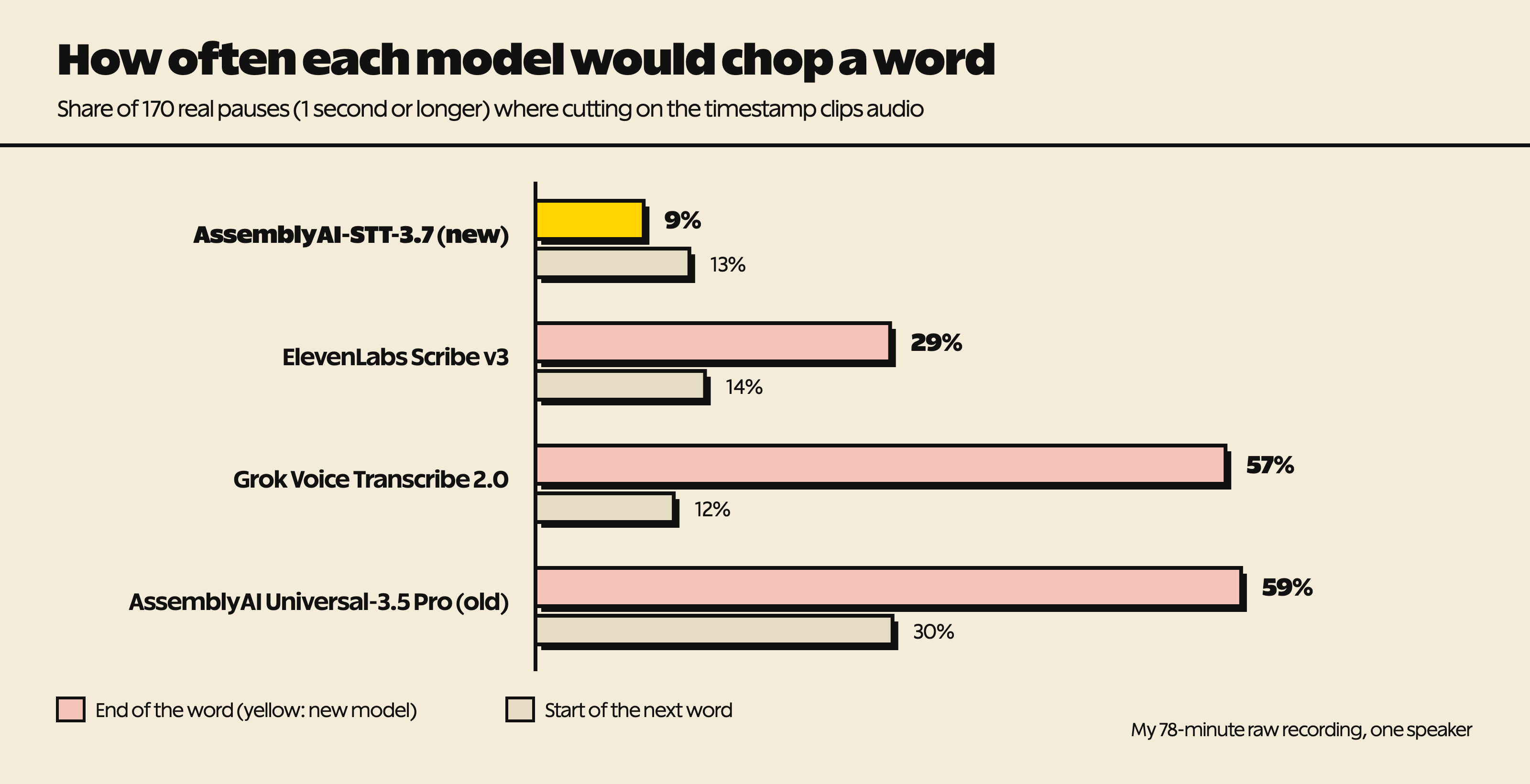
The new AssemblyAI model would chop the end of a word at 9% of the cut points. Scribe v3 was at 29%, Grok Voice Transcribe 2.0 at 57%, and the previous AssemblyAI model at 59%. On the start of the next word, three models were close (12% to 14%), and the previous AssemblyAI model was at 30%. A 15-minute excerpt told the same story.
The old and new AssemblyAI models matched each other 99.6% word for word on that excerpt. Same words, very different timing. That's why I don't pick a model from a public leaderboard for this job. On Artificial Analysis's speech-to-text leaderboard, Scribe v3 ranks near the top for word accuracy, but that leaderboard measures words, not timing.
How much padding each model forces
Then I looked at the number behind loose cuts: how much padding would you have to add after every cut to stop chopping the end of the word at 95% of the cut points?
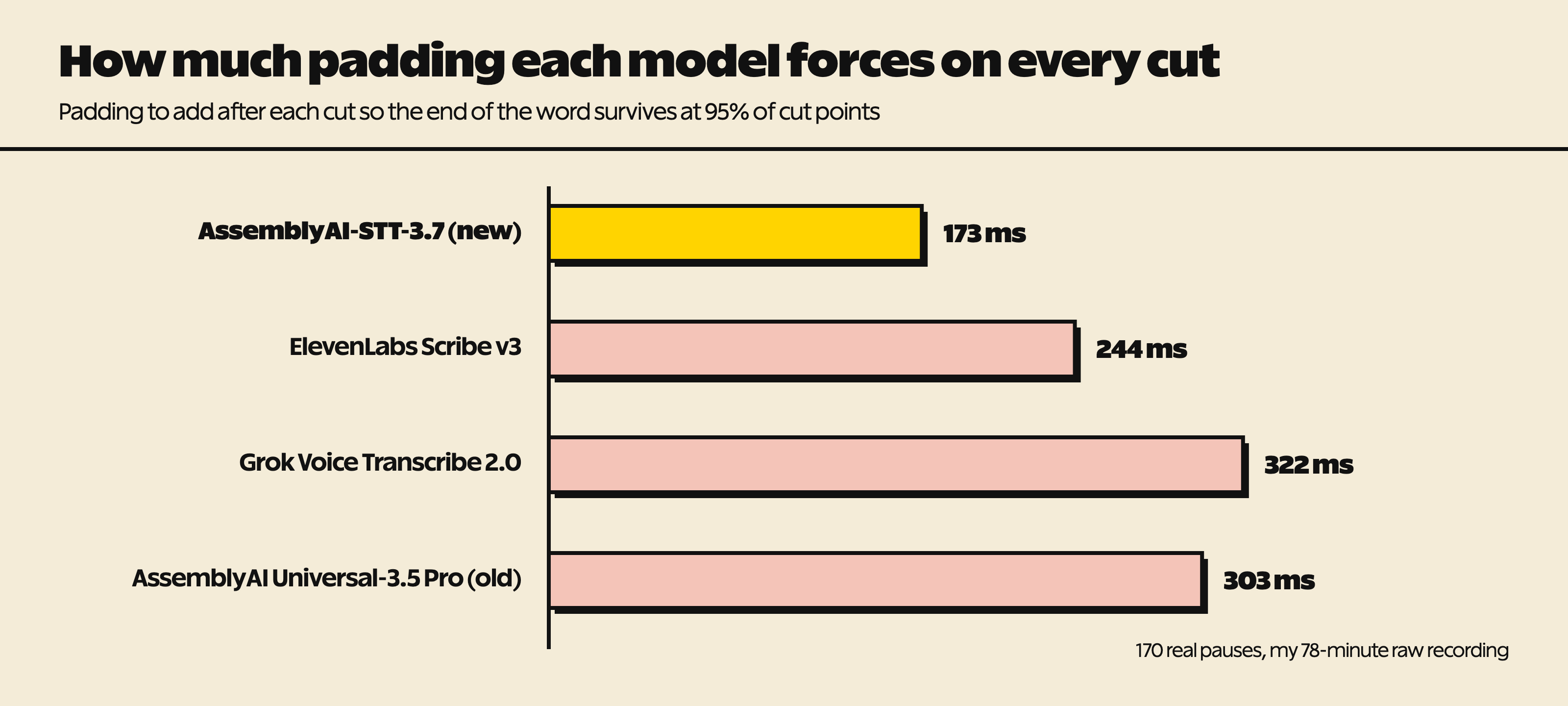
The new AssemblyAI model needs 173 ms. Scribe v3 needs 244 ms, Grok 322 ms, and the previous AssemblyAI model 303 ms. At 90% of the cut points, the gap is bigger: 25 ms for the new model, against 126, 183, and 241 ms for the others.
So with the old model, an agent that plays it safe pads every cut by roughly a third of a second, and you can hear that. With the new model, most cuts need almost none.
The trade-off: short pauses disappear
The new model has one quirk worth knowing. It stretches each word to meet the next one, so pauses shorter than about a second disappear from the word timings. Pauses of a second or more stay.
That's the second way transcription makes cuts loose. If the word timings don't show a short pause, the agent can't see it, so it leaves it in. If you want to trim short pauses too, detect them from the audio waveform instead of the gaps between words.
How to check your own setup
You don't need my test to find out whether this is your problem.
- Find a few spots where an AI edit felt loose or chopped a word.
- Zoom in on the waveform at the end of the last word before the pause, and note where the sound actually goes quiet.
- Compare that with where your transcript says the word ended. If the transcript ends words early, your cuts either chop them or need padding.
- Check how much padding your agent or script adds after each cut. If it's around a quarter of a second or more, that's probably the looseness you hear.
- Run the same clip through a second model and compare.
My whole test cost about USD 1 in API usage, so trying a couple of models on your own audio is cheap.
What I use now
My editing agent now runs on AssemblyAI-STT-3.7. AssemblyAI says the model uses a new word-timing method for English. Switching was a one-line change (the model name), and the price is the same as the previous model: USD 0.21 per hour of audio.
It isn't perfect. It spelled DataForSEO as "Data4SEO" (passing product names as key terms fixes that), and there's the short-pause trade-off above. And this was one speaker, one mic, and one video. It measures cut timing on my kind of audio, not general accuracy, so I'll test again when new models ship.
If you want to try AssemblyAI, this is my referral link: you get $100 in credits, and I get a cut if you end up paying for it later.
Get Dave's Toolbox
The tools I actually use, every Tuesday. Free. No spam.
No cost. No spam. Unsubscribe anytime.