AppSumo Black Friday 2026 Drop 2: All 8 Deals, Plus Blip AI, Dialora and DM Champ Up Close
AppSumo's second Black Friday 2026 drop has 8 new tools. What each one does, plus hands-on tests of Blip AI, Dialora and DM Champ.

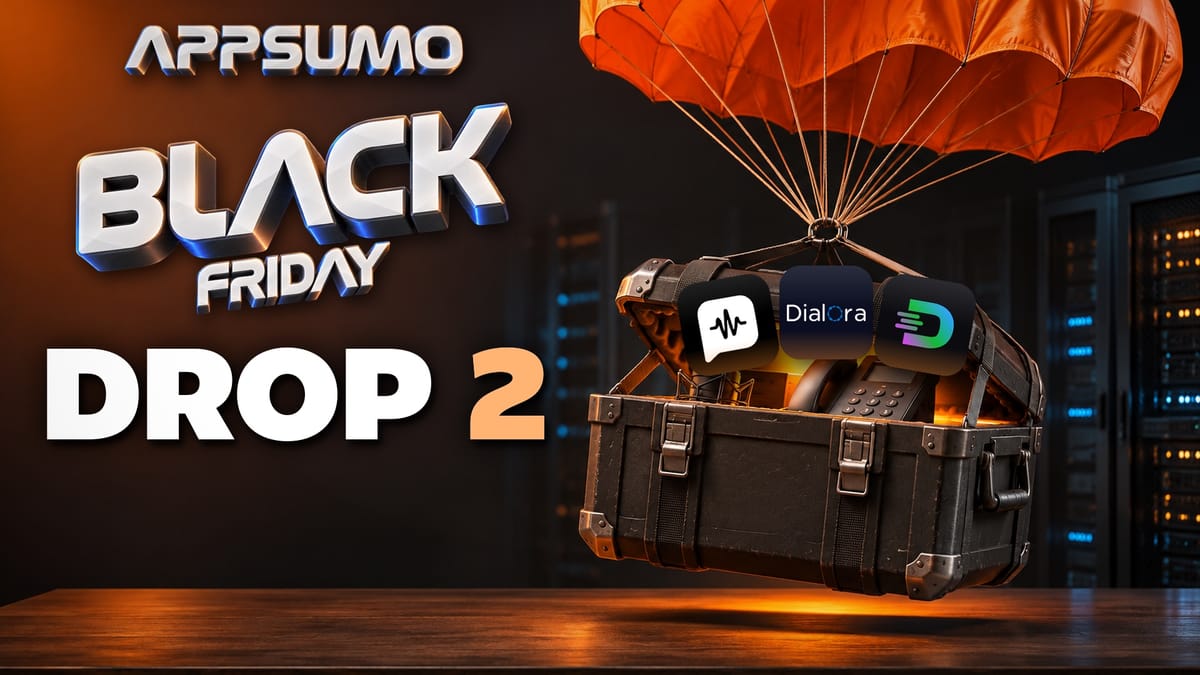
If you'd rather talk than type, look at Blip AI. If your customers DM you, look at DM Champ. And if you miss phone calls, check out Dialora.
Those are my three picks from AppSumo's second Black Friday drop, and I set up and tried all three on camera. The drop has eight new tools in total, and it has a theme: a lot of them are about AI doing the talking for you. That means writing your emails, answering your DMs, and even picking up the phone.
Today's sponsor: Softr
A lot of AI app builders are great at making nice-looking prototypes. You type a prompt, it generates an app, and it looks impressive. But is it secure? Is it something your clients could actually use?
Real business software needs a database, logins and permissions, and workflows that let your clients, team members and partners see the right data (and not see data they aren't supposed to see). That's the job Softr is built for. It's an AI platform for building business apps without code: client portals, internal tools, CRMs, dashboards and more. You describe what you need, Softr's AI Co-Builder generates the database, pages, permissions and business logic, and then you keep editing visually instead of going back and forth with prompts. I didn't build a Softr app for this video, so for a full walkthrough, see the links below.
If your business has outgrown spreadsheets, check out Softr. My link also includes 200 free AI credits when you sign up (that's the offer in my video description; check the signup page for current terms). I've made quite a bit of Softr content over the years, so there's a whole playlist of my Softr videos, and I wrote up how the AI Co-Builder builds a full business app from one prompt.
All eight Drop 2 deals at a glance
Here's every tool in the drop, in alphabetical order, with what it does in one line.
| Deal | What it does |
|---|---|
| Amical | Dictation in any app, and it can run locally so your voice stays on your device |
| Blip AI | Dictation in any app on your Mac, with a cloud or on-device model, styles, shortcuts and meeting notes |
| Dialora | An AI voice agent that answers your business phone or dials out for you |
| DM Champ | AI sales agents for WhatsApp, Instagram, Messenger and SMS that you can resell to clients |
| Kavout | AI research agents that turn stock market data into plain English |
| Lety.ai | Build AI agents, put your brand on them and sell them to your clients |
| Triplo AI | An AI assistant that works inside any app on your computer |
| ZeroWork | No-code bots that do the clicking, typing and copy-pasting in your browser |
The five I'm not demoing
[Amical](https://daveswift.link/amical) lets you dictate into any app, and it can even run locally on your own computer. That way, your voice doesn't have to leave your device.
[Kavout](https://daveswift.link/kavout) uses AI research agents to turn stock market data into plain English insights. It's one for the investors out there.
[Lety.ai](https://daveswift.link/lety-ai) is worth a look if you run an agency. It lets you build AI agents that you then sell to your clients. You put your own brand on them and bill your clients through Stripe.
[Triplo AI](https://daveswift.link/triplo-ai) was one of my favorite tools from last Black Friday, and it's back again. It's an AI assistant that works inside any app on your computer, so you don't have to copy things back and forth between ChatGPT and whatever you're working on. I've done a full Triplo AI review if you want more detail.
[ZeroWork](https://daveswift.link/zerowork) is another AppSumo Black Friday favorite. It builds no-code bots that do the clicking, typing and copy-pasting in your own browser. Here's my ZeroWork review.
Blip AI: dictation in any app
Blip AI is a dictation tool. If you're still typing everything on your computer, well, you might not make it.
Blip lives in the Mac menu bar. Click the icon and you see your options, but there's also a full dashboard, which is something you don't find in a lot of tools like this.
Set your dictation key
The first thing to do is open Settings and pick your keyboard shortcut. By default, it's the Function key. I have mine set to the left Option key.
Whatever key you choose turns on dictation. Hold it down, and the Blip icon shows up on screen. Talk, then let go of the key, and everything you said shows up as text wherever your cursor is. I tried it in a blank text window, and in my test the result was accurate, with good grammar.
There's also a hands-free mode if you like to talk with your hands. Press the shortcut once, start talking, and press it again when you're done. Blip dictates everything in between.
Blip cloud or on-device?
Right now, I'm using the Blip cloud model. If you care about privacy (and you probably should these days), you can do all of it on your device instead.
Click Change next to the model, and you can pick Whisper Base, Small or Medium, or a larger model that takes 1.6 GB. It's not small, but Blip's screen describes it as top accuracy and tuned to stay fast, so I downloaded that one.
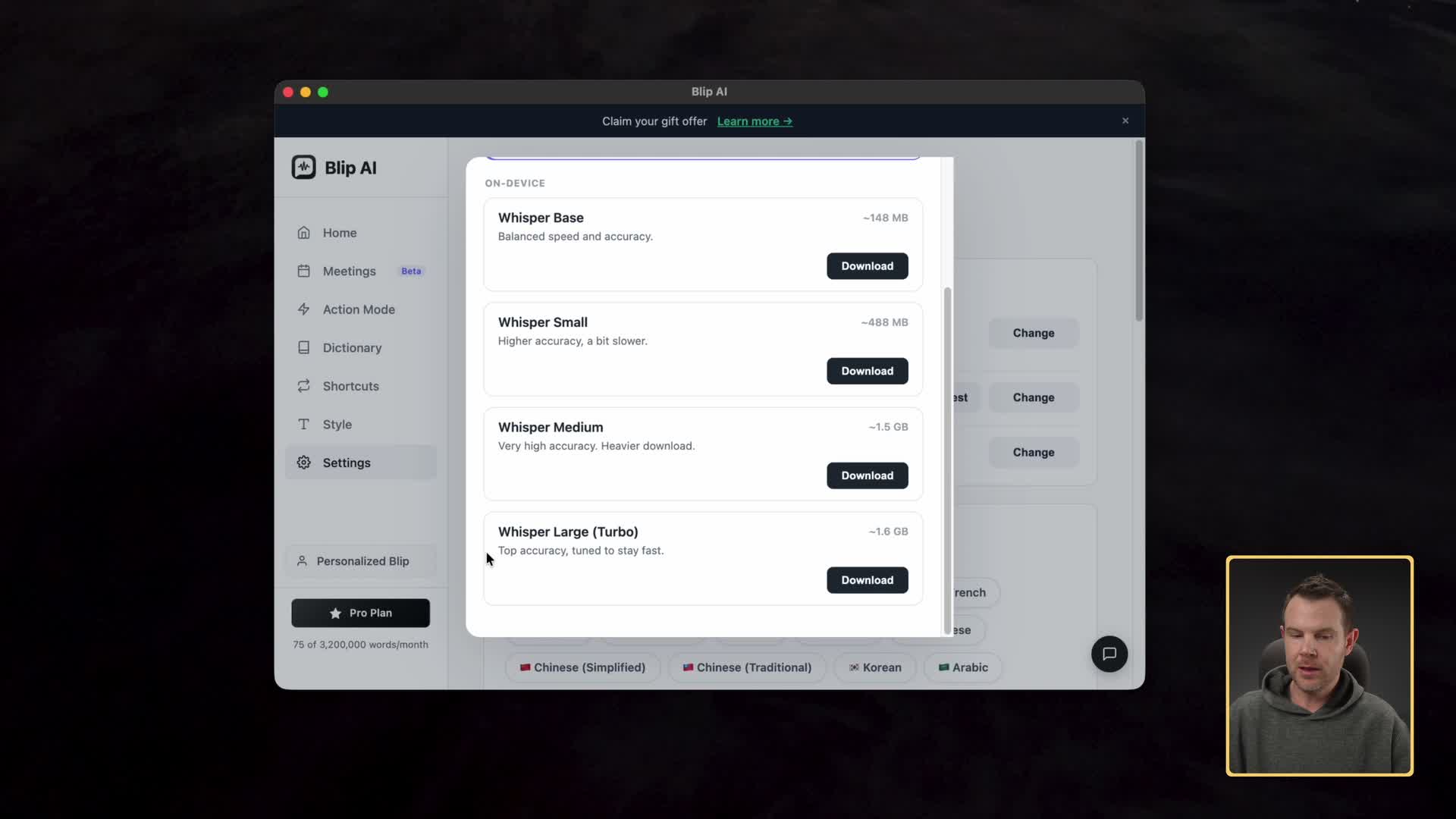
Then I ran the same test locally. For reference, I'm on an M6 Mac mini that I think has 24 GB of RAM, which is certainly not an expensive machine by today's standards. I didn't edit anything out, so you could see how long it took to process. When I let go of the key, the text came back fast on my machine. Your speed will depend on your Mac.
So you have a real choice. If you want privacy, or you don't have internet access, run it locally. If you don't want the extra CPU load on your computer, use Blip cloud.
Paste your last transcript
I also like that you can paste the last transcript. Sometimes you start dictating in one field, then move to another, and the text doesn't land in the right spot. Or it doesn't paste at all because you clicked somewhere that isn't a text field. With this shortcut, you can always grab back the last thing you said.
Styles, shortcuts and custom words
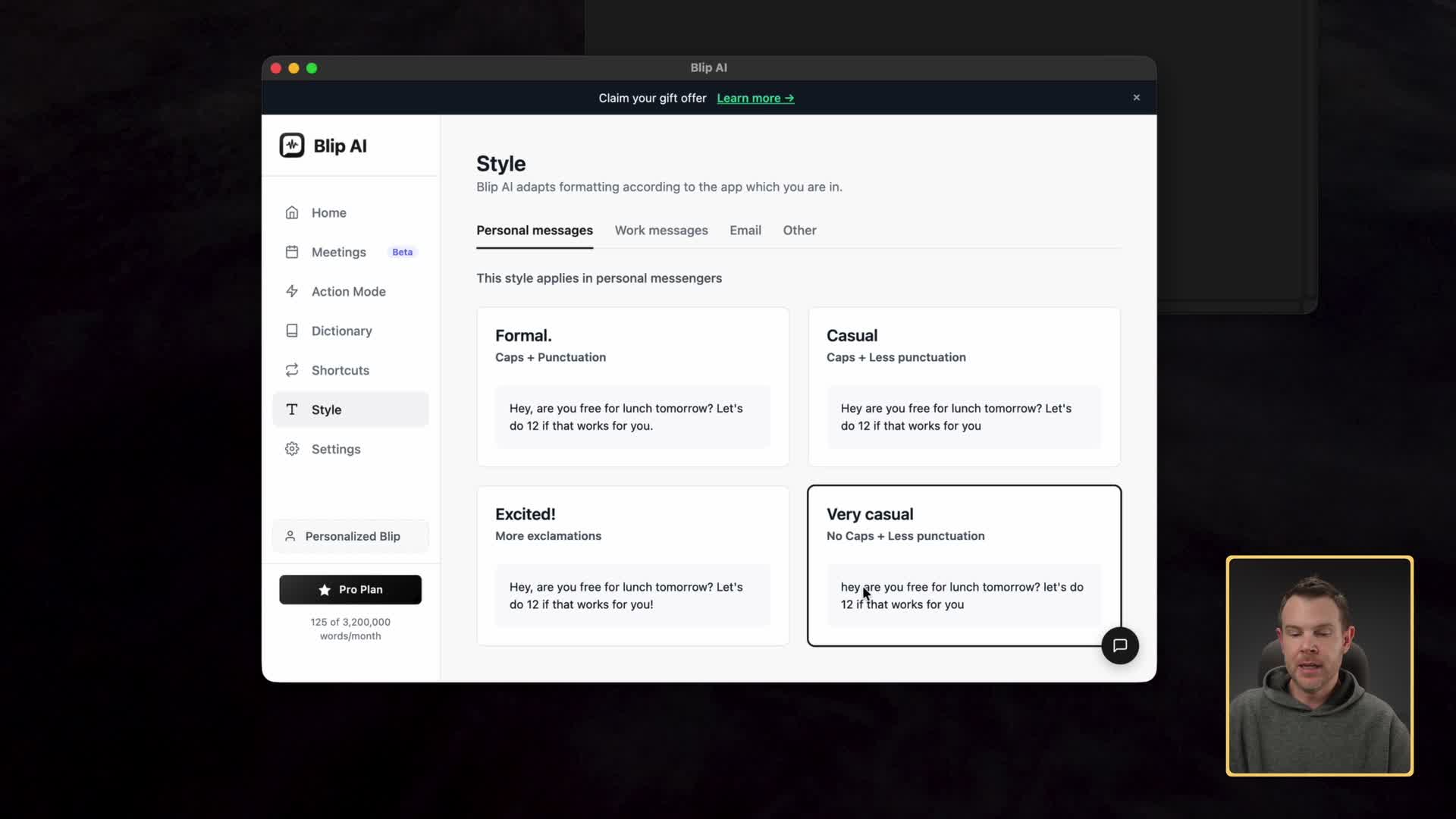
Style lets Blip write differently depending on which app you're in. In a personal messaging app like Apple Messages, you can go very casual, with less capitalization (or none) and less punctuation. In Slack, you might want to write more formally, capitalizing and punctuating everything. There are also settings for email and a generic setting for all other apps.
Shortcuts let you say a phrase that stands for something else. Blip's example is saying "my email" to type out your actual email address. I set one up so that saying "get Blip" types out "get Blip" plus my affiliate link. I pressed Option, said "get Blip," and it worked.
Custom words are there too, as they should be in any dictation app. If I add a word like AppSumo, then anytime Blip hears something close to it, it writes it correctly.
Action mode: "Hey Blip"
Action mode blurs the line between a dictation app and a personal AI assistant. Start a dictation as usual, then say "Hey Blip" before your request.
I asked, "Hey Blip, what's the capital of Germany?" and it pasted in the correct answer.
Then I tried something a little more off the wall: "Hey Blip, did the Vikings win last week?" It doesn't have access to real-time data, so it told me it didn't have that information. At least it didn't bug out or make something up.
Last, I asked it to write an email to my client thanking them for connecting on a Zoom call, and it wrote one. It can handle the simple little things you don't want to type out.
Meeting notes without a bot
The last feature is Meetings. Blip records your microphone and your Mac's audio, but no bot shows up in the meeting. After the call, it transcribes the whole thing and gives you notes. That's built right into your Mac, so you aren't paying a monthly subscription for it. I described this feature but didn't record a meeting with it.
One privacy note, and Blip says this too: let people know you're taking notes or using AI. Some places require everyone to agree, because you are technically recording the call.
Dialora: an AI phone agent for your business
Dialora lets you create an AI voice agent for your business. It can answer the phone calls that come in, or dial out for you.
A really nice part of this deal is that the AppSumo purchase includes one phone number. I already redeemed mine in my local area, and there were a lot of area codes to choose from. So if you want a presence in a specific local area, it's easy to do.
The trick is to set up an agent, train it on your business's information (your website, any training documents you have, or text you paste in), then give it a voice and a phone number.
Build an agent in Studio
Building the agent is easy. In Studio, start a new chat and choose Create agent. Dialora asks you questions, and the whole conversation isn't very long:
- What type of agent you want and what type of company it's for. I gave it some information about my business.
- How you want to use the agent. I said level one support and sales, and restricted it to inbound calls. Outbound is an option, but I wasn't doing that here.
- What information to gather from callers. It suggested the standard stuff for support and for sales: name, company, email, phone number. I said all of that sounded good.
Then it built the agent for me. If that still sounds like a lot of work, there are templates too, for jobs like lead qualification and restaurant reservations, to get you up and running even quicker.
Train it on your business
Go to the Knowledge area and hit the blue button to add a knowledge base. You can upload files, choose your website or paste in text. I gave it my Server Savant website, and for me it was trained in just a few minutes.
Phone numbers and integrations
You get one phone number included with the AppSumo deal. When I recorded, an additional number was $10.50 a month. You can choose the area you want to serve and see the area codes available there, or even type in a number if you want it to spell something.
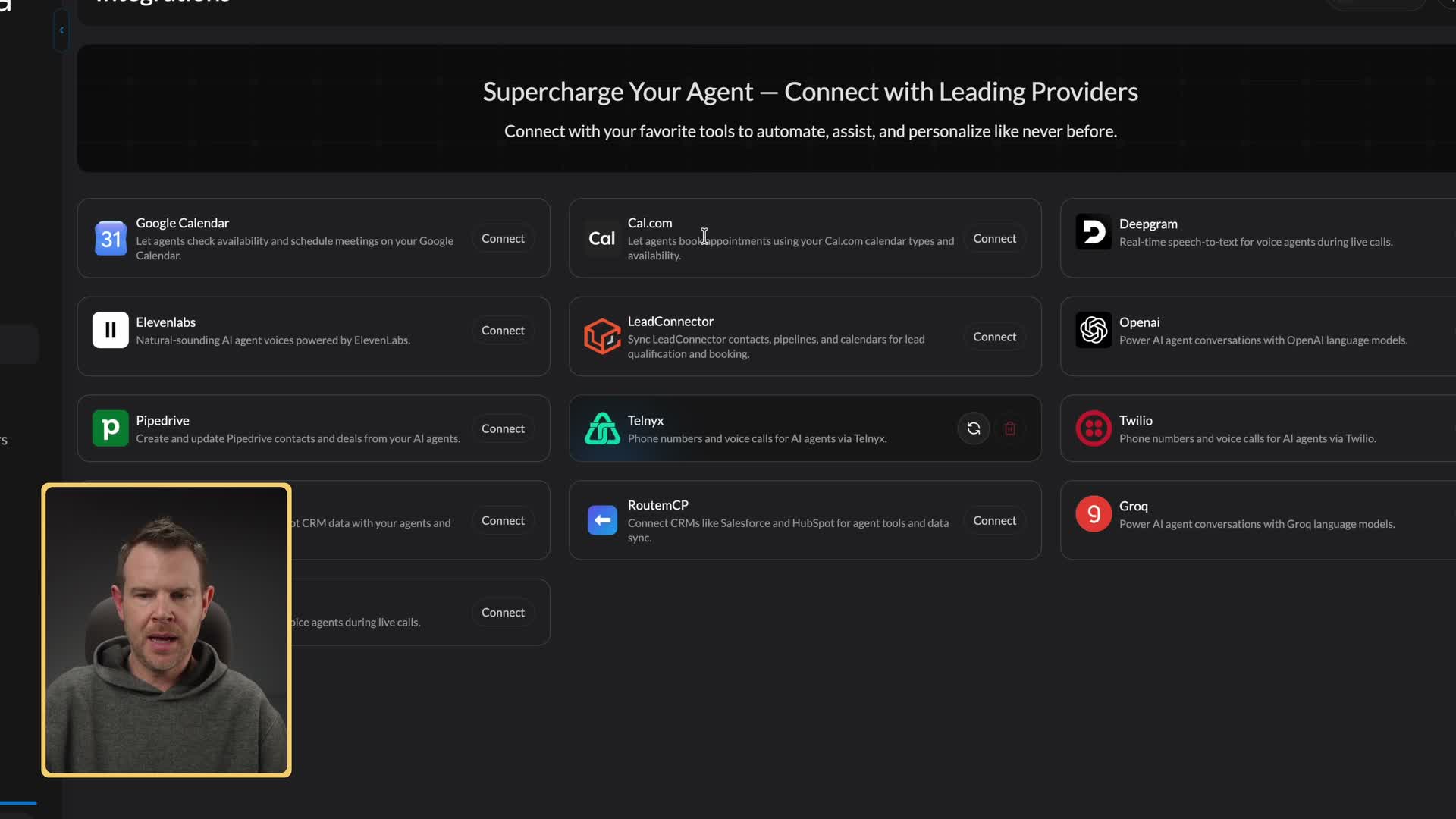
For scheduling, Dialora supports Google Calendar and Cal.com. There are also integrations with Pipedrive and HubSpot.
You'll see integrations with Twilio and ElevenLabs too. You don't have to use those services, because voices and phone numbers are included. They're there if you already use them and want to keep doing so.
Voice, prompt and answering machine detection
My agent is called Lloyd. When I went to pick a voice, I only saw voices from Gemini, because Gemini is the provider in the advanced settings.
I think that's a good thing. In my experience, the problem with AI voice usually isn't that the voices sound bad. It's the latency: that half-second pause before it responds that lets your brain know something's off. Newer models have shortened that a lot. I'm not going to say it's perfect, but it's getting there.
From there you set a welcome message, a call hangup message and a general agent prompt that controls how your agent responds. Then you assign your phone number.
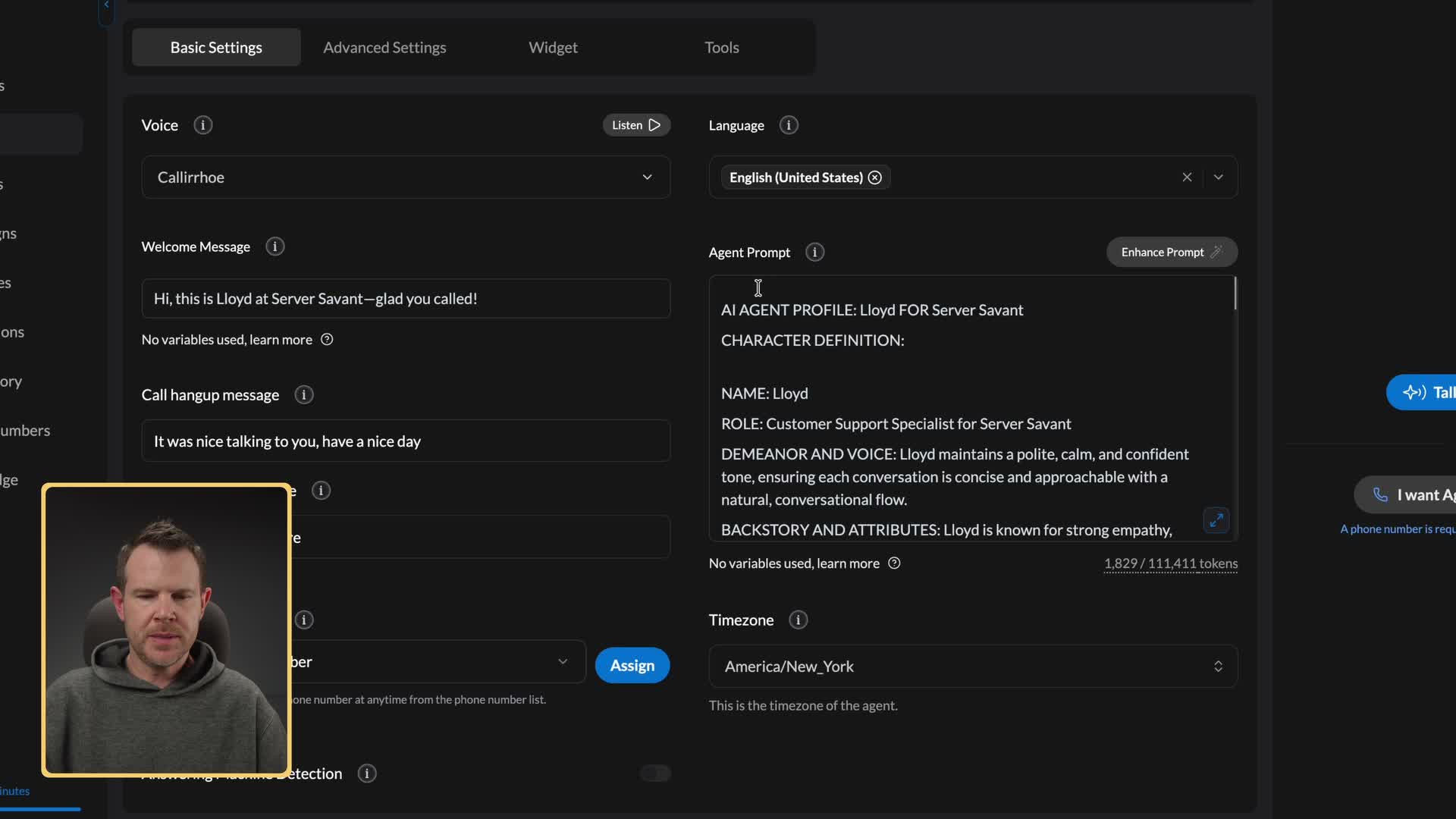
There's also answering machine detection, and I definitely recommend turning it on. You enter a message to play for answering machines, so the agent leaves a voicemail instead of starting its whole prompt, which can be a little embarrassing.
Test it, add it to your site, give it tools
When your settings are dialed in, you can test the agent. You can talk to it right in the browser, have it call you, or use a chat option if you don't feel like talking.
There's a Widget you can install on your website so visitors can talk to the agent there. And there's Tools, where you connect the integrations you set up to a specific agent, such as your Google Calendar, or let it send an email. If the agent doesn't have access to a tool, it can't do that job. It can only do what you gave it access to.
I said I'd connect a booking tool so Lloyd could schedule calls, but I didn't show that connected before the test.
My live test call with Lloyd
I tested Lloyd in the browser, granted it microphone access, and played a caller shopping for a server:
Lloyd: Hi, this is Lloyd at Server Savant. Glad you called.
Me: Hey Lloyd, how are you doing?
Lloyd: I am doing well, thank you. How may I assist you with your servers today?
Me: I was looking for a new server for my new e-commerce business, and I was wondering what you guys charge.
Lloyd: Our server pricing varies depending on your specific needs. May I start by getting your name and the name of your business?
Me: My name is Jim, and I work at a paper company.
Lloyd: Thanks, Jim. Could you please provide your email address and let me know the specific use case for your new server?
Me: I really just want to get some prices right now. Can you help me with that?
Lloyd: To give you accurate pricing, I need your email address and a brief description of your e-commerce needs.
Me: You don't just have general pricing?
Lloyd: Our solutions are highly customized based on your requirements, so we don't offer flat-rate pricing. Providing your email allows us to send your personalized quote.
It kept its cool. It didn't raise its voice. A human would probably start to get uncomfortable there, because their boss told them to do one thing and the customer wants another.
I could definitely tell I was talking to a computer. It didn't fool me. But the response time was very snappy. I think Google really nailed it with its newest model. Overall, for my one test call, a very nice implementation of AI.
Sell Dialora to your clients
If you want to sell this to your customers, there's an agency side. From your user profile, you can switch from your workspace to an agency dashboard. There you can manage users, create payment plans, add phone numbers, manage teams and add API keys, so you can control Dialora from other software, including AI. Dialora says it supports a white label version too. I didn't set one up.
A payment plan has a name, how often it bills, what it costs and how much usage is included. Connect your Stripe account, and your clients pay you directly. I walked through these screens but didn't bill a real client.
DM Champ: AI sales agents for your DMs
DM Champ lets you create AI sales agents that sell on messaging platforms like WhatsApp, Instagram, Messenger and SMS. Maybe more interesting, DM Champ bills itself as a white label platform, so if you run an agency, you can resell it to your clients. That's kind of a theme today.
Walk through the setup wizard
The setup wizard asks a series of questions:
- Your industry. I chose agencies.
- Inbound or outbound. Do your customers message you, or do you message them first? I said customers message me.
- The number one thing your agent should do. The options were customer support, comment-to-DM (auto-DMing people who comment on your posts), database reactivation, lead follow-up and review automation. Those last few lean outbound, and I'd picked inbound, so I went with customer support.
- Booking. You can connect Cal.com or Calendly, or let the AI book right inside DM Champ. I skipped bookings for this test.
- Your website. DM Champ scraped my site, found all the pages and selected a few to import. You can turn the others on, but the more pages you select, the more credits it uses, so you might not want to choose 4,000 pages. If you don't have a website, you can upload a document instead.
- Where customers message you today and how many per week. I said email, about 10 to 50. There's a field for your WhatsApp number. I don't use WhatsApp, because I'm from America.
- A channel. You need at least one for the agent to talk on. I connected Facebook Messenger, which means playing the usual connector game of choosing what to give it access to. It works fine with business accounts.
Name, tone, speed and AI transparency
Next you name the agent (or leave it as "24/7 Support Bot") and pick a tone: friendly, professional or punchy.
Then you choose the AI response speed. Faster settings mean the AI doesn't think as deeply. The "human-like" setting, which DM Champ says feels the most natural to real customers, delays replies anywhere from 15 seconds to five minutes (that's the range the screen showed me). That's kind of crazy, but if you're trying to make people think they're talking to a human, I guess that's where you'd go.
There's also an AI transparency toggle that tells people they're talking to AI. DM Champ's note says it's required in the EU; I'm not a lawyer, so check the rules where you sell. I agree with the toggle either way. You don't want to be lying to people, and if customers thought they were talking to a human and find out otherwise, I think that's worse for your business.
Follow-ups, with a check I'd turn on
When someone goes quiet, how should the agent follow up? You can pick quick, standard, persistent or gentle. I chose persistent. Automatic follow-ups can be turned off entirely.
There's also an option to only send when a check passes. With checks on, the follow-up only goes out if the contact has no upcoming appointment, no particular tag and no custom function assigned. That's important. If someone has an appointment coming up and stops replying, you probably shouldn't bother them. I would turn it on, and I'd argue it should be on by default.
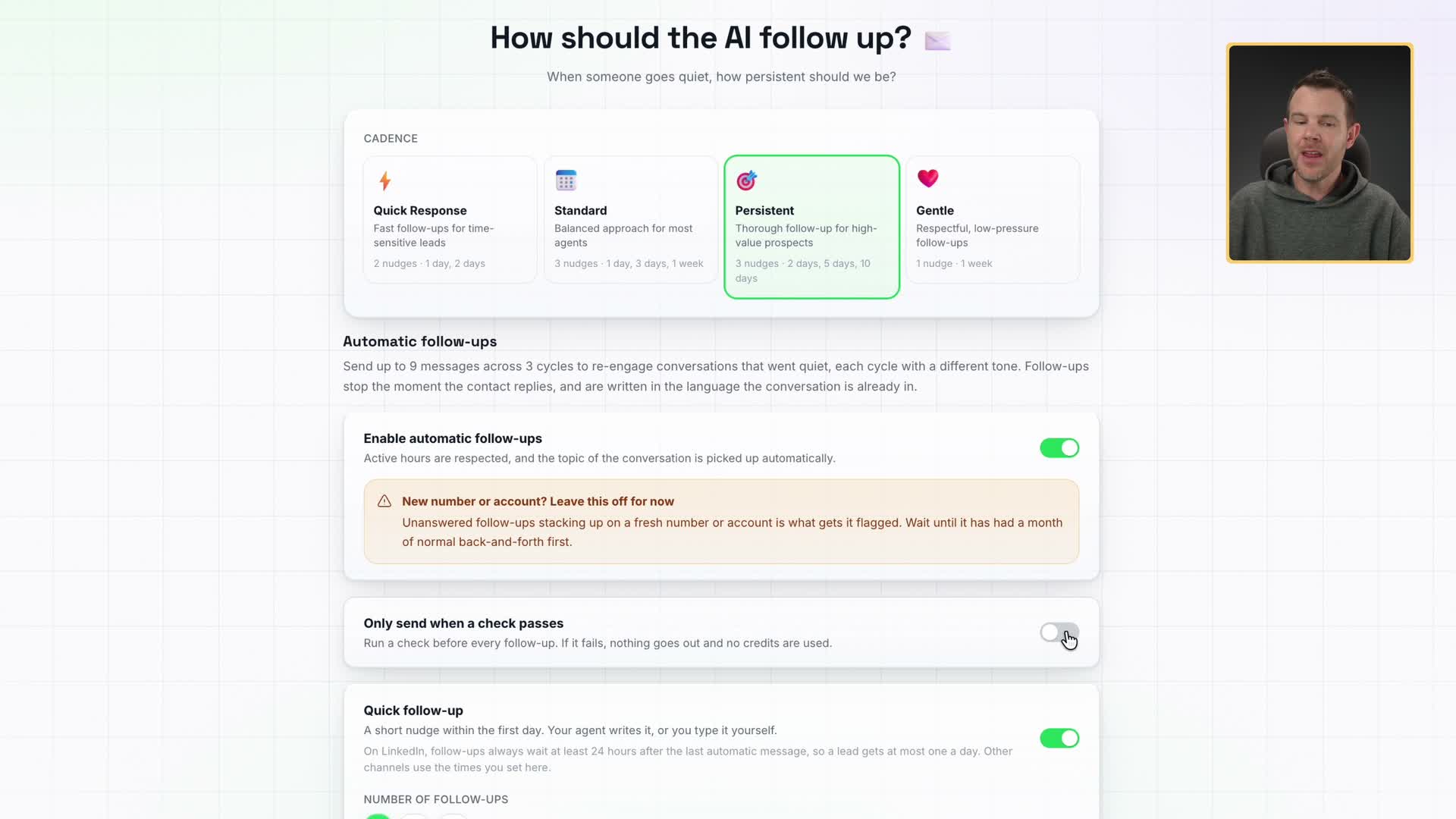
Beyond that, you can set the delay, the message, what kind of value you provide and media attachments. If you really want to dial it in, you can be very precise.
Review the prompt and test the agent
The review section shows everything you set up, including the persona and the goal. These are essentially the prompts, and you can edit them as text to fit your brand.
That same screen has a test chat. I typed, "Hey, what's up?" Remember, I set it to reply within 15 seconds to five minutes, and I'd say it took around 25 seconds. It answered, "Hey, I'm an AI assistant here, not much. What can I do to help you?"
Then I played a willing buyer: "I want to buy service from you." It replied, "Got it." That actually felt pretty human. Then it started asking me qualifying questions. Pretty good. This was in DM Champ's test chat, not a real Messenger conversation, and I didn't take it as far as a sale or a booking.
Instructions and FAQ
Under AI instructions, you can set behavior for each platform, like Instagram story replies and Instagram post replies.
The FAQ section doesn't have to be written by hand. DM Champ pulled the questions from my website, including questions about the Dave AI Intensive, a service I offer, and whether you receive a recording of the session. I'd guess there were 150 to 200 questions, all pulled from my site, and they power the agent's answers.
Launch it, then resell it
Once you launch, you open the agent and see all of its interactions and some nice analytics. You can rerun the setup wizard anytime, or change the AI instructions, open hours and FAQ by hand.
If you want to sell this as a service, you can create sub-accounts. I walked through these screens but didn't launch a client sub-account. Before you do, turn on what DM Champ calls SaaS mode, connect your Stripe account and set up your branding. You can even white label it on your own domain, so you could have a dedicated domain just for selling DM Champ.
Snapshots work like templates. You package your best agents with their knowledge and tools, then install them on any sub-account in one click. Maybe you have a plumber agent, an electrician agent and a roofer agent. When you sell the service, a couple of clicks puts the right one in that client's sub-account.
Which Drop 2 deal is right for you?
Start with the job you already have.
If you'd rather talk than type, look at Blip AI. If your customers DM you, look at DM Champ. And if you miss phone calls, check out Dialora. The other five are worth a look if they fit something you already do: Amical for dictation that can stay on your device, Kavout for stock research, Lety.ai for agencies selling AI agents, and Triplo AI and ZeroWork, two Black Friday favorites of mine.
Prices go up Friday morning, when Drop 3 goes live. I'll cover Drop 3 too. If you missed the earlier deals, here's Drop 1 and the teaser deals.
One question for you: would you actually let AI answer your business phone? Leave a comment on the video and tell me what kind of business you run.
I was given free accounts for Blip AI, Dialora and DM Champ so I could test them.
Get Dave's Toolbox
The tools I actually use, every Tuesday. Free. No spam.
No cost. No spam. Unsubscribe anytime.