
AppSumo Black Friday 2026 Drop 1: All 9 Deals, Plus RobinReach, Emailit and Visby Up Close
AppSumo's first Black Friday 2026 drop has 9 new tools. Here's what each one does, and a closer look at RobinReach, Emailit and Visby.


If you only look at three deals in AppSumo's first Black Friday drop, make it RobinReach, Emailit and Visby. They cover three things I think every online business needs: posting on social media, getting your emails into the inbox, and getting recommended when your customer asks ChatGPT what to buy or who to hire.
There's another reason I picked those three. The biggest change for me over the last year is that I look for tools with an MCP (a way to connect the tool to your AI). That's what gets me excited to buy now, much more than a pretty interface. All three of these have one, so I can plug them into the rest of my system and let my AI agent do the clicking.
When to buy: today or tomorrow
This is how it works for the rest of Black Friday week, as AppSumo releases more drops: the best price is right when a deal launches.
- Monday, November 16: Drop 1 goes live with nine new tools, at their lowest price.
- Wednesday morning, November 18: the next drop goes live, and every tier of every Drop 1 deal goes up $10.
So if one of these tools fits your business, the best time to buy it is today or tomorrow.
The teaser deals from last week are open to everyone now too, not just AppSumo Plus members. If you missed them, I covered all five in my AppSumo Black Friday teaser video (or read the written version). There are some good ones in there.
All nine Drop 1 deals at a glance
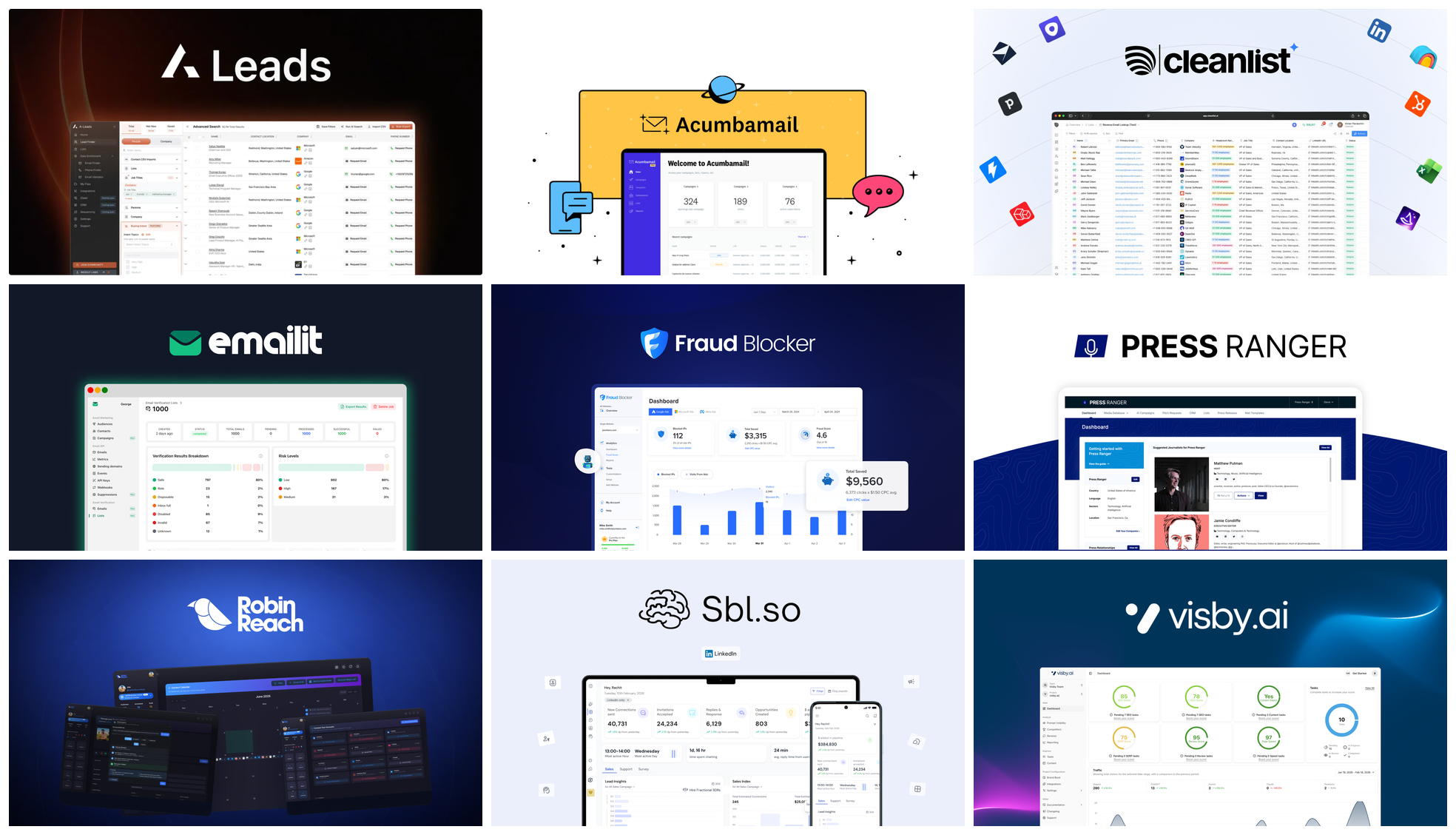
Here's every tool in the drop, in alphabetical order, with what it does in one line.
| Deal | What it does |
|---|---|
| A-Leads | Finds B2B contacts for your sales team, and gives your credits back if an email or phone number is bad |
| Acumbamail | Email campaigns and landing pages to grow your list |
| CluGTM (formerly Cleanlist AI) | Contact data on over a billion profiles, so you can find the right person to reach |
| Emailit | Sends your website and app emails from your own domain, plus newsletters, forms and campaigns |
| Fraud Blocker | Finds bots and stops fake clicks on your Google and Meta ads |
| Press Ranger | Helps you reach journalists and podcasters to get press for your business |
| RobinReach | A social media scheduler you pay for once, with AI built in and an MCP |
| Sbl.so | An AI sales rep that runs your LinkedIn outreach and books calls |
| Visby | Tracks whether ChatGPT, Claude and Gemini recommend your business, and what to fix if they don't |
The six I'm not demoing
A-Leads finds B2B contacts for your sales team. The part that stood out to me: if an email or phone number they give you turns out to be bad, you get your credits back. That's really unheard of for this type of tool, so it's an amazing feature.
Acumbamail is an old favorite. It lets you send email campaigns and build landing pages to grow your list. It's similar to what you might be paying for monthly with Mailchimp or ActiveCampaign, except Acumbamail is a lifetime deal. I've done a full review of Acumbamail if you want to go deeper.
CluGTM used to be called Cleanlist AI. It gives you contact data on over a billion profiles, so if you want to reach out to a company, it helps you find the right person to actually contact.
Fraud Blocker is another old favorite (my Fraud Blocker review). If you run Google Ads, Facebook ads or any other Meta advertising, it finds bots and stops fake clicks. If you're paying for traffic, you want to make sure it's actually humans clicking on your links. I definitely recommend Fraud Blocker.
Press Ranger comes back nearly every Black Friday, and it's one I keep recommending year after year. If you don't want to pay for traffic, press is a great way to get attention for your business. Journalists and podcasters need a constant stream of things to talk about, so why not your business? If you're doing something interesting, a press release or a podcast appearance can get you real exposure, and Press Ranger helps you get in touch with the right people.
Sbl.so is an AI sales rep that runs your LinkedIn outreach for you, and it can even book calls. If you're doing the LinkedIn outreach thing, check it out.
RobinReach: social media scheduling you pay for once
RobinReach is a social media scheduler, comparable to something like Buffer, except you pay for it once rather than monthly for life. It's been one of my top deals over the last year, and I'm happy to see it back for Black Friday. I reviewed RobinReach in full earlier this year, and I use it for my own posting, so this is a look at my favorite features rather than a complete tour.
What I really like is that you can do everything with AI, either inside the app or from outside it. More on that below.
Connect your accounts and brands
It has a pretty decent interface for this type of tool. After you log in, you connect your social accounts. I have LinkedIn, YouTube, Instagram, X, Facebook and TikTok connected, and you can add more, including multiple accounts on the same network. RobinReach posts to up to 13 platforms, and that includes some you might not think of as social media, like Google Business, WordPress and Telegram.
If you manage more than one business, you can add brands. I'm set up under the Dave Swift brand, and adding another is one click. There's a limit on how many brands each AppSumo tier includes, so check the pricing page for the specifics before you buy.
Turn your blog into social posts with RSS
This is one of my favorite features. If you already post to a blog, you can connect its RSS feed to RobinReach, and it creates social media posts from your blog posts. I have daveswift.com connected, and I use it to create posts for Facebook, LinkedIn and Instagram.
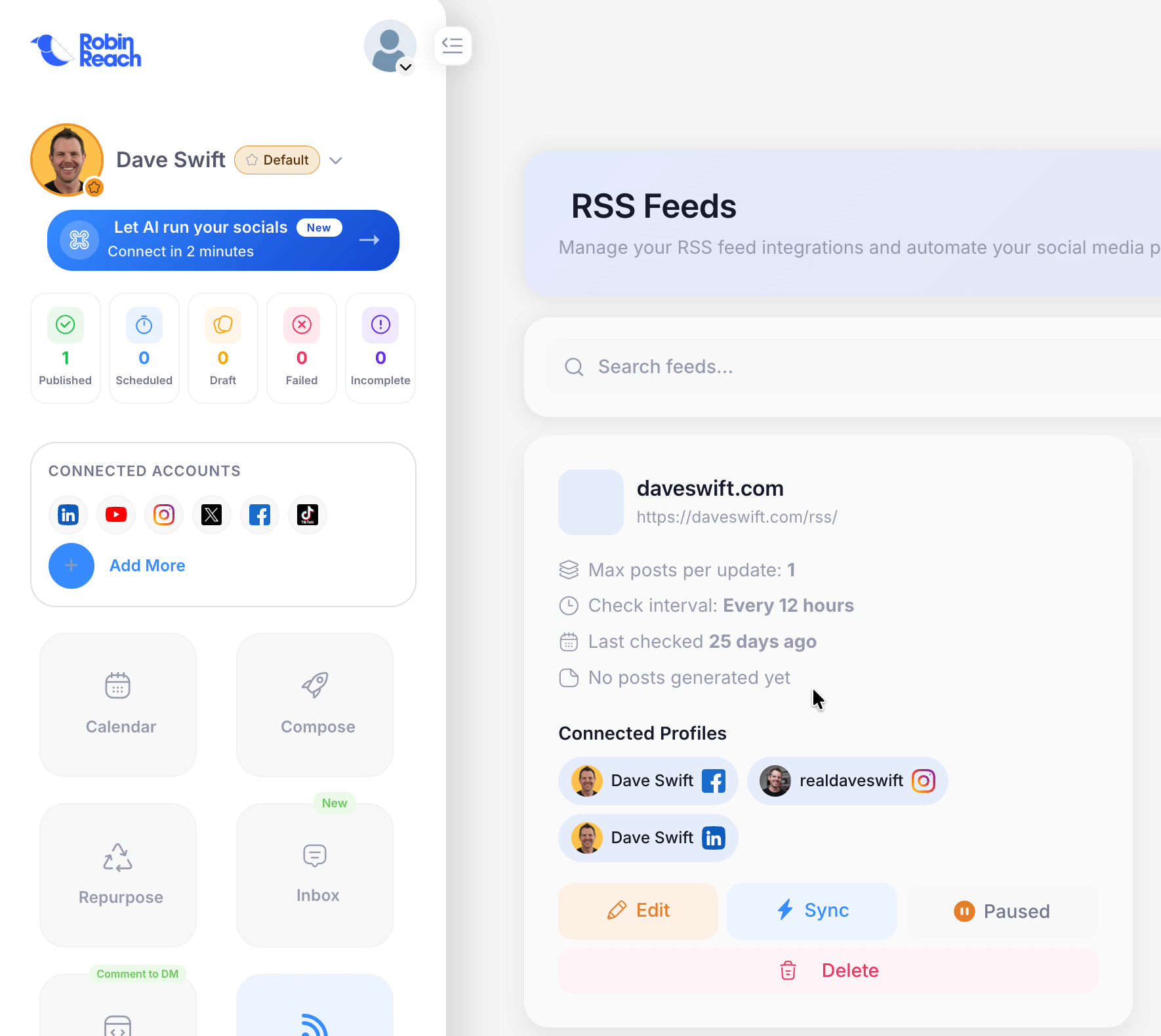
I had mine paused, so I unpaused it and ran a sync. It grabbed my recent posts, including one about a Hermes plugin I just released, and scheduled the social posts automatically. All I had to do was hit one button. I have it set to wait for my approval before anything goes out, and you can click the eyeball icon to preview exactly how the post will look on Facebook, Instagram and LinkedIn.
Answer comments from one inbox
Another feature I really like is the newer Inbox. It isn't just your DMs. It's the inbox for everyone replying to every thread across your social media. I don't post on Facebook very often, but I could see comments on a recent post and reply right there, without logging in to Facebook. That's definitely a perk in my book.
Comment-to-DM automations
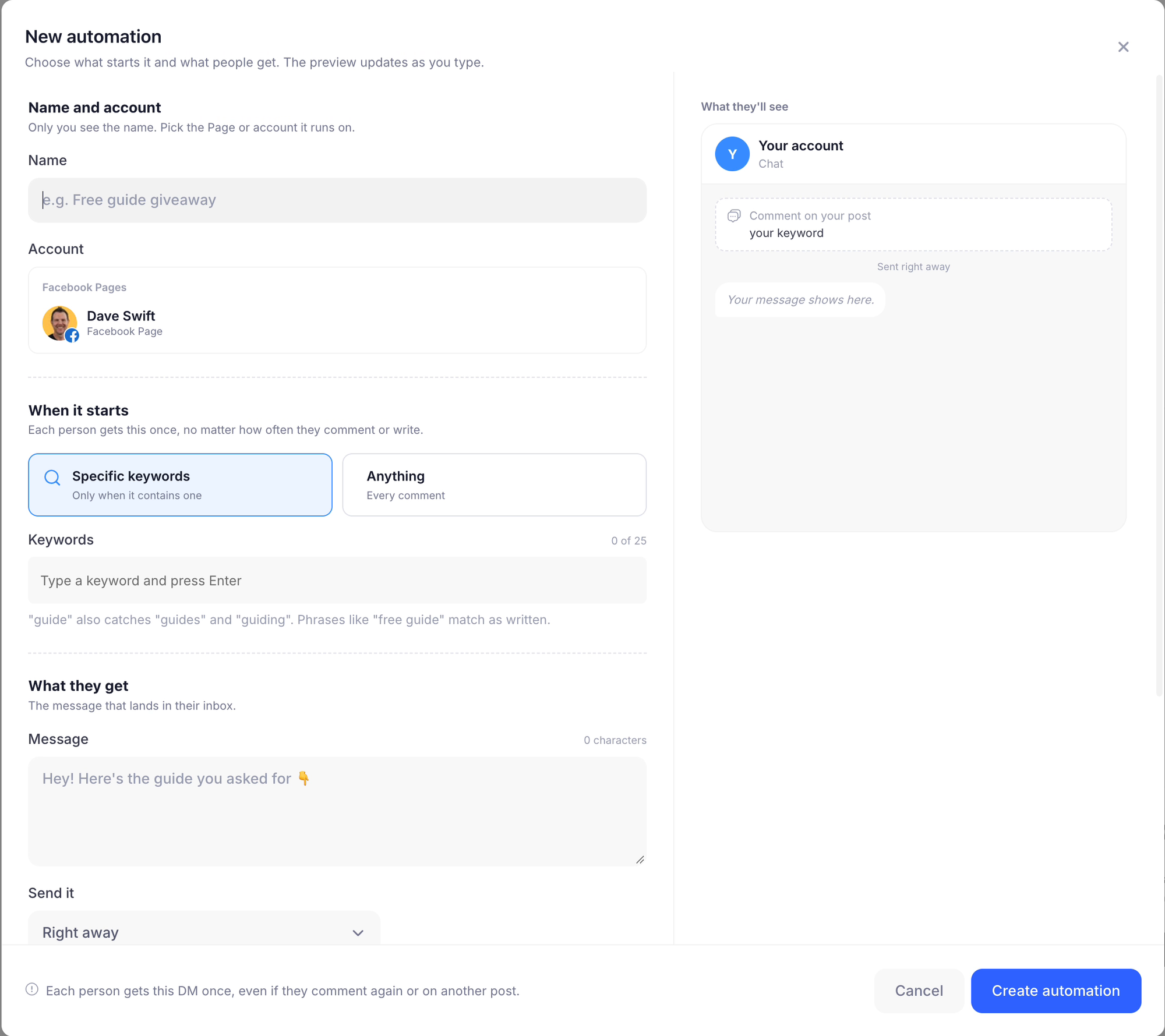
You've probably seen posts that say "comment this keyword and I'll send you the guide." Those people aren't sending DMs one by one. They have an automation running in the background, and RobinReach can do that too.
Click to add an automation, give it a name, set the keyword, and write the message. The message can include a link, like a PDF download or whatever you're offering people for signing up.
Compose posts and build a link-in-bio page
You can also write posts inside the app: write your message, upload your file, pick which networks to post to, and you're done.
RobinReach also just added a bio page, so you don't need a separate link-in-bio tool. You build the page inside RobinReach with links, cards, a post grid, a video embed or a plain text heading, publish it, and link it from your social profiles.
The best part: let your AI run it
All of those features are great, but my own computer use has changed over the last year. I don't want to look at these interfaces anymore. I'd rather connect the tool to my agent and let the agent take the action. Thankfully, RobinReach is first class at this.
There's a dedicated connector for ChatGPT or Claude. You choose your platform, give it the URL, sign in, and then your AI can control your whole account: write drafts for you to approve, and schedule posts into the future. It also works with agents like Hermes Agent, Codex, Cursor and anything else that takes an MCP. It really is like living in another dimension.
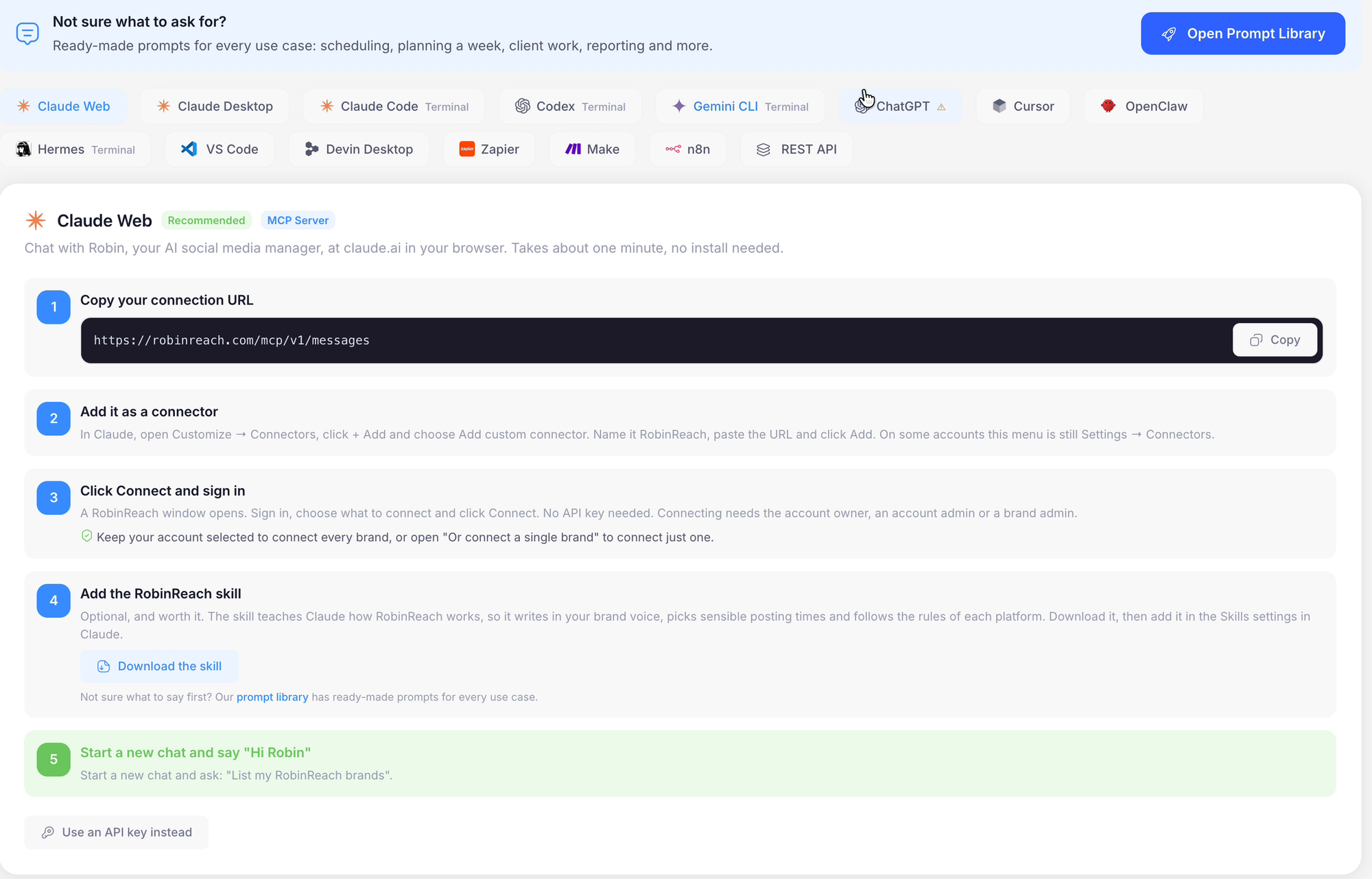
RobinReach even has its own skill, so you can teach your AI how the app works if it can't figure it out on its own. And if you're not sure what to ask for, there's a prompt library with ideas: have it plan your week, fill in the empty days, decide what you should post about. Your AI plans something on brand, and you're off.
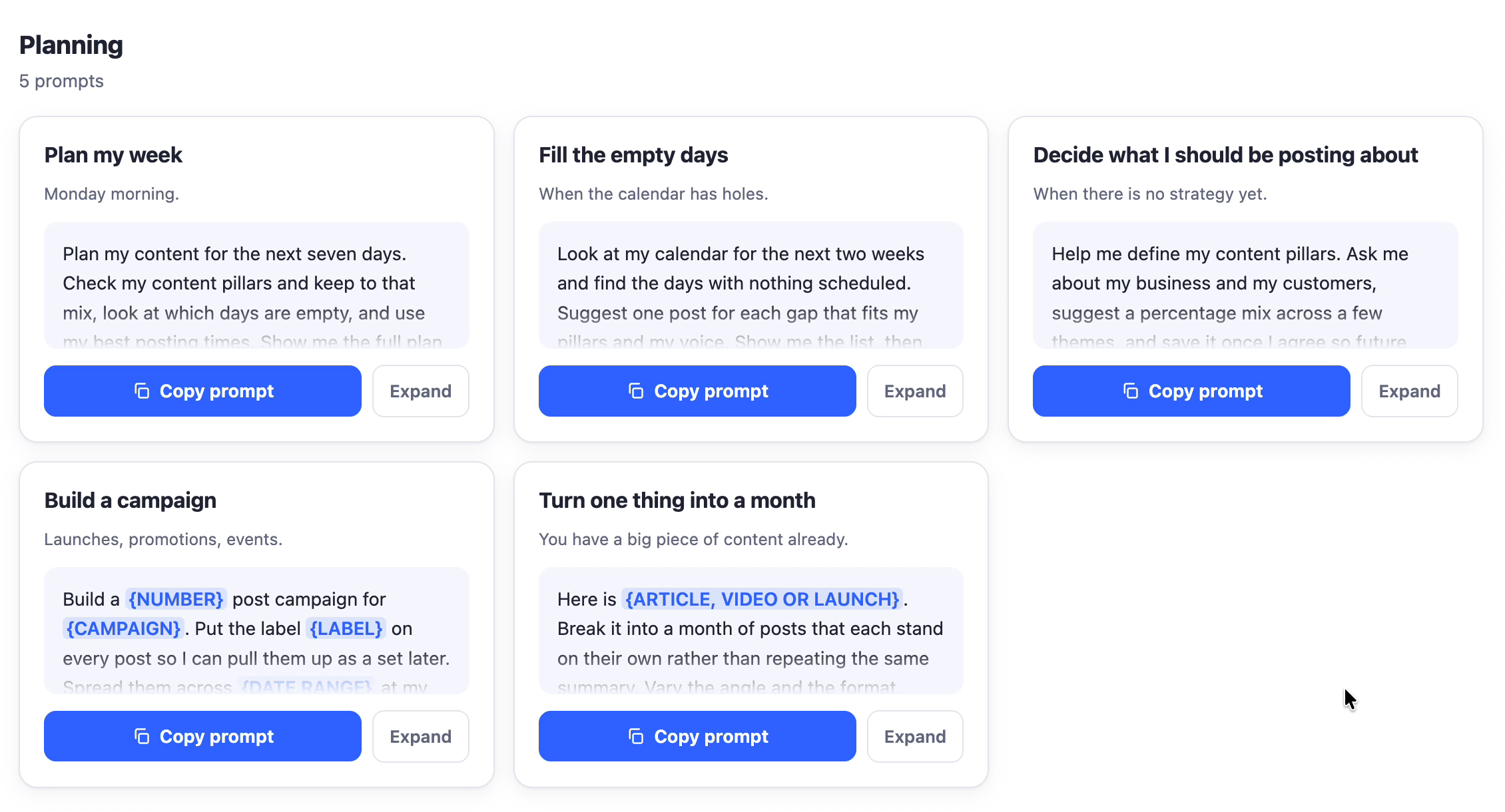
One thing to check before you buy: the AI (MCP) and API connection starts at Tier 2.
My call: one of my top deals of the last year, especially if you want your AI agent to handle your social posting.
Emailit: get your app and website emails into the inbox
Emailit is a tool I think a lot of people sleep on, and they shouldn't, especially now. We're all building websites. We all have little vibe-coded apps we use internally, and we want those apps to send emails.
I think Emailit is the perfect tool for someone who isn't highly technical. Maybe Amazon SES intimidates you, but you still want to send emails without paying $40 or $50 a month for a SendGrid subscription. I reviewed Emailit in full earlier this year if you want every detail.
Emailit starts at $54 on AppSumo (the launch price, before the $10 bump on Wednesday). Tier 1 covers one domain and 20,000 emails a month.
Two halves: email API and email marketing
Emailit has two sections: email marketing and an email API. To me, the most interesting part is the API.
The API lets you send email through Emailit from your own domain. You click Domain, add your domain, and verify it. After that, any app you write or any website you run can send through Emailit: a newsletter, or the transactional message that goes out when someone completes a checkout. The emails go out through Emailit, but they come from your own domain. That's why you have to verify it.
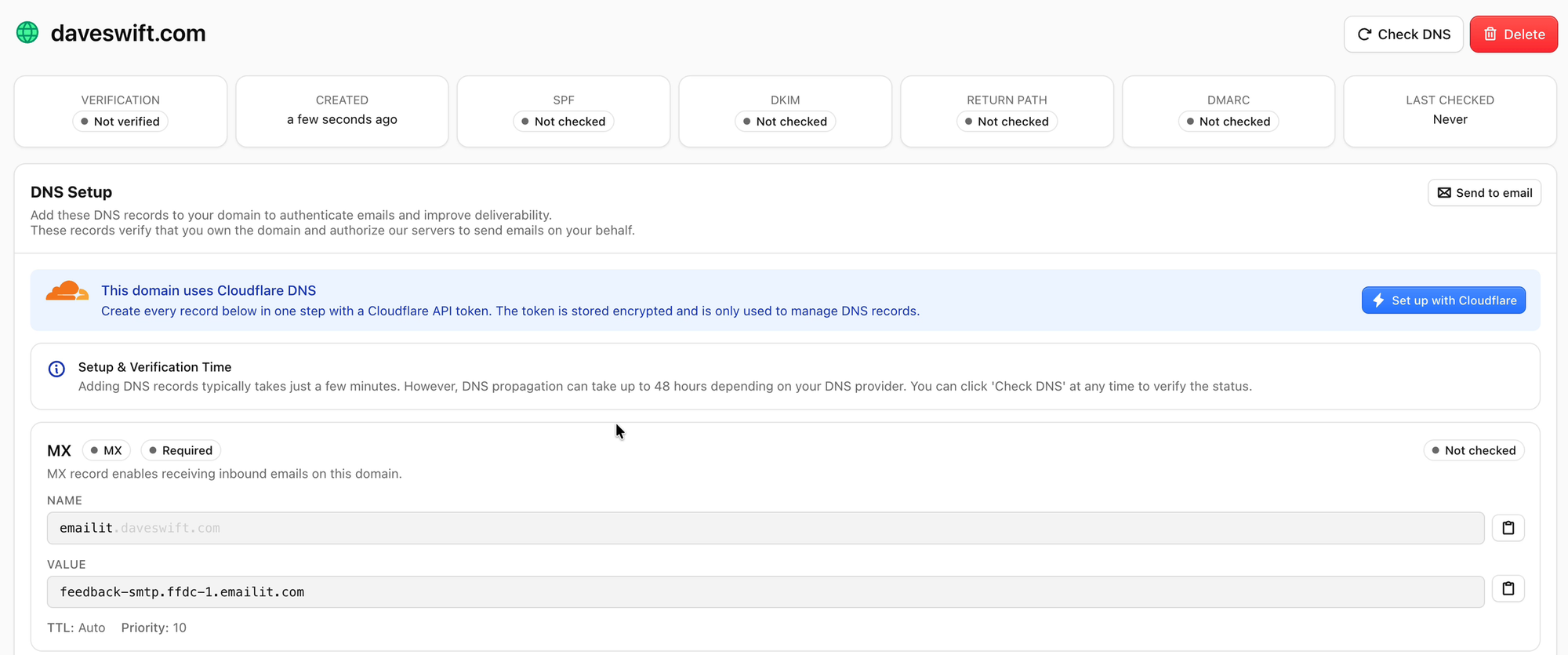
The short version: you're already vibe coding things and making tools, and you want them to send messages. If you're not comfortable running your own Amazon SES account, Emailit is the way I'd recommend doing it.
Let your AI set up your domain
The way I'd actually use Emailit is different than you might think.
First, figure out where your domain's DNS is hosted. Hopefully it's somewhere modern like Cloudflare. Cloudflare has an MCP, so you can connect it to your AI, whether that's ChatGPT, Claude or whatever you use. Then connect Emailit to that same AI, because Emailit has an MCP too, and it's included on every tier.
The Emailit MCP page took me some trial and error to find, so here's the path:
- In Emailit, go to the API keys section.
- Click the small code-symbol icon labeled API.
- You'll see the link to connect an AI assistant. Give your AI that URL.
- Sign in, choose the workspace you want to use (you get one with your AppSumo account), and give it access.
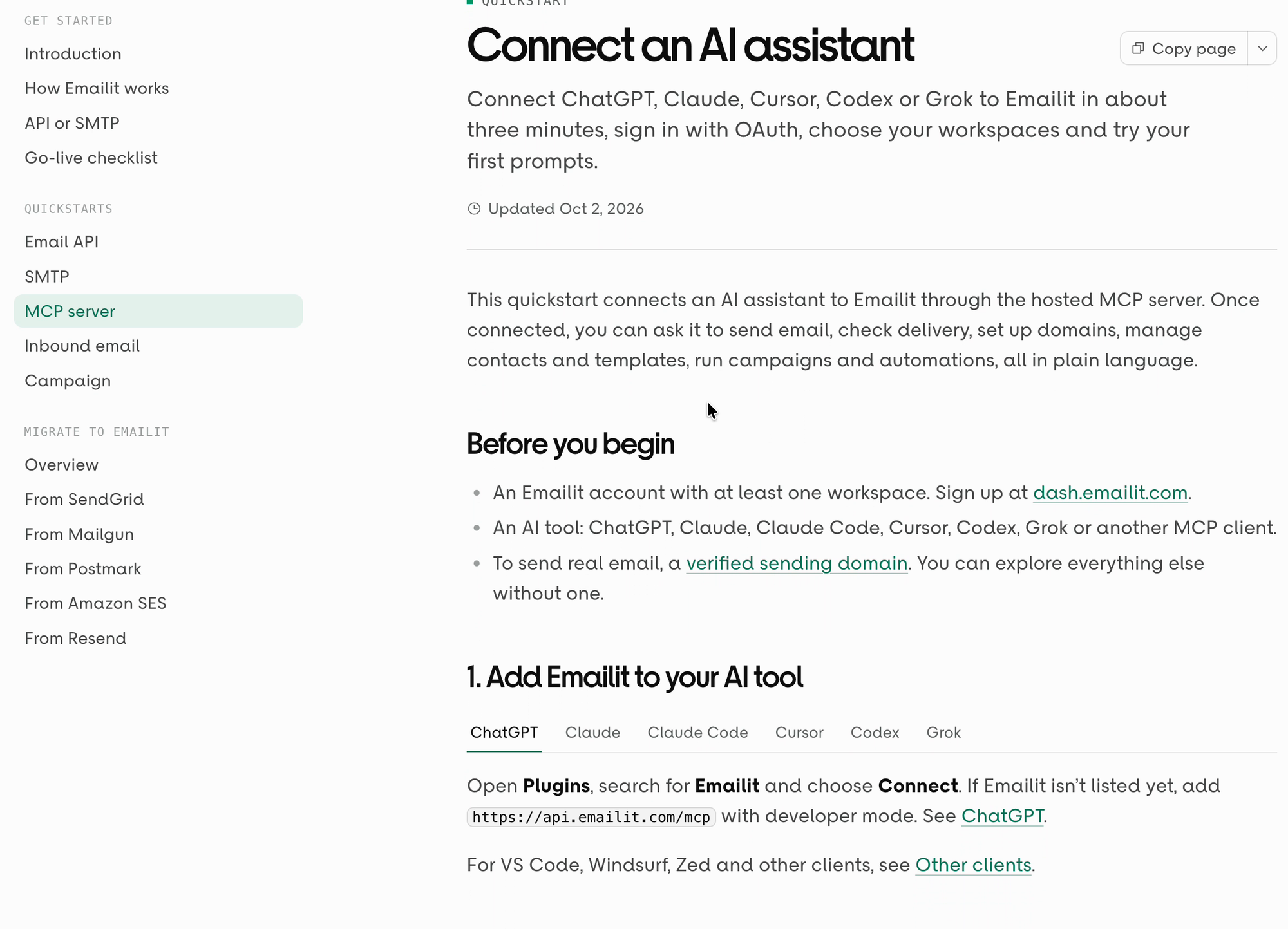
Now your AI can change your Emailit workspace and your Cloudflare DNS. Tell your AI agent, "I want to add my domain and verify it," and it sets everything up for you.
If it's the same AI you used to vibe code your app, tell it to start using Emailit to send the app's emails, and you're good to go. It's literally two sentences, maybe 30 seconds, and the authentication and DNS get set up correctly without you struggling through it.
Email marketing, forms and campaigns
The email marketing side isn't bad. I just don't use it very much, because I'd rather not log in to software. But if you still like to, you can log in to Emailit, create a broadcast and send it out.
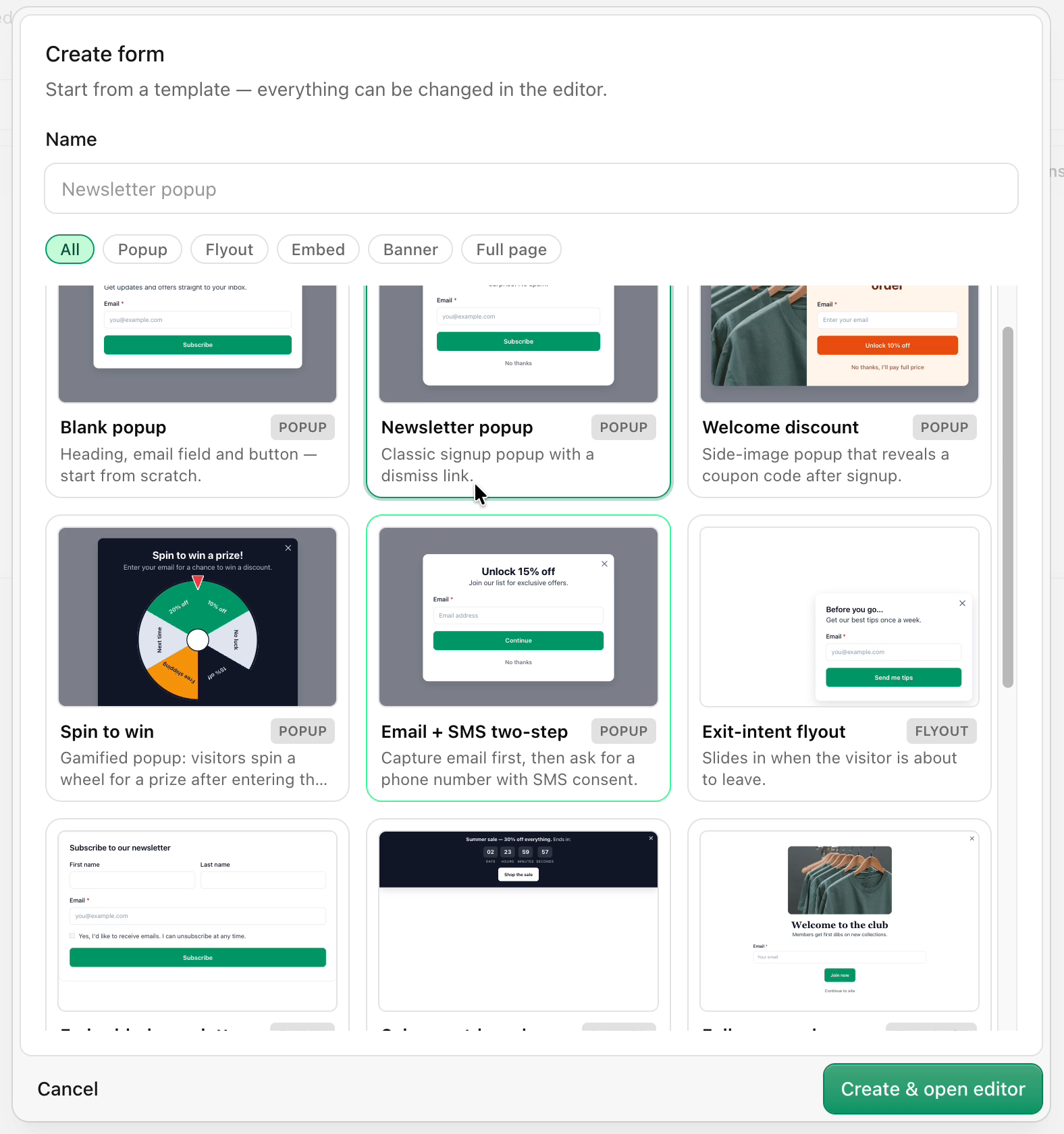
You can import your list, or add a signup form to your website. Creating a form is easy: hit Create form and start from a template, like the newsletter popup. Then in the form settings, choose which audience new subscribers go into. I used a test audience. Once the form is on your website, everyone who signs up lands in that audience as a new contact. Note that signup forms start at Tier 3.
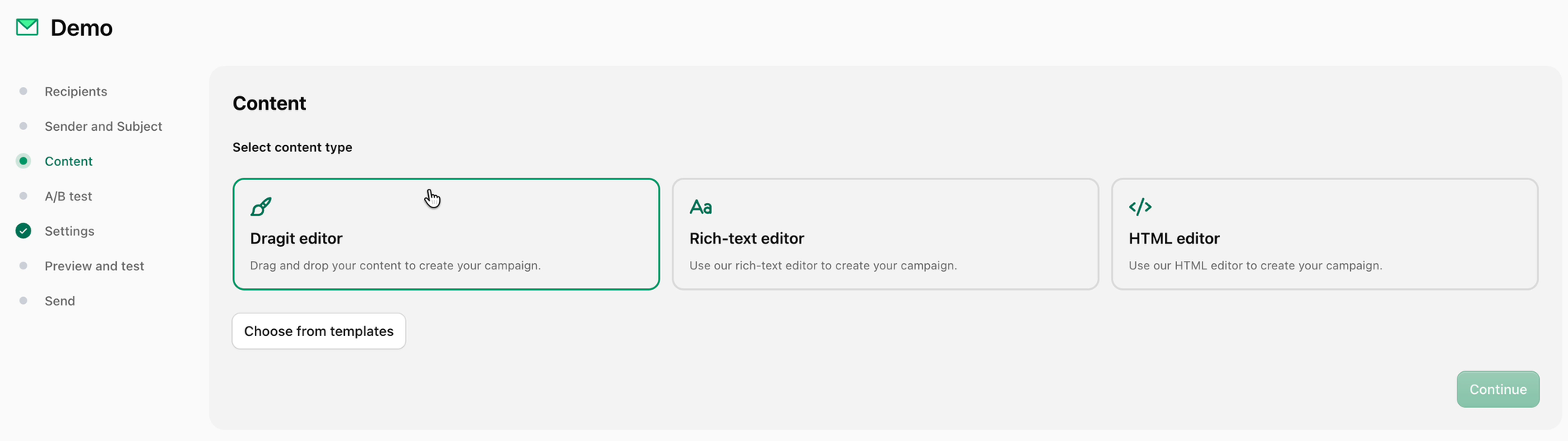
To message your list, create a campaign (a broadcast). You get a choice of three editors: drag and drop, rich text, or HTML. If you design your email in another tool (say you have Claude design it), paste the HTML into the HTML editor and you'll see a preview right there. Or do it the old-fashioned way in the drag-and-drop editor. There are tons of templates to start from, and they look really professional. Start with one and customize it to fit your brand.
Use it for alerts, too
One more use I like: notifications to yourself. You can have your AI email you when something goes wrong on your computer or your server. An email is more reliable, and more likely to be seen, than some notification on your phone.
My call: I definitely recommend Emailit, especially if you've struggled to get emails delivered, or you just want your apps and your AI to send email from your own domain.
Visby: find out if ChatGPT recommends your business
Visby is new to my channel, and it's about something most businesses haven't thought about yet. When your customer asks ChatGPT what to buy or who to hire, does it mention your company's name, or does it recommend your competitor? Visby's tagline is "be the brand that AI recommends."
It's a very nice-looking tool that gives you some genuinely helpful information. I've used it with my own website to see where I'm mentioned, and where I could improve my content to get mentioned by AI more often. It has a light mode and a dark mode, and you can connect Google Analytics for even more data.
Visby starts at $69 on AppSumo (launch price). Tier 1 covers one website, ten questions and ChatGPT only. Claude and Gemini start at Tier 2.
Setting up a project
You start under Project, then add a new project. It's about a five-step setup:
- Enter your website. Visby scrapes your site and, almost instantly, comes back with a brand book: its summary of how your business works. You can edit it by hand. I had to enter my main location myself.
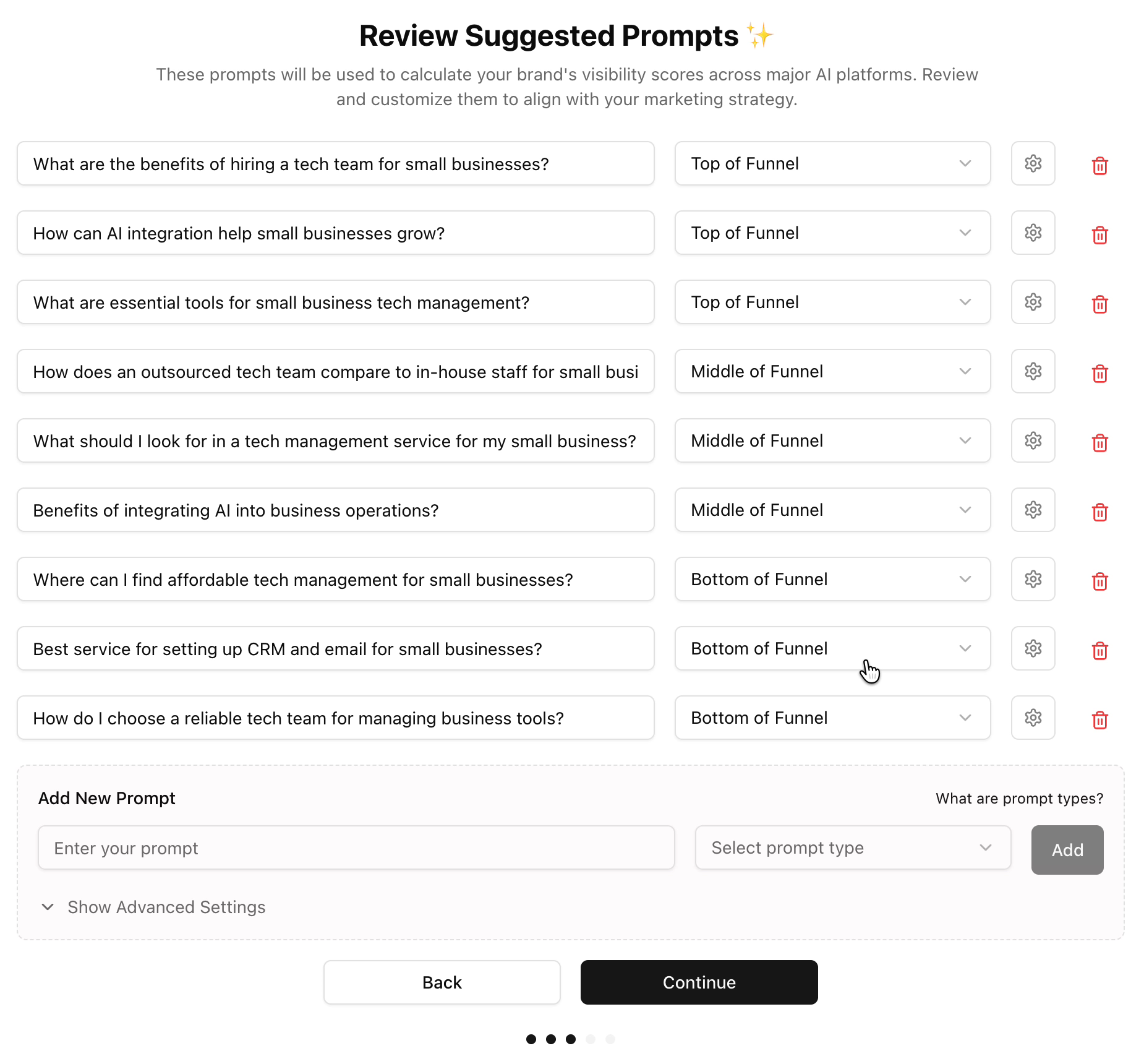
- Pick the prompts to track. These are the questions people ask AI that you want to show up for. Visby suggests some and sorts them by where they sit in the sales funnel. If you're new to that terminology, it's just a way of describing how close someone is to buying. Top-of-funnel people are just getting interested. Bottom-of-funnel people already know they need what you sell and are choosing a provider. The suggestions include three of each, which is a good mix, and you can add your own.
- Review competitors. Visby suggests competitors to track. Remove any you don't actually compete with and add any it missed. You can change these later, too.
- Choose your AI engines. The options are ChatGPT, Gemini, Google's AI Overview (which I think is a very critical one right now) and Claude. I'd like to rank in all of them, but if I had to put them in order, it would be Google AI Overview, then ChatGPT, Claude and Gemini. My setup let me pick three.
- Let it run. Visby analyzes everything you gave it to find where your brand shows up. My very first analysis took about 20 minutes.
Tasks and competitors
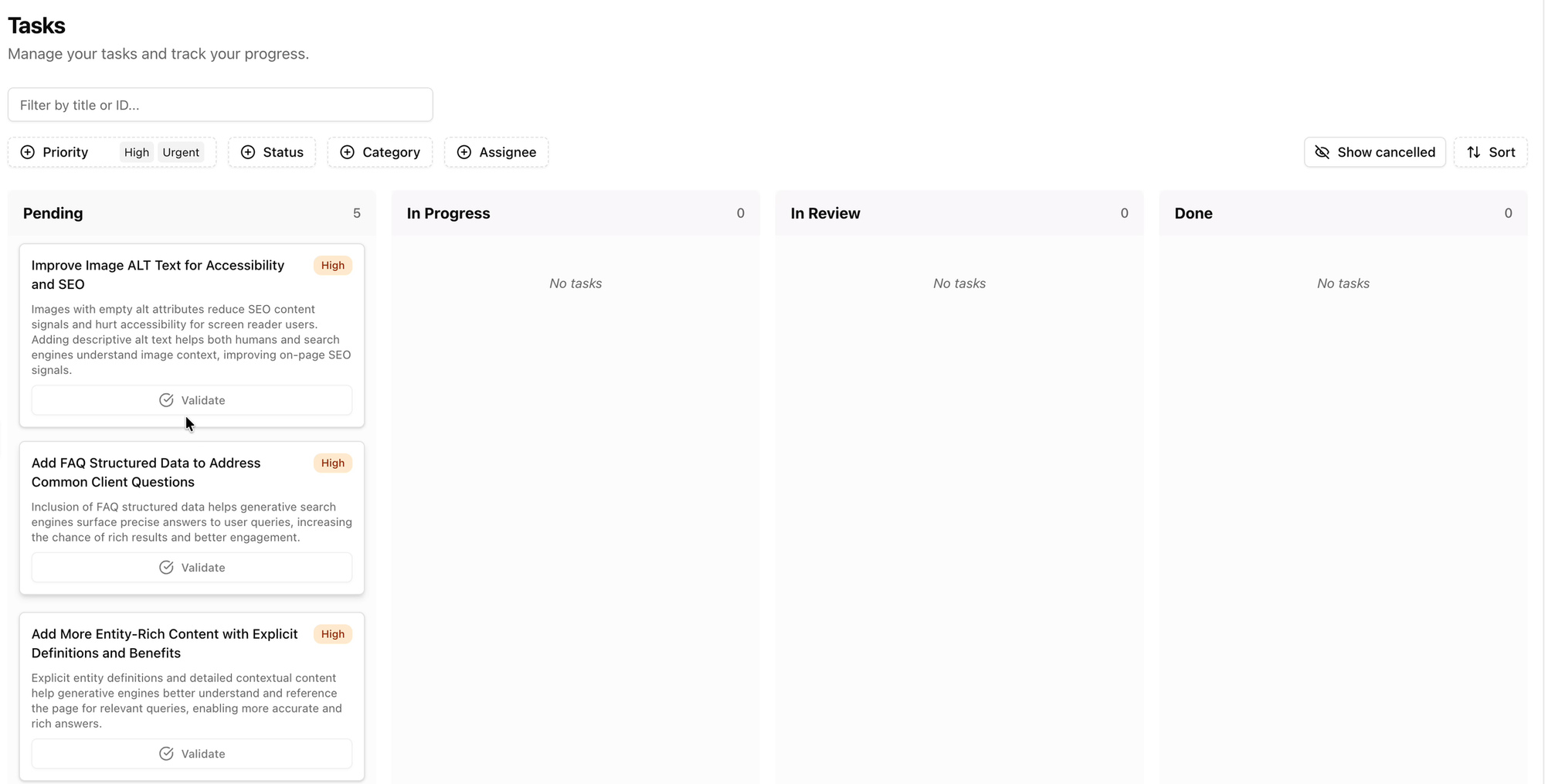
When the analysis finishes, the part I like most is the task list: what you need to do to start seeing results. The tasks go onto a Kanban board you can sort by priority. If you only do the urgent and high-priority items, you get the best results, then move on to the next batch.
There's also a competitor section where you can see what your competitors are doing. On my Dave Swift project, Visby's list included Zapier, which isn't actually a competitor of mine, so I'd just remove it. Because I write about software, a lot of the suggested competitors were software tools themselves, when I'd rather track other people who teach software to business owners. Still, it found a few of those, like Future Tools and Kevin Stratvert, so overall it did a decent job.
The content optimizer
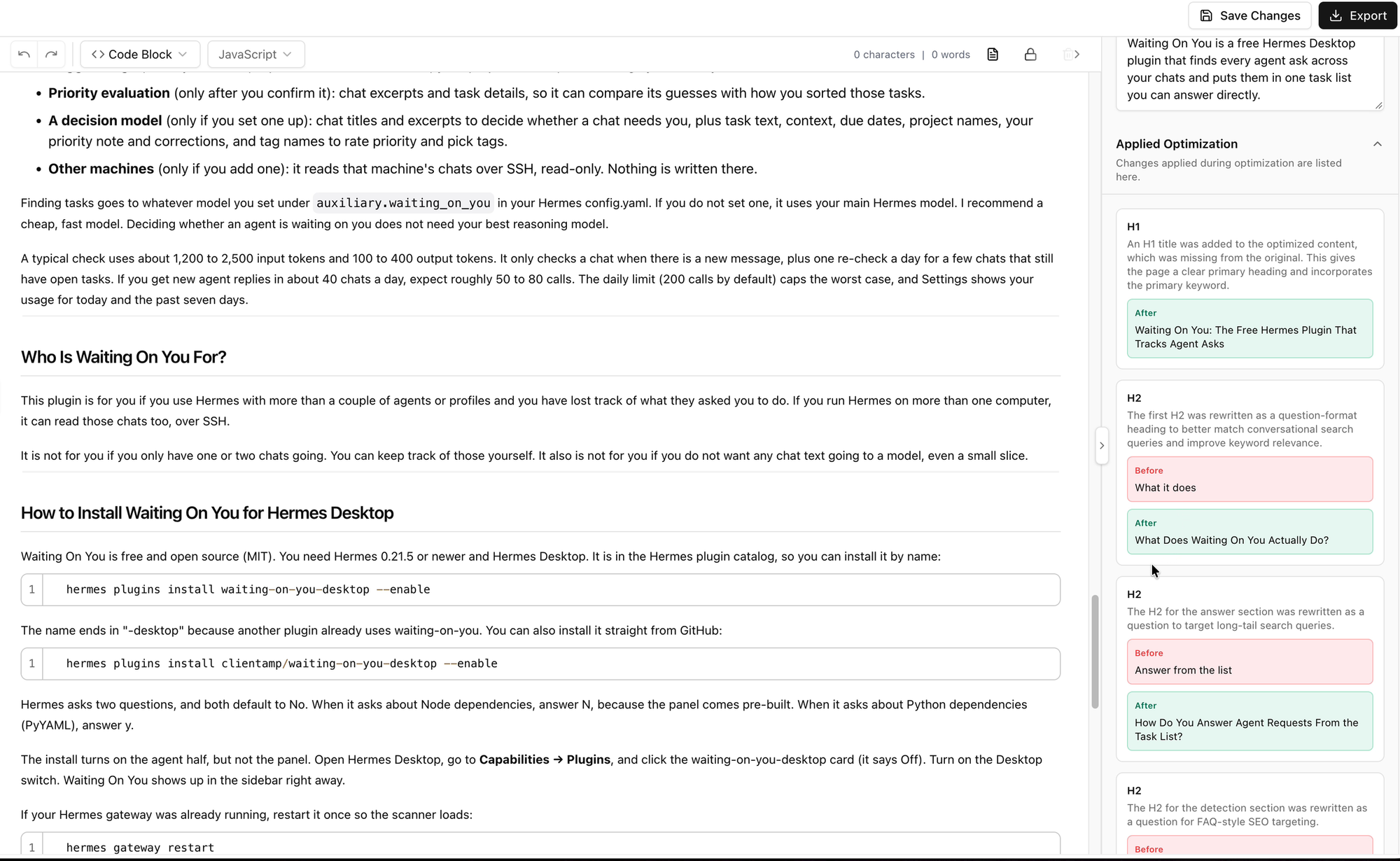
Under Improve Content, then Optimize Content, you can link your sitemap.xml or paste in a single URL. I pasted a recent blog post. Visby isn't optimizing for SEO here. It's optimizing for AI (it calls it AIO).
When it's done, click Edit to see the changes: green is what it suggests, red is what you had. It suggested better headings for my post. "What it does" became "What does Waiting On You actually do?", which is definitely a better headline. I probably should have written it that way. You can export the changes as a doc or a PDF and make them on your live site.
There are integrations, but not for existing website platforms. I'd love to see one where a change syncs straight to your WordPress site.
Prompt visibility and citations: the most important part
The most important part of the whole tool is the prompt visibility section, combined with citations.
Prompt visibility shows the results for the prompts you're tracking, sorted by funnel stage. You can add more prompts to track here too. One of mine was "Who reviews AppSumo lifetime deals honestly on YouTube?" I would hope I'd show up for that one. Currently, I don't. On my first run, none of the three AIs named me. Claude and Gemini didn't name any reviewer, and ChatGPT pointed to small review sites instead.
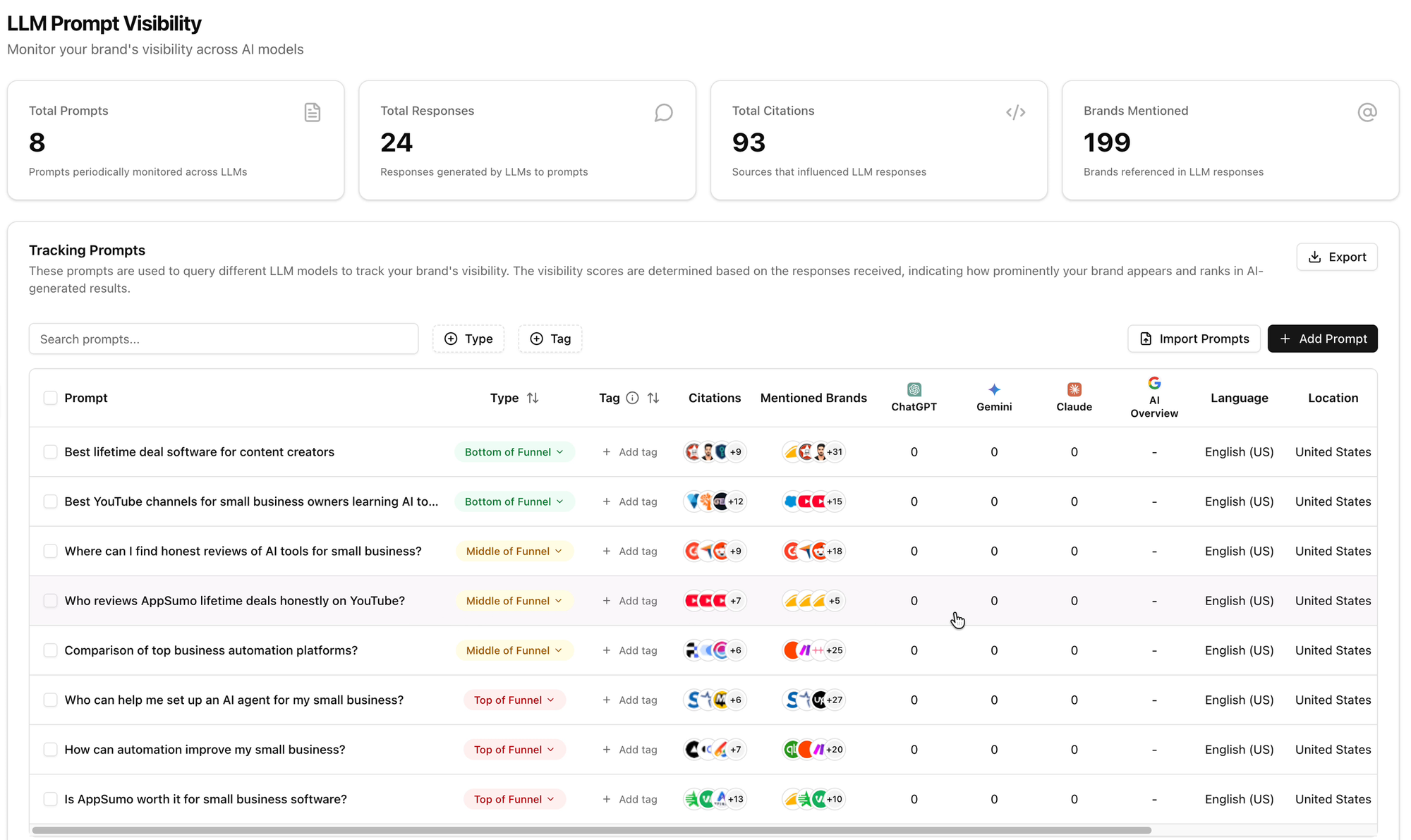
Click into any prompt to read the actual responses. For example, I could read Claude's answer about trusted AppSumo reviewers, see the links it gave, and compare my content to what it recommended to find room for improvement.
The Citations tab is similar, but it shows the actual links the AIs cite, all in one place, again sorted by funnel stage. You can see which domains get cited and filter by ChatGPT, Gemini or Claude.
Shopify and the Visby MCP
Two more quick things. If you run an e-commerce store, there's a beta Shopify integration you might want to check out.
And Visby has an MCP, so you can connect your AI and pull Visby's data straight into it. That's useful because your AI already knows about you. If you use the same AI over and over, it learns about your business and the content you make, so it can take Visby's data and give you better advice than a dashboard alone.
My call: if you've never checked whether AI recommends your business, Visby is a really easy way to find out, and it tells you what to fix. Check the tiers first, because Tier 1 only covers ChatGPT.
Which Drop 1 deal should you buy?
Start with the job you already have. If you post to social media every week, look at RobinReach. If your website or apps need to send email, look at Emailit. If you want to know whether ChatGPT recommends you or your competitor, look at Visby. And if you're paying for ads, Fraud Blocker is still one I recommend.
Whatever you pick, check that it has a way to connect to your AI. That's the filter I use now.
Buy before Wednesday morning, when every tier goes up $10.
This is only Drop 1, and I'll be back with Drop 2. If you have questions about any of these deals, including the six I didn't demo, leave a comment on the video and I'll do my best to answer.
Get Dave's Toolbox
The tools I actually use, every Tuesday. Free. No spam.
No cost. No spam. Unsubscribe anytime.