BetterClaw: Hosted AI Agents Without Buying a Mac Mini
BetterClaw was easy to get running with my ChatGPT subscription, but several tasks felt slow. My AppSumo-sponsored walkthrough covers skills, connected accounts, browser control, and which plan limits matter.

My take on BetterClaw
I would try BetterClaw if you want to give a non-technical coworker an AI agent without managing the hosting yourself. It was one of the easier agents I've set up, but several tasks felt slow compared with the Hermes Agent I run at home.
BetterClaw hosts the agent for you, so you don't need to buy a dedicated computer for it. The AppSumo lifetime deal starts at $79 for platform access. Model usage is not included: you connect a supported AI subscription or API key, and any subscription fees or API usage charges are separate. Running Hermes or OpenClaw on a computer you already own is another option.
AppSumo sponsored my BetterClaw video and provided the Tier 5 account I used. If you buy through my BetterClaw link, I may earn a commission at no extra cost to you. I use Hermes Agent roughly 10 hours a day, so that is the experience I'm comparing it with.
Setup: bring your own ChatGPT subscription
The model is the brain that BetterClaw connects to. During onboarding, I could choose a Google Gemini API key, an OpenAI API key, or a ChatGPT subscription. I used my ChatGPT subscription. Those were the options I saw, not a complete list of supported providers. API-key support and subscription support are different, so check BetterClaw's current connection options before assuming your provider or plan will work. I'd like to see Grok and Claude subscription options too.
I named the workspace after my company, kept the default General Assistant agent, and chose GPT-6 Astra. Connecting the ChatGPT subscription is a three-step process: open the ChatGPT sign-in page, then copy a redirect URL into step three. The redirect page looks broken. It isn't. Copy the URL from the address bar anyway, paste it where it says paste to finish, and hit connect (around 01:15 in the video).
After connecting the subscription, I clicked create my lifetime workspace and could start using the agent. I didn't need to open a terminal or configure a server. That's the part I liked: the setup got out of the way.
Don't rush the getting-started checklist
BetterClaw has a getting-started checklist that offers extra credits for setup tasks, including connectors, workflows, and custom agents. It's a good reason to explore the tool, but I wouldn't treat earning every credit as the goal.
I've spent a ridiculous number of hours setting up agents, and rushing has a way of creating more work later. If you teach an agent the wrong process, you then have to undo it. I'd rather get one useful task working properly before adding more.
Use the checklist to learn where things live. Set up the connectors and workflows you'll use. The credits are nice, but a clean setup is worth more than a few hundred bonus credits.
How many agents you really need
My test account (a Tier 5 that AppSumo gave me) includes 30 agents. It's tempting to think you need one agent per job or per employee you'd like to replace. From what I see online, most people run far more agents than they need.
I add a separate agent for two reasons. The first is a different model: a research agent probably doesn't need the latest GPT-6 Astra and can run on something cheaper. The second is keeping information apart: if your main agent reads your email, you may not want a research agent to have that access.
If the same agent can handle your tasks with the same model and permissions, I would try sharing useful skills before creating separate design and coding agents. Add another agent when you have a reason for it.
Customizing an agent with its soul file
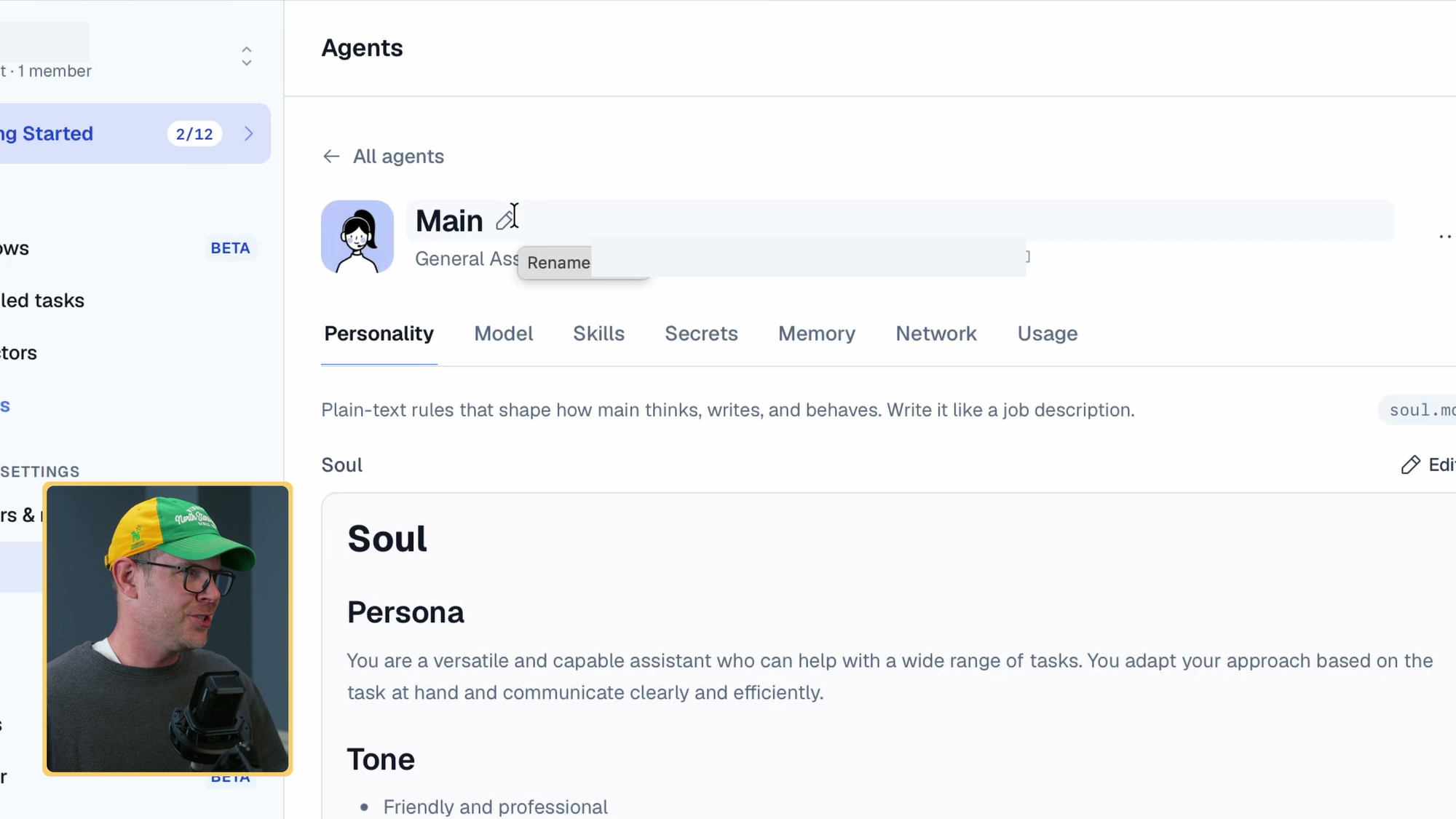
I renamed the default Main agent Debbie. I couldn't find a way to change its avatar, which was a small bummer. The part that mattered more was the editable soul.md file.
Each agent has a soul.md file that holds its persona, tone, and interaction style. If the answers are too short, open the soul file and tell it to be more elaborate. If they're too chatty, tell it to be concise. Editing the soul is how you shape the responses without rewriting every prompt.
I would start by adjusting the instructions to suit the way you want the agent to respond, rather than creating a new agent for every kind of task.
Skills: the library, custom skills, and secrets
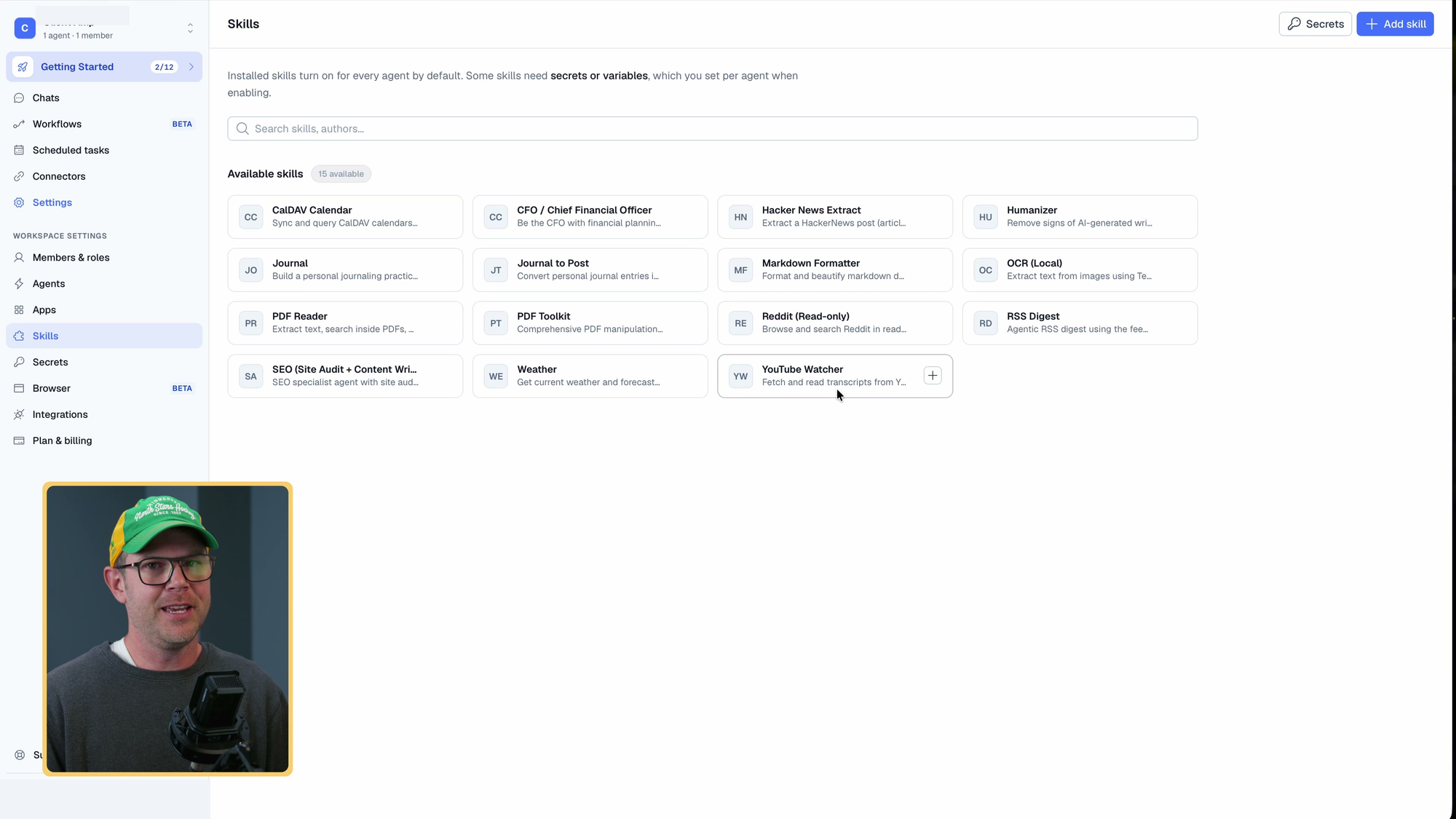
Skills are the procedures your agent performs on a regular basis, and they matter more than agent count. People often think they need a new agent when they just need to share a skill. Hermes Agent creates its own skills as it works. In BetterClaw, you add them from a skills library, and when you install one it asks which agent should get it.
A few from the library stood out. The YouTube Watcher summarizes a video from its URL, which saves a lot of time on clickbait headlines. The CalDAV connector is a big deal for me because so many tools only support Google Calendar and I don't use it. There's a Reddit reader for product research and a Humanizer that makes AI writing sound less robotic. I added those plus an SEO specialist to Debbie (around 05:52).
You can also add skills from ClawHub, a GitHub repo, a URL, or an uploaded Markdown file. BetterClaw has a secrets section for credentials and other values. Those would live with a cloud service, so check its security and storage policies before adding sensitive accounts.
Speed test: BetterClaw vs Hermes on the same model
I pasted a Wall Street Journal video URL about a nuclear engineer saving Guitar Center and asked how he was doing it. For almost 20 seconds I didn't see useful progress. At 53 seconds BetterClaw showed a plan, and it finished after about a minute and a half. The task begins around 08:14 in the recording.
Then I sent the same prompt to my Hermes Agent on a Mac Mini in the other room. It used the exact same model on the exact same ChatGPT subscription. It finished in under 10 seconds. The answers were comparable in quality, with bullet points and a few paragraphs each.
That was a clear speed difference in this one task, and it matters to me. It doesn't tell us what caused the gap. The agents may have taken different tool paths, and I didn't isolate those steps or run a controlled benchmark. If you already have Hermes working, I wouldn't switch just for this setup experience.
Sharing chats and turning them into skills
I liked the option to share a chat with a teammate. The interface said the chat was private until shared, then readable by anyone with the URL. Check the contents before sharing a conversation that includes information from connected accounts.
The triple-dot menu lets you save a conversation as a reusable skill. Hermes can create skills as it works; in BetterClaw, I chose when to save one.
Saving a skill from a conversation that worked is a useful starting point. You still need to read the generated instructions and try them on another task, because a successful conversation doesn't guarantee a reusable process.
Building an AppSumo review summary skill
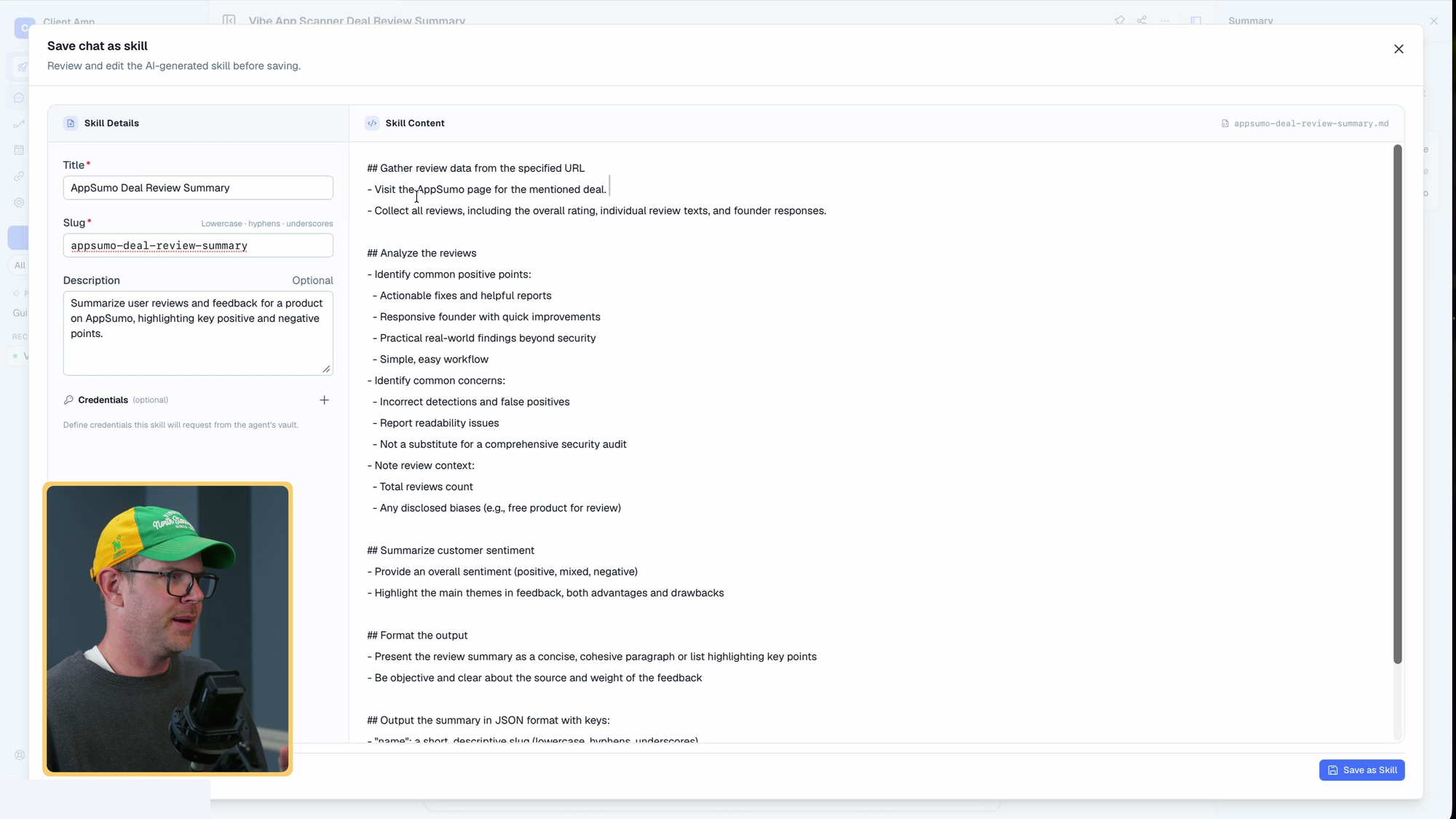
I asked the agent to find the Vibe App Scanner deal on AppSumo, read all of the reviews, and summarize what people think. I didn't give it a URL. After 46 seconds it had a three-step plan: locate the deal, read the reviews, summarize them. It finished after about two minutes and 40 seconds (around 10:53).
The agent's summary said buyers liked the actionable findings and responsive founder, while concerns included incorrect detections and report readability. It also said the product wasn't a replacement for a security audit. That sounded similar to my own experience in my Vibe App Scanner video, but this was an agent-generated summary, not my own fresh check of every customer review.
The generated skill was hard-coded to Vibe App Scanner, when I wanted something I could use for any AppSumo product. I couldn't find a way to ask the AI to revise it inside that editor, so I changed the relevant line to visit the deal page for the mentioned product and saved it. You can also download the skill file. I'd check its tools and instructions before moving it to another agent platform.
Running the skill, and why it's built for regular people
New chats had an auto-selected setting to route a request to an agent. With one agent, that didn't change much. I couldn't find a direct way to invoke a specific skill, like the slash commands I'm used to elsewhere.
I typed AppSumo review skill ShortPixel and pressed Ctrl+Return. It followed the same plan and mentioned a skill, though it never clearly said it was using mine. It took about 2 minutes and 10 seconds and returned a downloadable JSON file. The bottom line: past buyers liked ShortPixel for image compression and WordPress workflows, which feels like a different era (the reviews were from 2019 to 2021).
BetterClaw hides most of the agent's thought process. As a super nerd, I want all of it so I can correct the agent later. A regular person just wants the answer, and for them this is the right approach. If you want to set up a non-technical coworker with their own AI agent, this could be a great fit. If you already run agents elsewhere, it will probably feel slow and thin on detail.
Telegram, Discord, Slack, and connectors that take action
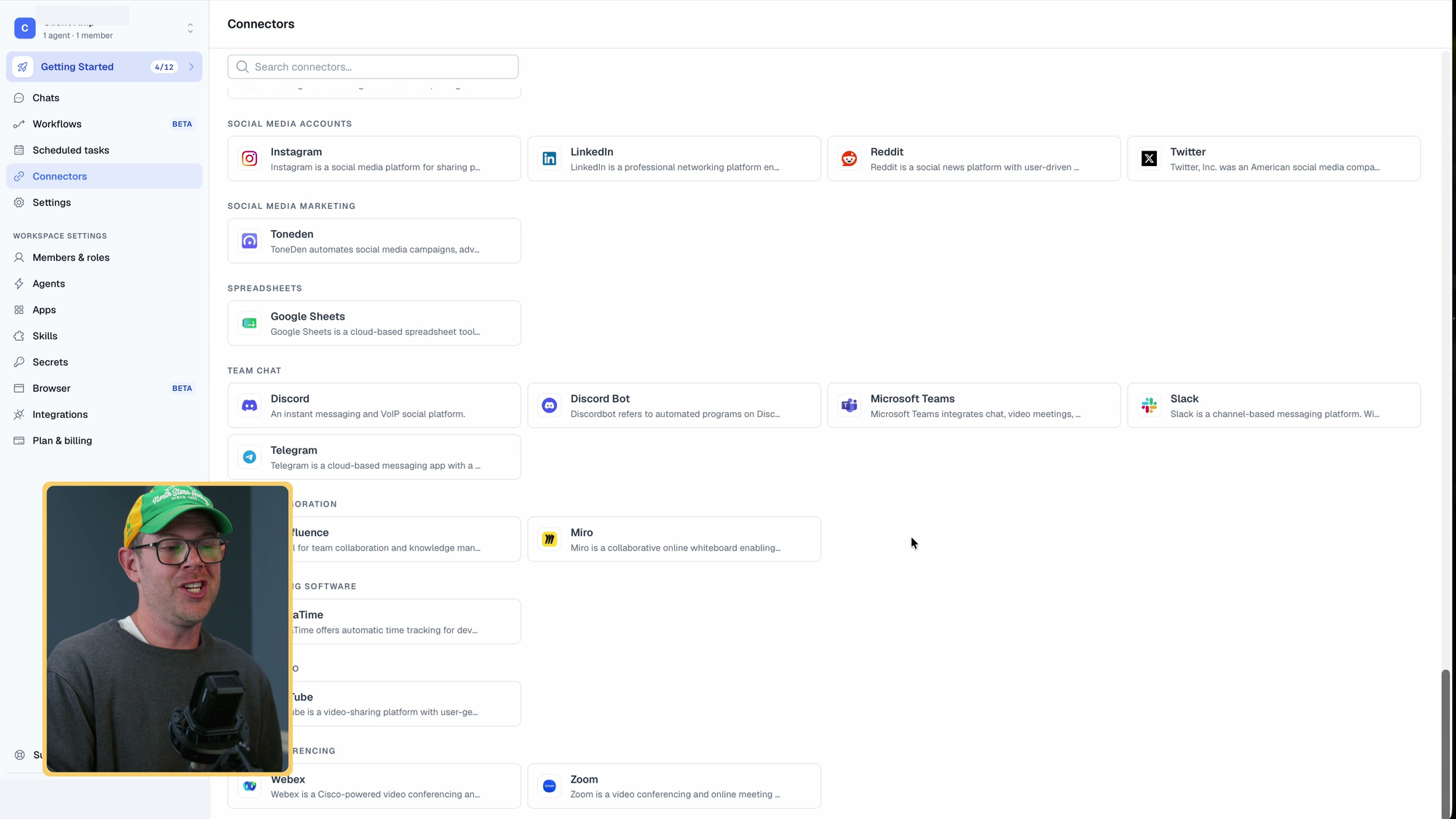
BetterClaw offers channel connections for Telegram, Discord, and Slack. For Telegram, the setup asks for a bot token from BotFather and lets you restrict who can message the bot. Use that restriction, especially if the agent can reach your email or calendar. An open bot can expose connected information to people you didn't intend to give access to. I cover the BotFather setup in my Hermes on Cloudways video.
The other connectors let BetterClaw work with services you use. I saw options including Hugging Face and OpenRouter. Start with the accounts needed for a specific job rather than connecting everything at once.
Depending on the connector and permissions, an agent can do more than read information. The kind of workflow I have in mind is finding an email, drafting a reply, posting a Slack update, and recording the result in a Google Sheet. I talked through that example; I didn't run that whole chain here. That's why I care more about useful connections and repeatable skills than a huge agent count.
Finding a local business with DataForSEO and Google Maps
I connected DataForSEO (affiliate link) with its credentials, then connected Google Maps through a sign-in flow. I didn't need to create Google Cloud API keys for that connection. DataForSEO provides SEO data through an API; I described it as paying for what you use rather than a monthly SEO software subscription.
I used my dictation tool for the prompt: I live in the Twin Cities, I want to start a services business I can rank for with local SEO, so search the area and show me where the opportunities are. Then I let it run in the background while I explored the rest of the app.
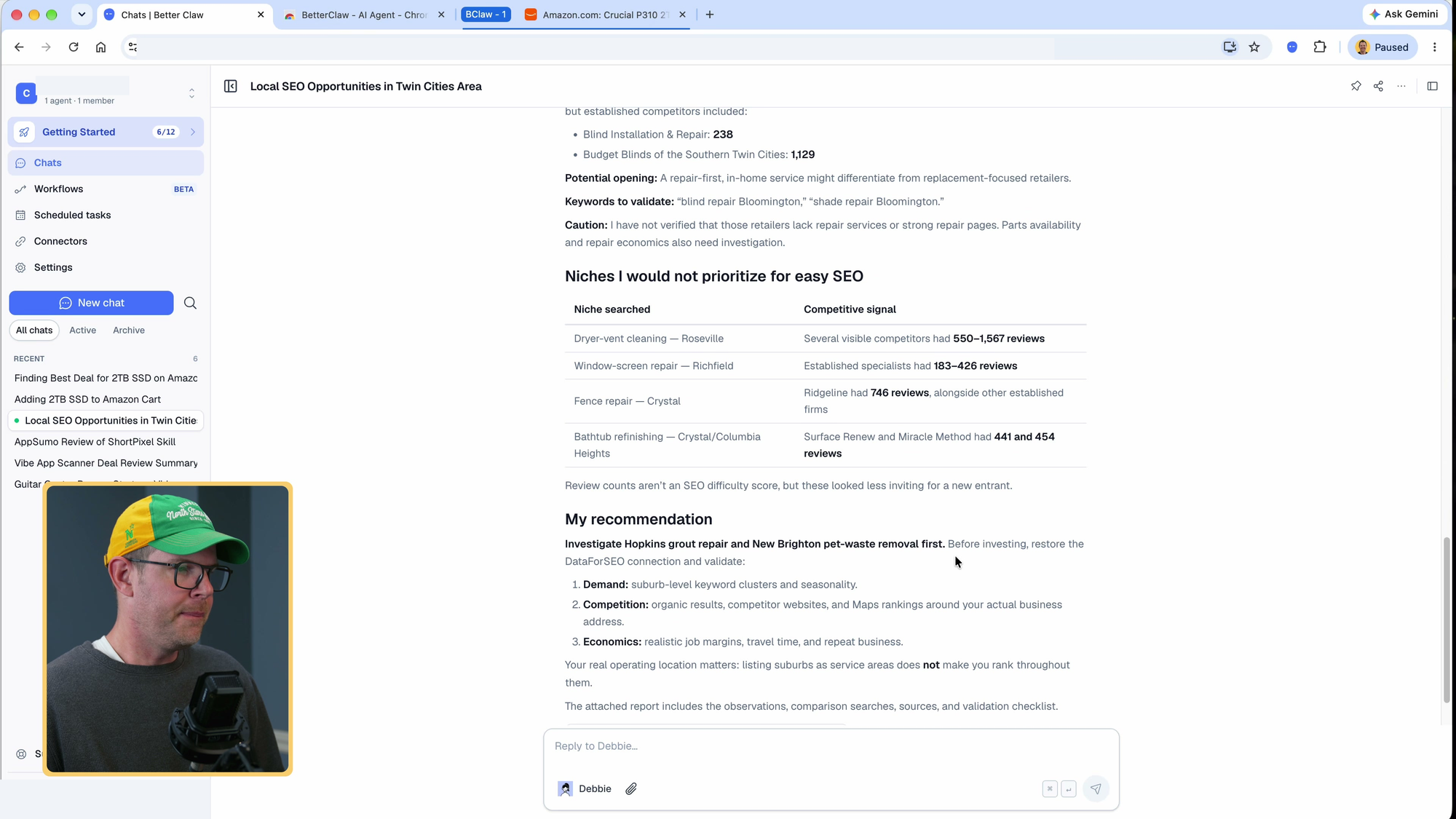
The task ran for almost seven minutes. Its suggestions included grout repair in Hopkins and pet waste removal in New Brighton. It also advised against dryer vent cleaning, window screen repair, fence repair, and bathtub refinishing. Those are leads to investigate, not proof that a business will rank or make money. I liked using the agent to find possible manual-labor opportunities, even if going from a desk job to poop 911 isn't everyone's idea of an upgrade.
Workflows and scheduled tasks
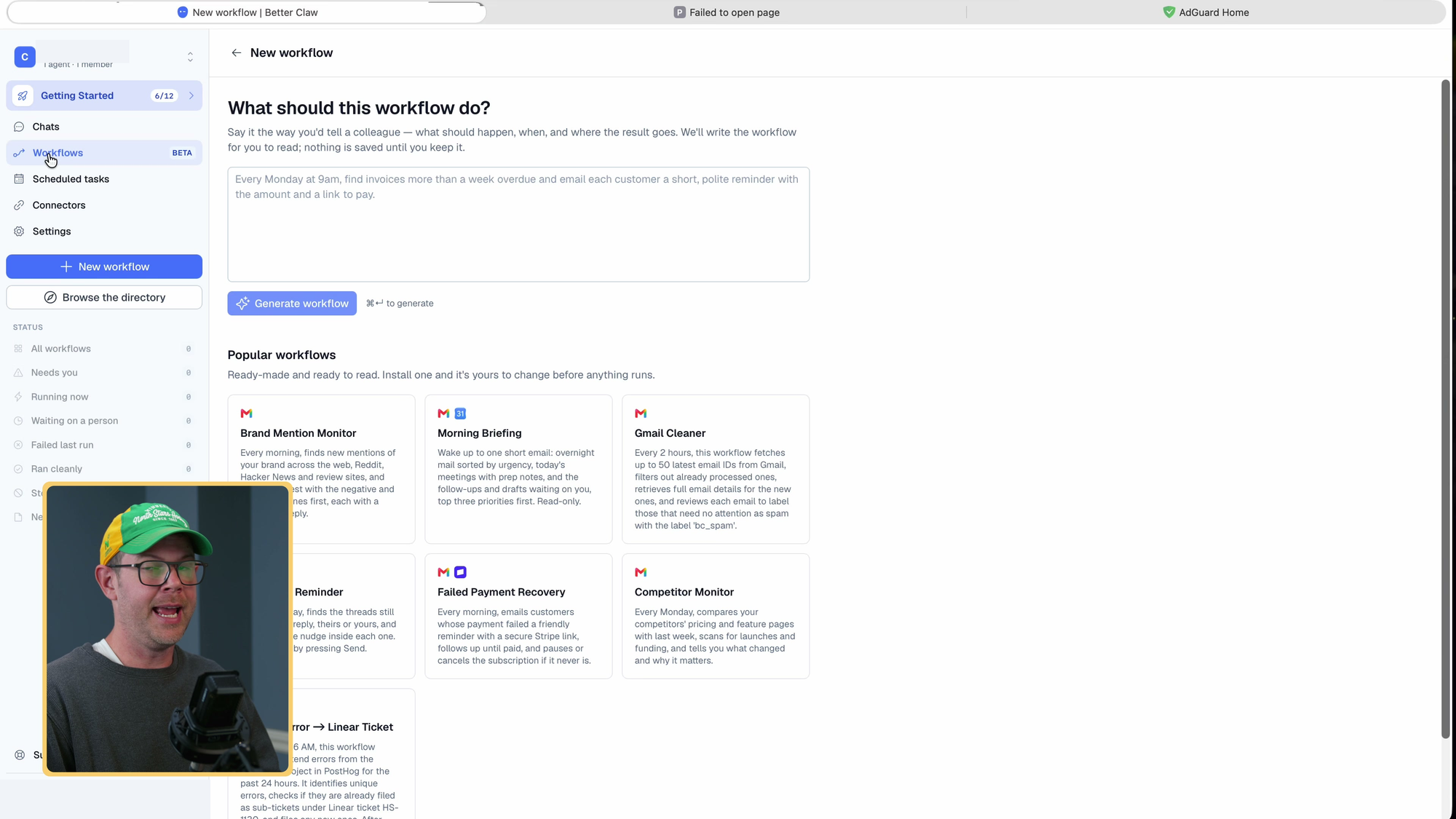
Workflows let you describe jobs to run on a schedule. The examples included a Gmail cleaner and a competition monitor that checks competitors' pricing and feature pages each Monday. I explored those options rather than running a scheduled workflow end to end.
When you add a workflow, BetterClaw creates the scheduled tasks for you. Scheduled tasks are a separate, more technical view where you write a prompt and set the schedule yourself.
I like having both. For a quick check, like looking at something every hour until it happens, write the scheduled task directly. For a longer process where you want to explain what you need in plain English, a workflow is easier.
Browser control: the Amazon test
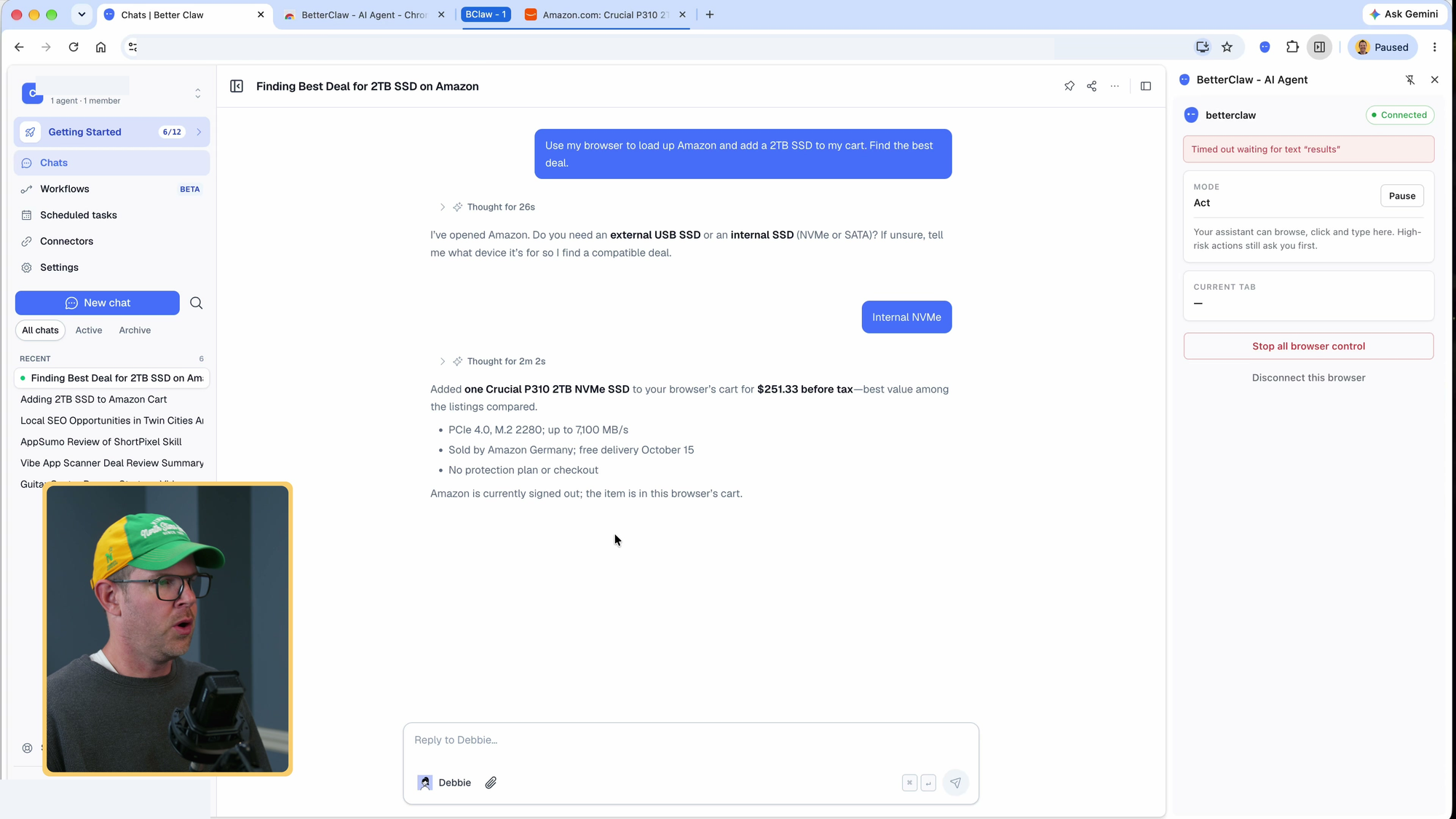
BetterClaw's browser feature connects to your own Chrome browser through an extension. That's useful when you want the agent to work in a browser you already use, but it also means thinking carefully about which accounts and permissions you give it.
The setup asked for a browser connection extension, but I couldn't find a link to it in the app. After installing it and pairing the browser, I could see permissions for things such as running JavaScript and filling passwords. My first attempt stopped with an error. I reconnected the browser and started a new chat because I couldn't find a way to edit and rerun the original message.
I asked it to add the best-value 2TB SSD to my Amazon cart. It asked internal or external, I said internal NVMe, and it reported adding a Crucial drive for about $250 that was backordered a couple of weeks, along with the drive's speed. It opened a new tab rather than a split view next to the chat, which I'd like to see. My plan for this is to let the agent fill the cart and take over for the final purchase myself.
Plans, credits, and which tier to buy
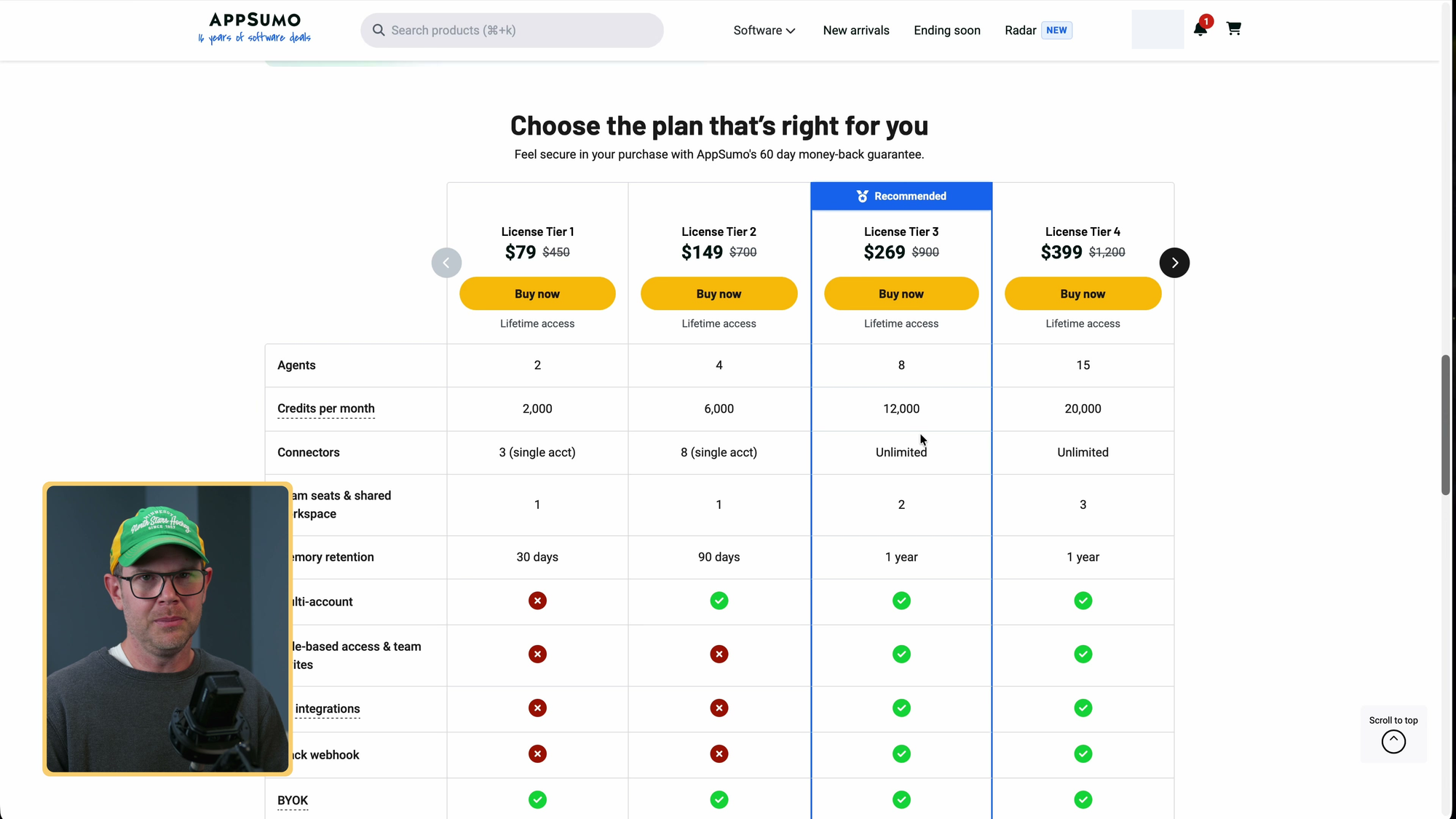
AppSumo currently lists four lifetime tiers, starting at $79. The prices below cover BetterClaw platform access, not model usage. Your supported AI subscription or API usage is separate. These public plans also differ from the Tier 5 account I used in the recording.
| Plan | One-time price | Agents | Monthly credits | Connectors | Seats | Memory retention |
|---|---|---|---|---|---|---|
| Tier 1 | $79 | 2 | 2,000 | 3 (single account) | 1 | 30 days |
| Tier 2 | $149 | 4 | 6,000 | 8 (single account) | 1 | 90 days |
| Tier 3 | $269 | 8 | 12,000 | Unlimited | 2 | 1 year |
| Tier 4 | $399 | 15 | 20,000 | Unlimited | 3 | 1 year |
AppSumo provided my Tier 5 test account with 30 agents, 30,000 monthly credits, five users, and unlimited memory retention. That plan is discussed in the video but isn't currently listed on the public deal page. Check the current deal page before buying.
The pricing explanation gave runtime as one credit per minute. That makes task duration worth watching, although I didn't measure billing closely enough to tie the speed test to a specific charge. My account showed 19 credits used across the recording. The plan information also mentioned proxies and Google, Meta ads, and X API usage; check the current allowances rather than assuming those services are unlimited or free.
I would look closely at Tier 3 if you need several connections and a second person logging into BetterClaw. Those limits matter more to me than having dozens of agents. Memory retention matters too, but unlimited retention isn't a promise that the agent will perfectly recall every detail forever.
BetterClaw at a glance
BetterClaw
Hosts AI agents with skills, connectors, scheduled tasks, and a connection to your own Chrome browser. You supply supported model access.
Who it's for: Non-technical teammates and small businesses who want an agent without buying a Mac Mini or running Hermes Agent or OpenClaw themselves.
Compare with: Running Hermes Agent or OpenClaw yourself, including on a computer you already own
Who I would use BetterClaw for
BetterClaw is a fairly decent, if slow in my experience, way to get an AI agent running without doing the hosting work yourself. I would consider it for a non-technical coworker who wants connected tools and reusable skills. If you already run Hermes or OpenClaw and like seeing more of what the agent is doing, it may feel limited.
If you buy BetterClaw, choose the plan around the connections and users you need. Then give it one task you understand, read the result, and save the process as a skill once it works. Don't rush through every setup option just to collect credits.
Common questions
Do I need separate AI access?
Yes. The $79 lifetime entry plan covers BetterClaw platform access, not model usage. During setup I could connect a Gemini or OpenAI API key, or my ChatGPT subscription. You still pay any separate subscription or API usage charges. Check support for your specific provider and plan; not every AI subscription or API key will work.
How did the speed compare with Hermes Agent?
For one video-summary task, BetterClaw took about 90 seconds and my Hermes Agent took under 10 seconds. I used the same prompt, model, and ChatGPT subscription. This was not a controlled benchmark and did not establish the cause.
Which plan limits should I check?
Check connectors, direct-login users, monthly credits, and memory retention. The public deal page currently lists Tier 3 at $269 with unlimited connectors, two users, and a year of memory. Confirm current terms before buying.
How do credits work?
The recording described runtime as one credit per minute and Tier 1 as including 2,000 monthly credits. My account showed 19 credits used during the recording. Check the current billing rules and allowances.
Can it use my Chrome browser?
I paired Chrome through an extension. The first attempt failed; after reconnecting, the agent reported adding an SSD to my Amazon cart. I did not complete a purchase.
Can I message it outside BetterClaw?
The interface offered Telegram, Discord, and Slack connections. Restrict who can message the bot before giving it access to private accounts.
Can I reuse a generated skill?
Yes, but check its instructions first. My generated customer-review summary skill was tied to one product, so I edited it before trying another product. A downloaded file may need changes for another agent platform.
Get Dave's Toolbox
The tools I actually use, every Tuesday. Free. No spam.
No cost. No spam. Unsubscribe anytime.