

Bullseye Review: Visitor Identification on AppSumo
Bullseye identifies anonymous website visitors and turns them into potential leads with names, emails, companies, and LinkedIn profiles. I tested it on my own sites to see whether the AppSumo deal is worth considering.


AppSumo sponsored this review. Dave has used AppSumo for more than a decade to find software deals before committing to monthly subscriptions or building tools from scratch.
Bullseye
Identifies anonymous website visitors and enriches them with contact and company data so you can follow up with higher-intent leads.
B2B businesses, consultants, coaches, agencies, and service providers where a single qualified lead can be worth far more than the tool cost.
Visitor identification, lead enrichment, and lightweight intent-data tools connected to CRM or outreach workflows.
What Bullseye Actually Does
Bullseye is a website visitor identification tool. Instead of only showing anonymous page views, it tries to identify the people and companies visiting your site, including email addresses and LinkedIn profiles when it can resolve them.
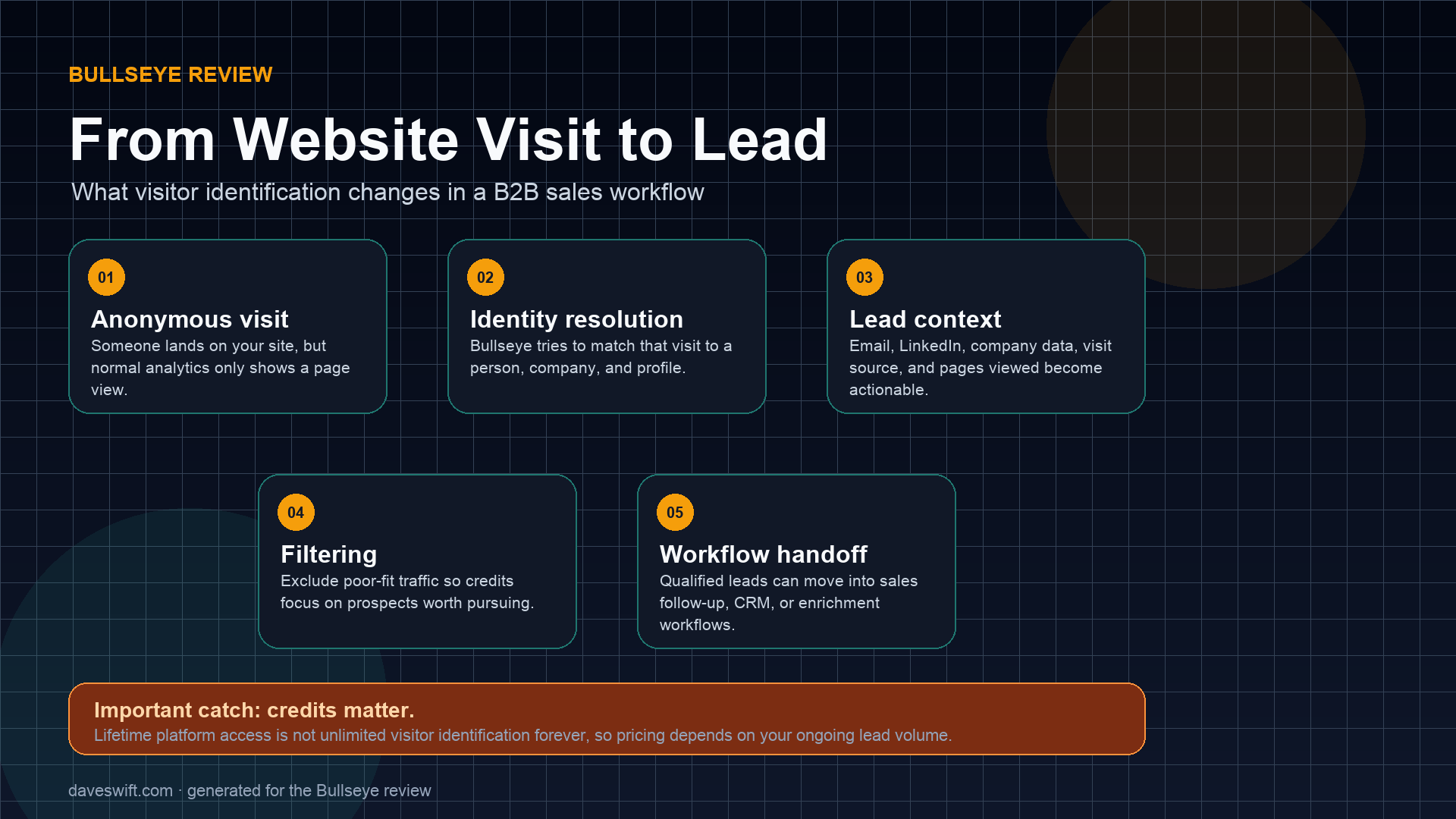
That makes it a much better fit for high-value B2B offers than for ordinary consumer products. If one qualified lead can turn into a consulting engagement, coaching client, agency project, or larger sale, visitor identification can be useful. If you are selling a low-ticket Shopify product, it may be overkill.
The useful mental model is not replacement analytics. It is lead intelligence layered on top of the traffic you already have. Google Analytics can tell you that a page received visits. Bullseye is trying to answer the more practical sales question: which of those visits might represent an actual person or company worth following up with?
Why I Tested It
Bullseye showed up on AppSumo with very little public review coverage. It did not even have much in the way of a promo video, but it was part of AppSumo’s chosen or launchpad-style program, which usually means AppSumo sees something promising in the product.
I installed it on my own sites for a few days so I could see what it actually captured and whether the dashboard was useful in practice.
That context matters because AppSumo launches can look attractive before there is much independent coverage. I wanted to see whether this was a thin lead-list gimmick or a real workflow tool. The answer is somewhere in the middle: the core idea is genuinely useful, but the value depends heavily on your audience, traffic quality, and tolerance for credit-based pricing.
The AppSumo Deal Has a Catch
The entry price is attractive, but this is not a traditional lifetime deal in the way many Sumo-lings expect. You get lifetime access to the platform, but the visitor identification credits do not renew forever.
That matters because credits are the part of the product that actually turn anonymous visitors into identified leads. Once you use them up, you eventually need to subscribe to a monthly plan if you want to keep using Bullseye on an ongoing basis.
That does not automatically make it a bad deal. It just changes how you should evaluate it. If you only need occasional lead identification, the lifetime platform access can still be useful. If you expect to run this across multiple high-traffic sites every month, you need to treat the AppSumo purchase more like an entry point than a forever-unlimited lead engine.
The Dashboard Is Clean
One thing I like about Bullseye is that the dashboard does not feel overloaded. I have used a lot of tools in this category, and many of them bury you in charts, low-value widgets, and noisy data that does not help you decide what to do next.
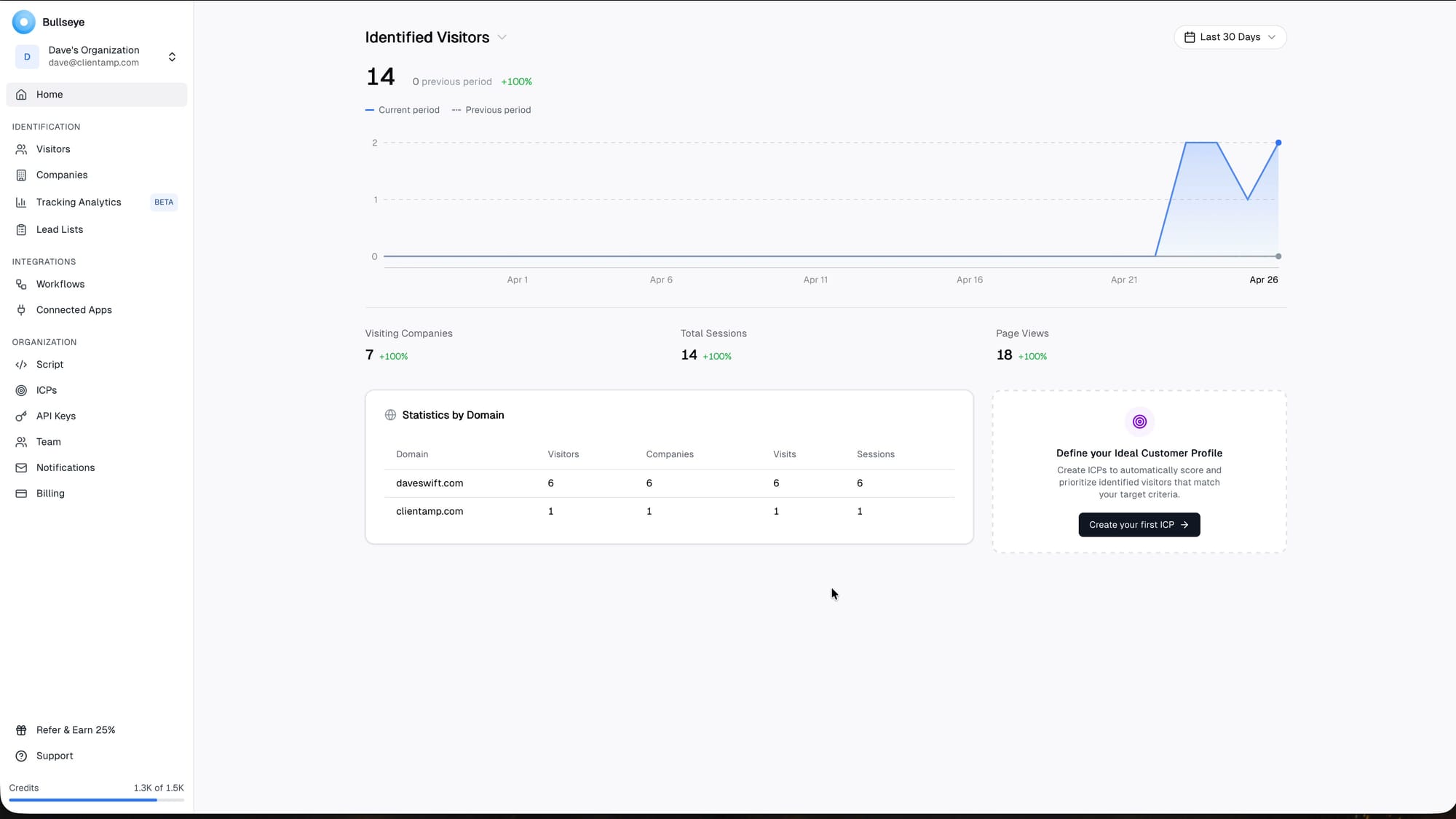
Bullseye keeps the core workflow fairly focused: install the script, filter who you want to identify, then review visitors and companies as data starts coming in.
I appreciate that the dashboard does not bury the basic job. You can see visitors, companies, sources, and lead details without needing to decode a complicated analytics suite. For a tool like this, that matters because the real work usually happens after identification: deciding whether the lead is worth a follow-up, tagging it, or routing it somewhere useful.
Agency Use Is Limited
A natural question is whether you can use Bullseye for clients. Technically, the tracking code can be installed on multiple domains, but there is not a clean agency-style structure where each client has a separate organization and scoped access.
If you want to use this with clients, check with Bullseye before buying specifically for that purpose. The product feels close to supporting an agency use case, but it is not really built around client separation yet.
For agencies, the question is whether Bullseye can be managed cleanly across clients. If each client needs separate reporting, separate credits, and separate expectations around what counts as an identified visitor, the workflow has to be very clear. The product may still help an agency, but I would be careful about promising it as a turnkey multi-client lead machine without testing the account structure first.
Setup Is Simple
Installing Bullseye is straightforward. You copy the tracking script and place it on your website. On Ghost, that means using code injection. On WordPress, you can use a snippet plugin such as Fluent Snippet and place the code in the header.
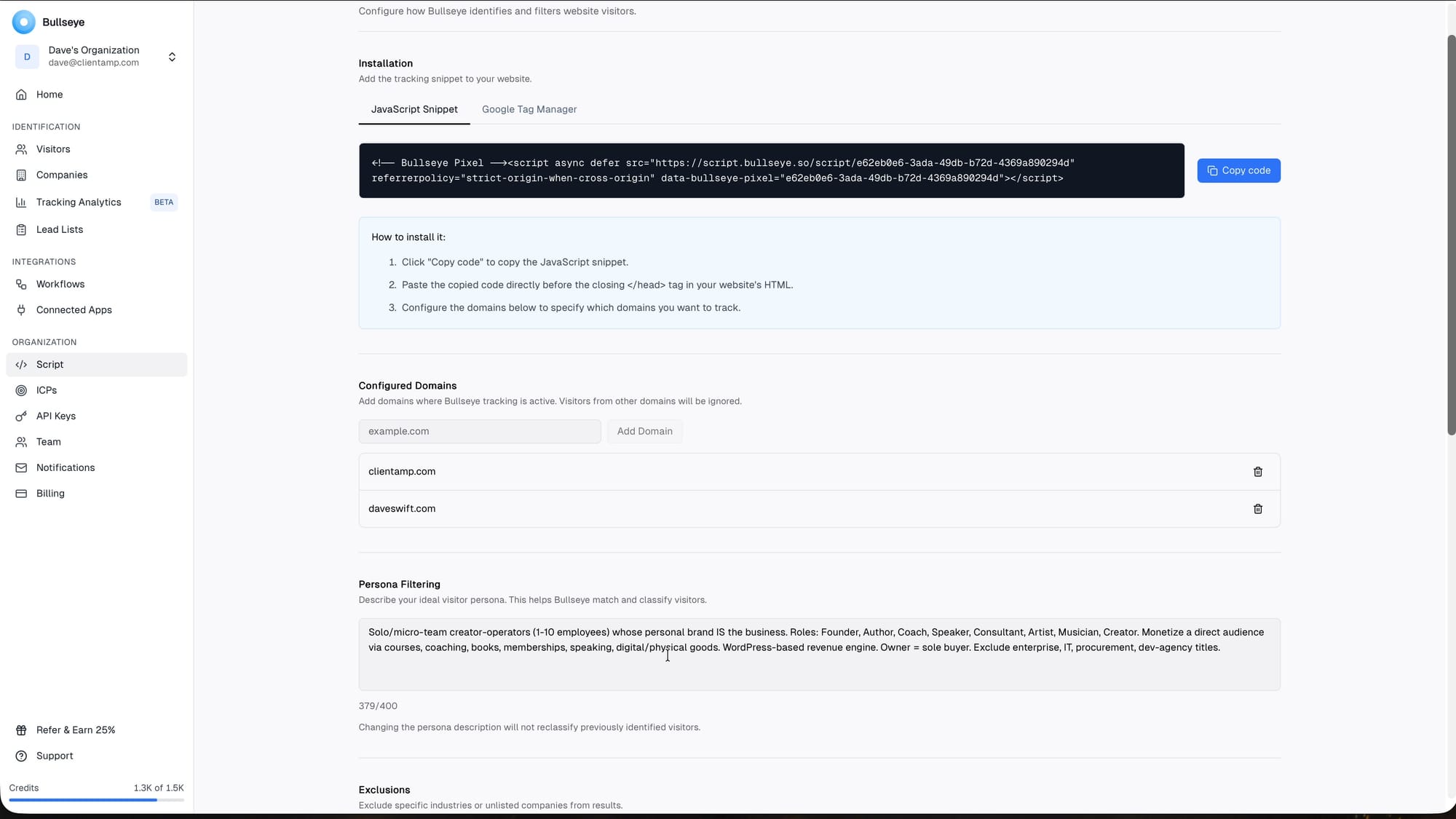
The only easy mistake is caching. If you add the script and nothing seems to happen, clear your cache before assuming the product is broken. That cost me some time during testing.
The simple setup is a real point in its favor. Tools in this category can easily become overbuilt, especially when they start asking for CRM configuration before you have seen any value. With Bullseye, the faster path is to install it, let it collect data for a few days, and then decide whether the identified leads are good enough to justify deeper workflow setup.
Filtering Matters a Lot
Bullseye becomes more useful when you aggressively filter who you want to identify. I used persona filtering to describe the kind of visitor I actually care about: solo creators and micro-team businesses that might be a fit for what I offer.
You can also exclude industries and known customers so you do not waste credits identifying people or companies that are not a fit. That is important because the AppSumo deal gives you a finite pool of credits.
This is one of the parts I would not skip. If your site gets a lot of irrelevant traffic, competitor visits, bots, support traffic, or low-intent visitors, raw identification can become noisy fast. Good filtering is what keeps the credit spend focused on people who might plausibly become customers instead of turning the dashboard into another inbox to ignore.
The Exclusion UX Needs Work
The filtering concept is good, but the exclusion workflow could be smoother. I wanted to exclude a long list of industries, and there was no simple CSV upload or bulk paste workflow that handled each item separately.
That is a one-time setup annoyance, but it is exactly the kind of thing that matters in a product where credit usage depends on careful filtering.
The underlying capability is important, but the interface around exclusions could be clearer. When a product charges or limits around identification credits, users need confidence that exclusions are easy to understand and hard to misconfigure. A confusing exclusion flow creates anxiety because a small setup mistake could waste credits on traffic you never cared about in the first place.
The Credit System Is Confusing
The AppSumo credit language is one of the weaker parts of the offer. You get a smaller set of credits during the refund window, then the rest unlock later. I understand why they do that: they do not want people using all of the credits and then refunding the deal.
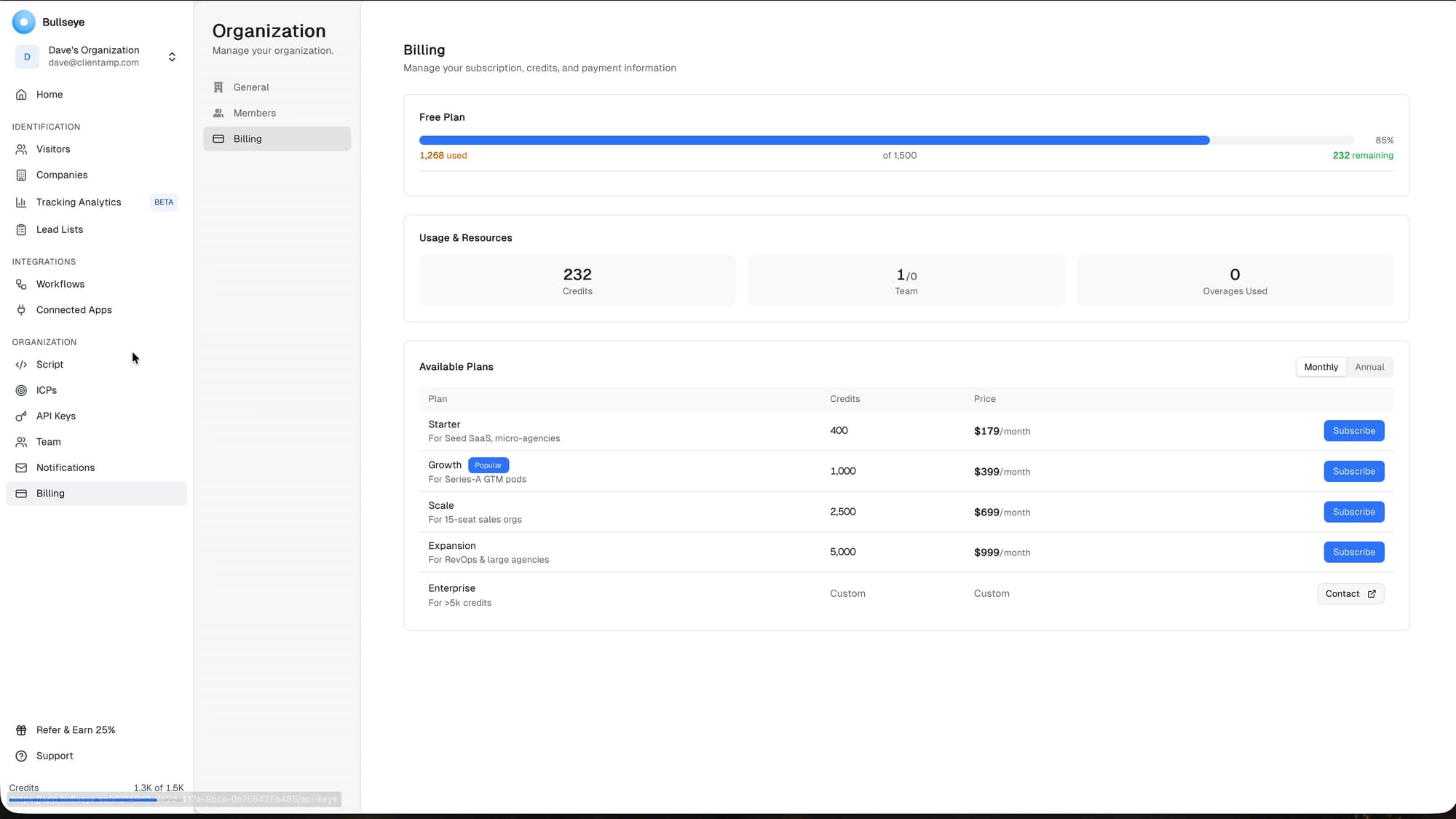
But the way it is explained can feel counterintuitive. For buyers skimming a deal page, this needs to be extremely clear because credits are the core unit of value.
This is the biggest thing I would want clarified before relying on Bullseye long term. Credit-based products are not inherently bad, but the unit economics need to be obvious. Buyers should know what consumes a credit, what happens after the included credits are gone, and how predictable monthly costs will be once real traffic starts flowing through the system.
The Lead Data Is the Best Part
In my test, Bullseye identified a small number of visitors, but the quality of the data was interesting. Six of the seven identified visitors had valid email addresses, and all of them linked to LinkedIn profiles.
That is where the product makes sense. I am not a fan of blasting cold outreach, but following up with someone who already visited your site is a different situation. If the offer is valuable enough, individualized outreach based on intent can be reasonable.
When the match is good, this is where Bullseye feels most valuable. A name by itself is mildly interesting. A name attached to a company, role, LinkedIn profile, pages viewed, and visit source becomes something you can actually reason about. That is the difference between curiosity analytics and a potential sales workflow.
Company View Adds Useful Context
The company view is useful because it lets you see when multiple people from the same company are visiting your site. If a company keeps coming back over multiple days, that may be a stronger buying signal than a single anonymous page view.
You can also inspect which pages were visited, which helps you understand whether they were looking at general content or something closer to a sales page.
Company-level context also helps avoid overreacting to one isolated visit. If several people from the same company are visiting pricing pages, comparison pages, or service pages, that can mean something different than a single anonymous click. For B2B sellers, that account-level view may be more useful than any individual record.
Workflows Are Helpful but Basic
Bullseye includes workflow integrations for tools like Microsoft Teams, Slack, Salesforce, HubSpot, Google Sheets, and webhooks. That is enough to get identified leads into a place where your team can act on them.
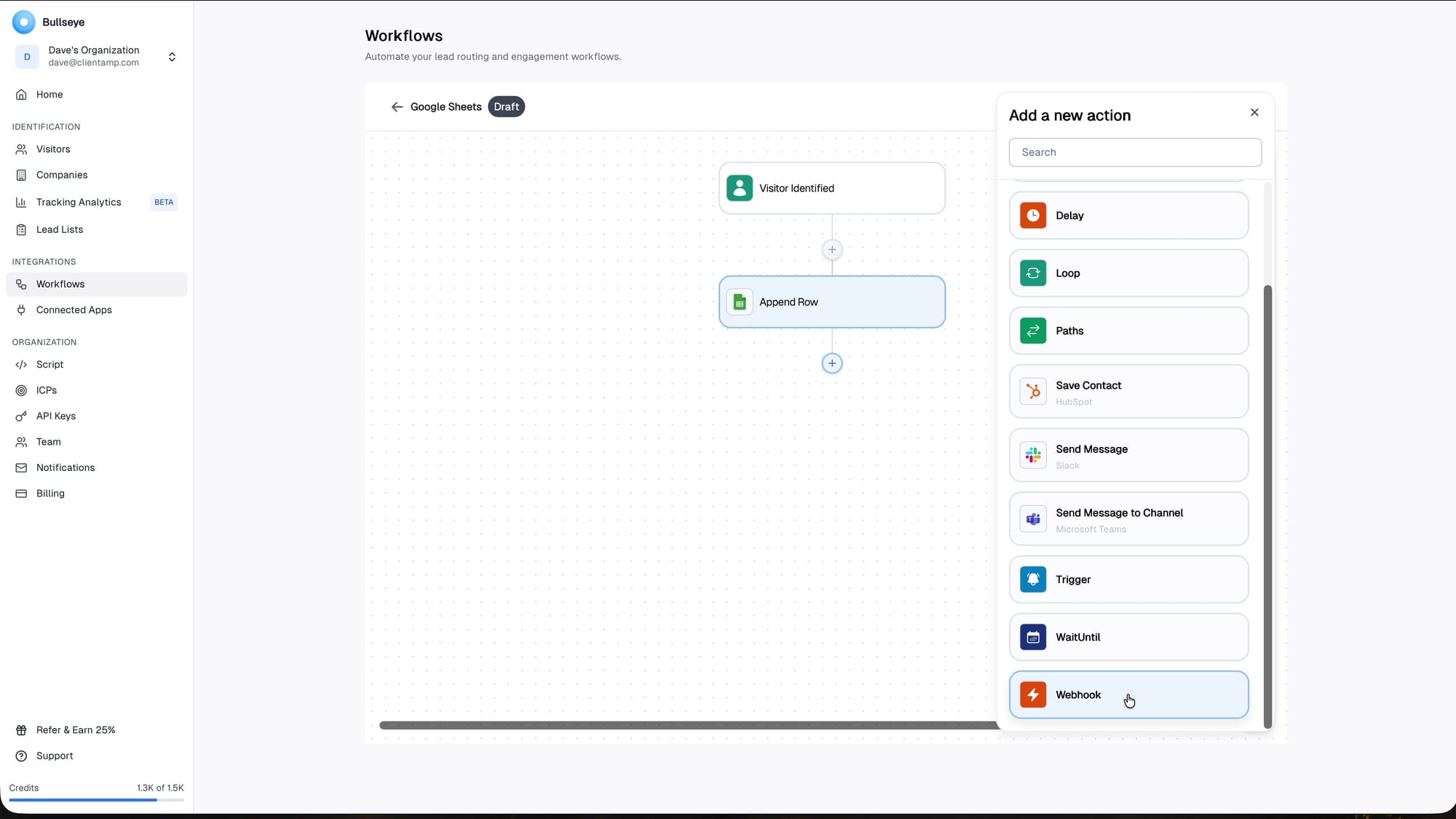
The workflow builder is not a full Zapier or n8n replacement, but it does not need to be. The important thing is that identified visitors do not just sit inside Bullseye waiting for someone to remember to check the dashboard.
The workflow features are useful as a starting point, but I would not buy Bullseye only for automation yet. The identification layer is the main value. Workflows become more interesting once you know the data is consistently good enough to route somewhere else, whether that is a CRM, spreadsheet, Slack channel, or manual follow-up process.
Where the Pricing Gets Harder
The biggest downside is what happens after the AppSumo credits are gone. At that point, the cheapest monthly plan mentioned in the video starts at $179 per month for 400 credits.
I understand that visitor identification likely has real data costs behind it. But I would much rather see a simple a la carte credit option inside the product, where I can buy a block of credits that sits on my account and does not expire.
The pricing conversation changes based on your offer. If a single converted lead is worth thousands of dollars, paying for identification can make sense quickly. If your average customer value is low, the same pricing may feel expensive. That is why I would evaluate Bullseye less as a generic analytics tool and more as a sales tool for high-value B2B offers.
API Access Feels Awkwardly Packaged
API access is available as an add-on, but the pricing and UX feel a little awkward. For a product aimed at entrepreneurs and automation-minded users, API access is exactly the sort of thing that could justify a higher tier.
The rough edge I noticed is that I could get to an API key creation screen without having paid for API access, but attempting to create a key produced no useful feedback. That is not a huge issue, but no-feedback interactions make a product feel less polished.
API access is one of those features that matters most to the exact people who are likely to operationalize the product. If you want Bullseye to feed a custom sales process, enrichment workflow, or internal dashboard, the API packaging matters. Putting that behind a higher tier may be understandable, but it makes the lower tiers feel less automation-friendly.
Ideal Customer Profiles Are Promising
Bullseye also includes Ideal Customer Profiles, which are basically segments of your identified visitors. You can create rules based on things like UTM source, LinkedIn URL, job title, or days since last visit.
That is useful because not every identified visitor deserves the same follow-up. Segmentation helps separate interesting buying signals from general traffic. I did run into a small backend glitch where a deleted ICP name still seemed to collide with a new one, so this area still has some polish work ahead.
The ICP direction is promising because it moves the product beyond raw identity matching. The more Bullseye can help separate good-fit visitors from random traffic, the more useful it becomes. Identification is only step one. The real leverage is knowing which identified visitors deserve attention and which ones should be ignored.
Should You Buy Bullseye?
I am not down on Bullseye. I actually think the core product is good, especially if your business can justify the cost with one or two quality leads. For consultants, coaches, agencies, and B2B services, the idea of identifying high-intent website visitors makes sense.
The AppSumo offer is where I have reservations. It gives you a useful way to test the platform, but because the identification credits do not renew indefinitely, it is not the same kind of lifetime deal people may be expecting. My final score is 6.7 out of 10: useful product, conditional deal value.
Frequently Asked Questions
What does Bullseye do?
Bullseye identifies anonymous website visitors and attempts to provide names, email addresses, company information, and LinkedIn profiles. The goal is to help you spot higher-intent leads already visiting your site.
Is Bullseye a true lifetime deal?
You get lifetime access to the platform, but the visitor identification credits do not renew forever. Once your credits are used, you may need a monthly plan to keep identifying visitors.
Who is Bullseye best for?
Bullseye makes the most sense for businesses where one qualified lead is valuable, such as consulting, coaching, agencies, and B2B services. It is less compelling for low-ticket consumer ecommerce.
Can agencies use Bullseye for clients?
The tracking code can be used on multiple domains, but Bullseye does not appear to have full agency-style client separation. If you plan to use it for clients, confirm the workflow with Bullseye before buying.
Does Bullseye integrate with other tools?
Bullseye includes workflows for tools such as Slack, Microsoft Teams, Salesforce, HubSpot, Google Sheets, and webhooks. The workflow builder is basic, but enough for common lead-routing use cases.
What are Bullseye credits?
Credits are used when Bullseye identifies visitors. The AppSumo deal includes a finite number of credits, with some credits available during the refund window and more unlocking later.
What score did Dave give Bullseye?
Dave gave Bullseye a 6.7 out of 10. The product itself is useful, but the AppSumo credit structure and a few rough edges make the deal more conditional.
Get Dave's Toolbox
The tools I actually use, every Tuesday. Free. No spam.
No cost. No spam. Unsubscribe anytime.


