Does ChatGPT Recommend Your Business? I Tested Mine With OtterlyAI
I pointed OtterlyAI at my own site to see if ChatGPT and other AI tools mention me, who they send people to instead, and what I changed.

Sponsored: OtterlyAI sponsored this video and article. Every number below comes from my own account.
If you run a business or a website, it's worth finding out what AI tools say when someone asks for a recommendation in your space. I did that for my own site with OtterlyAI, and the answer surprised me. AI wasn't mainly sending people to the creators I thought of as my competition.
Here's the problem. More people ask ChatGPT, Claude, or Google's AI answers for a recommendation instead of searching the old way. For me, the question might be "who actually tests AppSumo deals to make sure they work?" For you, it might be "who's the best bookkeeper for Etsy sellers?" or "what's the best dog groomer near me?"
AI isn't going to hand that person page after page of links. It gives them a name or two. If that name isn't yours, it's probably one of your competitors'.
So I wanted to know two things. Does AI mention me? And if it doesn't, who is it sending people to instead?
What OtterlyAI does
OtterlyAI tracks how your brand shows up in AI answers. You give it a list of questions (it calls them prompts), and it runs them on a schedule across ChatGPT, Google AI Overviews, Perplexity, and Microsoft Copilot. You can add Google AI Mode, Gemini, and Claude as paid extras. It saves the full answers, then tells you whether you were mentioned, which websites the AI cited, and how you compare with competitors.
If you've used old-school SEO tools, you know how keyword tracking works. With OtterlyAI, you don't track keywords. You track prompts. A keyword is "AppSumo reviews." A prompt is how a real person asks AI: "Which creator actually tests AppSumo deals?"
That's the big mental shift. It works alongside your SEO tools rather than replacing them, but it answers a different question. It doesn't tell you where you rank on Google. It tells you whether AI mentions you.
Setting up a brand report
Everything in OtterlyAI hangs off a brand report. Hit the plus button, give the report a title, and enter your brand name and domain. On the next step you choose which prompts to track and which competitors to follow.
Otterly suggests both based on your existing content, and you can change them if it doesn't get things quite right. For my report, I track other creators who review AI tools.
Then it churns for a while. Mine took several hours before I got the brand report back, so don't expect results in the first five minutes.
The scoreboard: who AI mentions
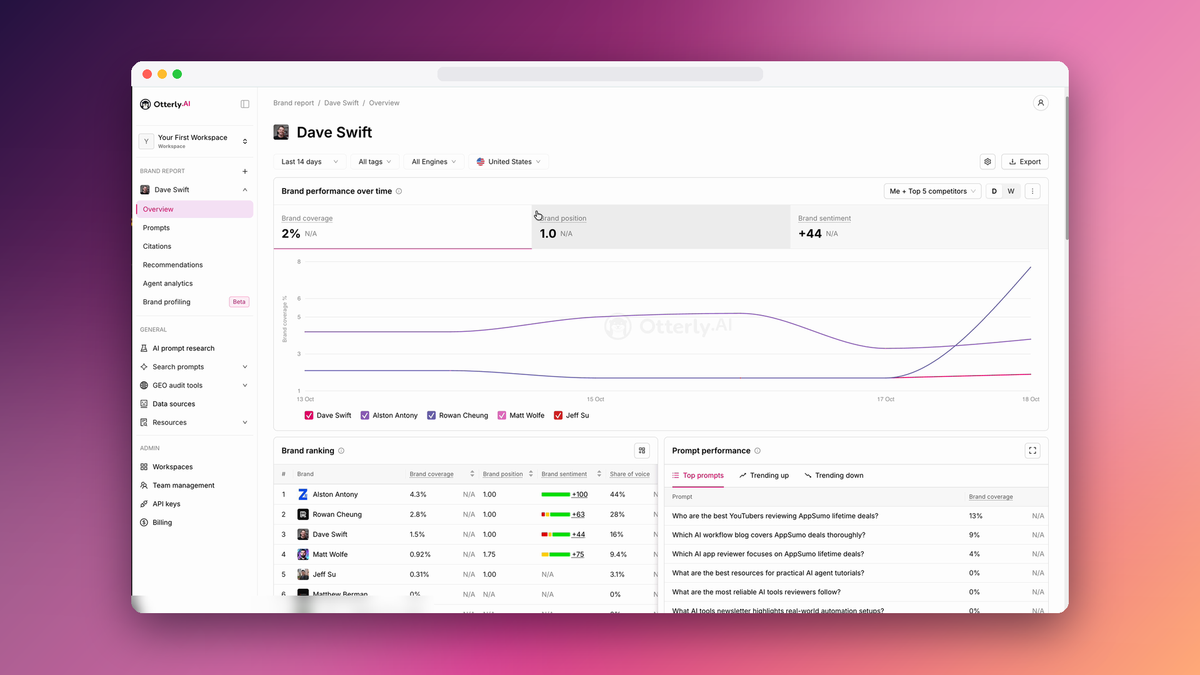
The overview screen is the glanceable part. You see how your tracked prompts are performing, how you compare with competitors, where your citations come from, and how all of that changes over time.
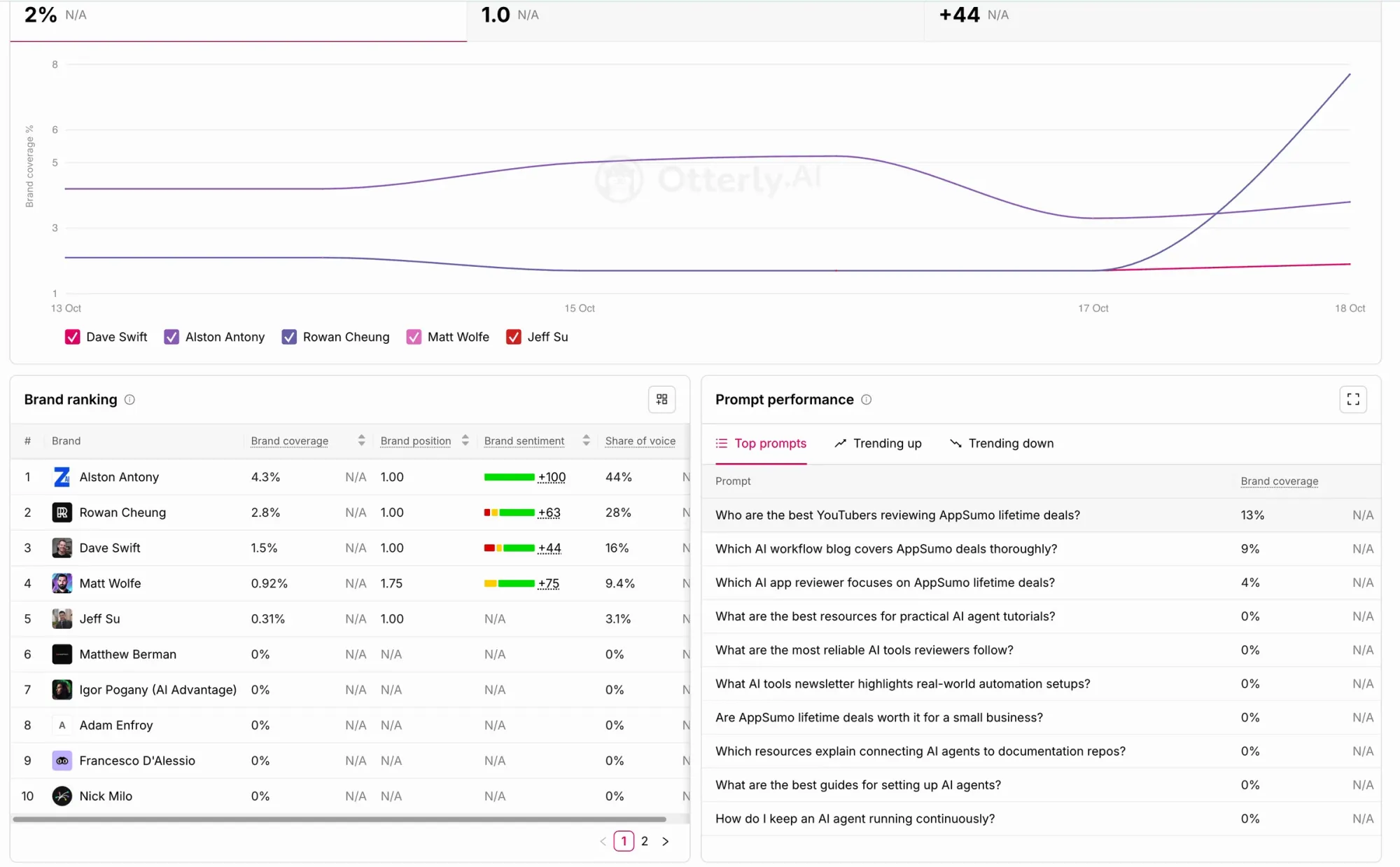
This is the brand ranking from my report (last 14 days, all engines, United States):
| Brand | Share of voice | Coverage |
|---|---|---|
| Alston Antony | 44% | 4.3% |
| Rowan Cheung | 28% | 2.8% |
| Dave Swift | 16% | 1.5% |
| Matt Wolfe | 9.4% | 0.92% |
| Jeff Su | 3.1% | 0.31% |
Share of voice is your slice of all the brand mentions across the prompts you track. Coverage is the share of tracked prompts where you show up at all. The numbers are small because AI rarely names anyone for these questions, but the order still tells you who it reaches for first.
Some of this I expected. Rowan Cheung and Matt Wolfe are big names in AI news and tools. The one that got me was Alston Antony. He reviews lifetime deals, which is my exact niche, and he wasn't even on my original competitor list. Otterly's citation data is how I found him. When I pulled the report data for October 12 to 17, his "AI Tool Reviews: 67 Hands-On Tests" page had been linked 11 times. Only one page in the whole report was linked more (an OpenAI guide, at 19).
I thought my competition was the other big AI YouTubers. For the questions I care about, AI's go-to source was a reviewer I hadn't been tracking.
A few other things from that October 12 to 17 data stood out:
- Engines don't agree. All three of my mentions came from Google AI Overviews. ChatGPT didn't mention anyone on my list. Copilot mentioned The Rundown (Rowan Cheung's newsletter) four times and me zero times.
- It changes day to day. On October 16, I had zero mentions. That's why checking once by hand doesn't tell you much, and why Otterly reruns the prompts on a schedule.
- My niche is where I show up. All three of my mentions came from AppSumo questions, like "Who are the best YouTubers reviewing AppSumo lifetime deals?"
Your numbers will look completely different. That's the point: you won't know until you look.
Where AI gets its answers
The domain sources screen can be a bit of a mind trip if you've been doing SEO for a long time. We're used to thinking about search results and the links we want pointing at us. These are different. Citations are the web pages AI answers list as their sources, whether or not those pages mention your brand. Otterly shows you which sites get cited most for the prompts you track, and where your brand shows up among them.
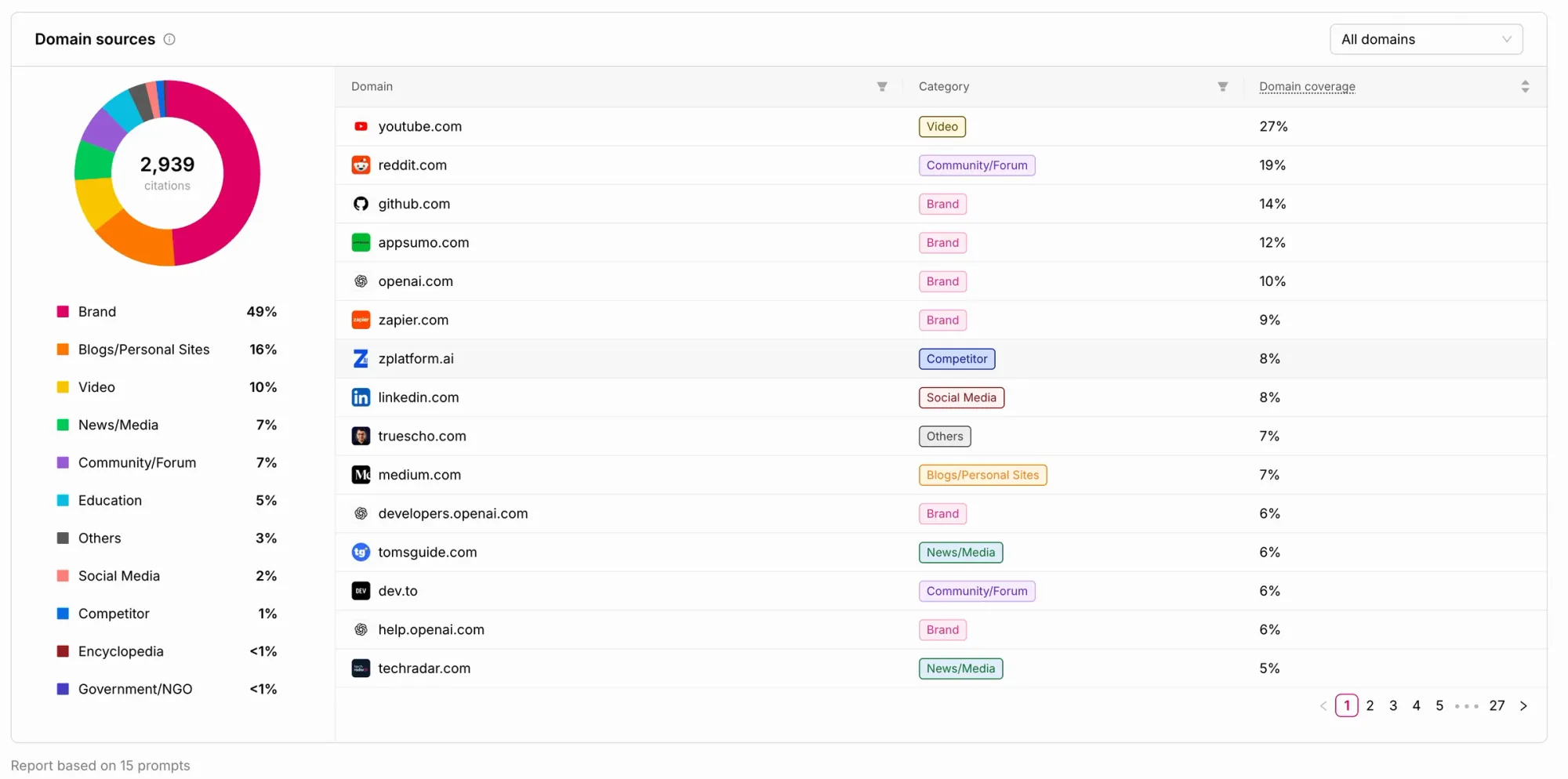
For me, YouTube, Reddit, GitHub, and AppSumo were near the top. In the October 12 to 17 data, YouTube was linked 138 times, GitHub 109, Reddit 103, and AppSumo 60. Only 4 of the 2,167 links went to my own pages.
That tells me something useful. Some of my visibility isn't coming from my website at all. It comes from my videos, from people mentioning me in community and forum posts, and from other sites. If you want AI to recommend you, being talked about in the places AI already trusts matters as much as your own pages.
Otterly also gives you a list of specific recommendations to improve your AI search results. More on those in a minute, because that's where I connected my own AI agent.
Finding the right prompts to track
Your prompts live under General → Search Prompts → Prompts. You can add one by typing it or importing a file, and you can assign prompts to specific brand reports. That's handy if you're doing this for clients, so a client's prompts only land in that client's report.
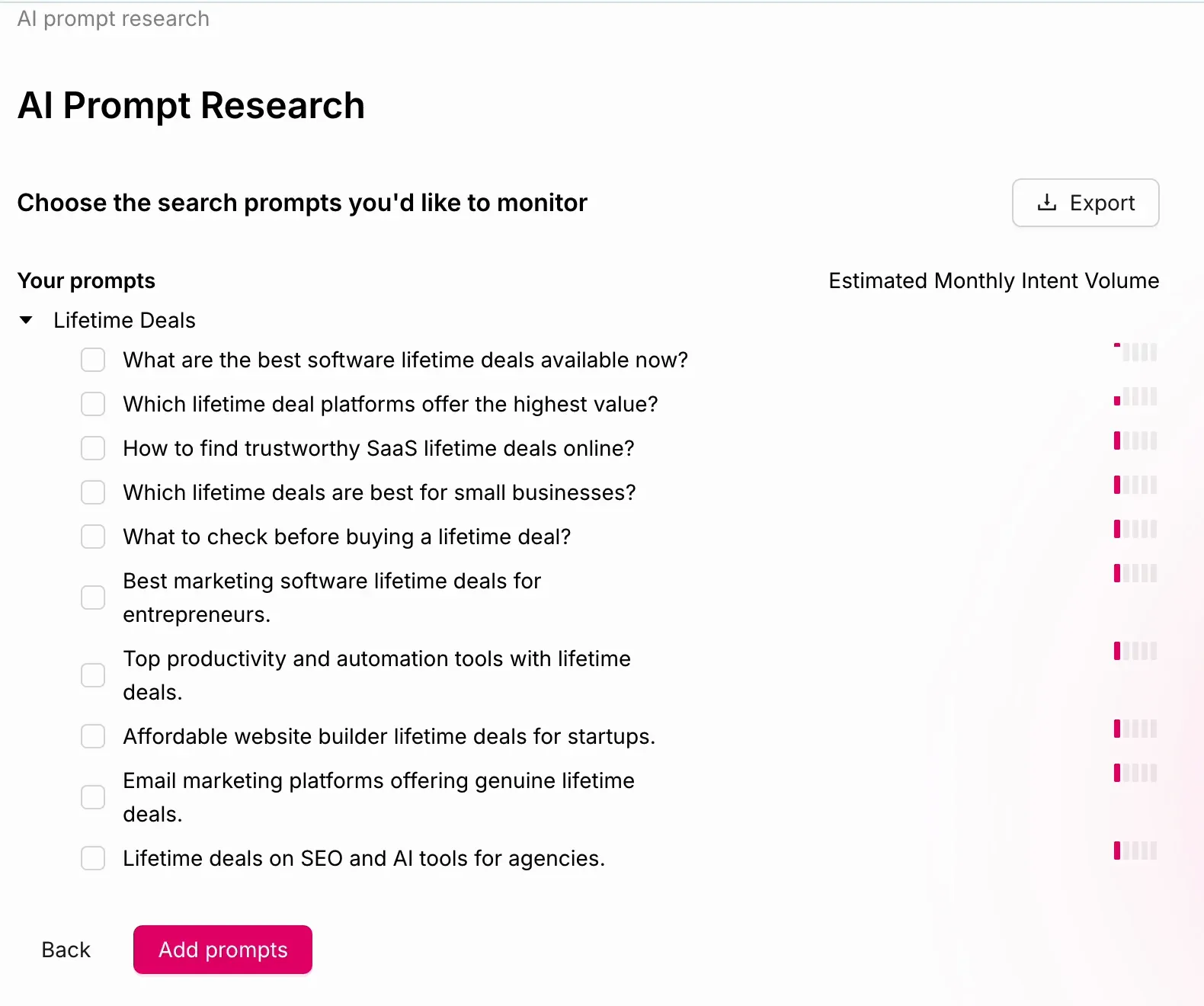
But what if you don't know which prompts to track? Otterly suggests some during setup, and there's also a built-in AI Prompt Research tool under General. You can start three ways:
- SEO keywords. Enter up to 20 at once. I entered "lifetime deals."
- A URL. It works backward to find which prompts might lead to that page.
- Your brand. It brainstorms new prompts based on what you do.
I like starting with keywords. If you don't know where to find yours, connect your site to Google Search Console. It lists the searches people already use to find you on Google. Copy those into Otterly and you've got a head start.
From "lifetime deals," it gave me a long list of prompts I could use as seeds for content on my site, along with a monthly intent volume for each. Those numbers were low for my niche, but that's just because not many people search for software lifetime deals. Tick the boxes next to the prompts you want, hit Add Prompts, choose the brand report, and they're added. They show as "calculating" for a bit before the data fills in.
How many prompts you can track depends on your plan. My account had room for 50, and the plan limits are in the pricing section below.
One thing to be clear about, since I review a lot of lifetime deals: OtterlyAI is not a lifetime deal. It's a monthly subscription, like most SEO and data tools. AI is expensive to run, and Otterly is no different.
Can AI even read your site?
The Crawlability Checker is worth running before you dig into prompts at all. It's under General. Enter your website, and it checks whether AI crawlers are allowed in.
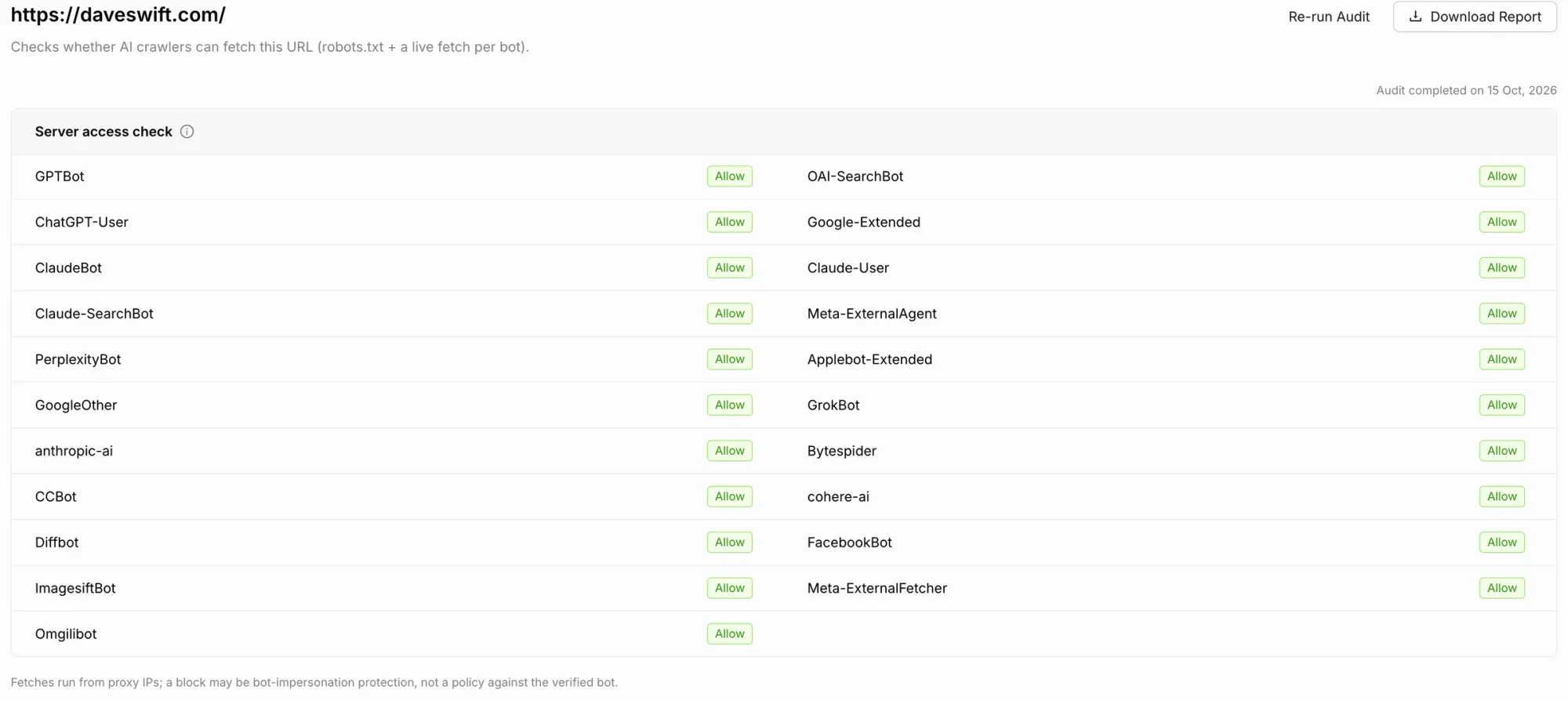
You might have a setting in your robots.txt file, or you might have flipped a switch on Cloudflare that blocks AI from reading your site. A year or two ago, a lot of us worried AI would take our content and nobody would visit our sites anymore. Now we know it's important to let AI reach the pages we actually want traffic to, like product pages and blog posts. That's how it sends interested people your way.
So go check. If the bots can't get in, nothing else in this article matters much.
Checking one blog post with the Content Checker
The Content Checker looks at a single page and tells you how well it's structured for AI. I ran it on my post about how Hermes uses secrets, because there's a lot of confusion about giving an AI agent access to passwords.
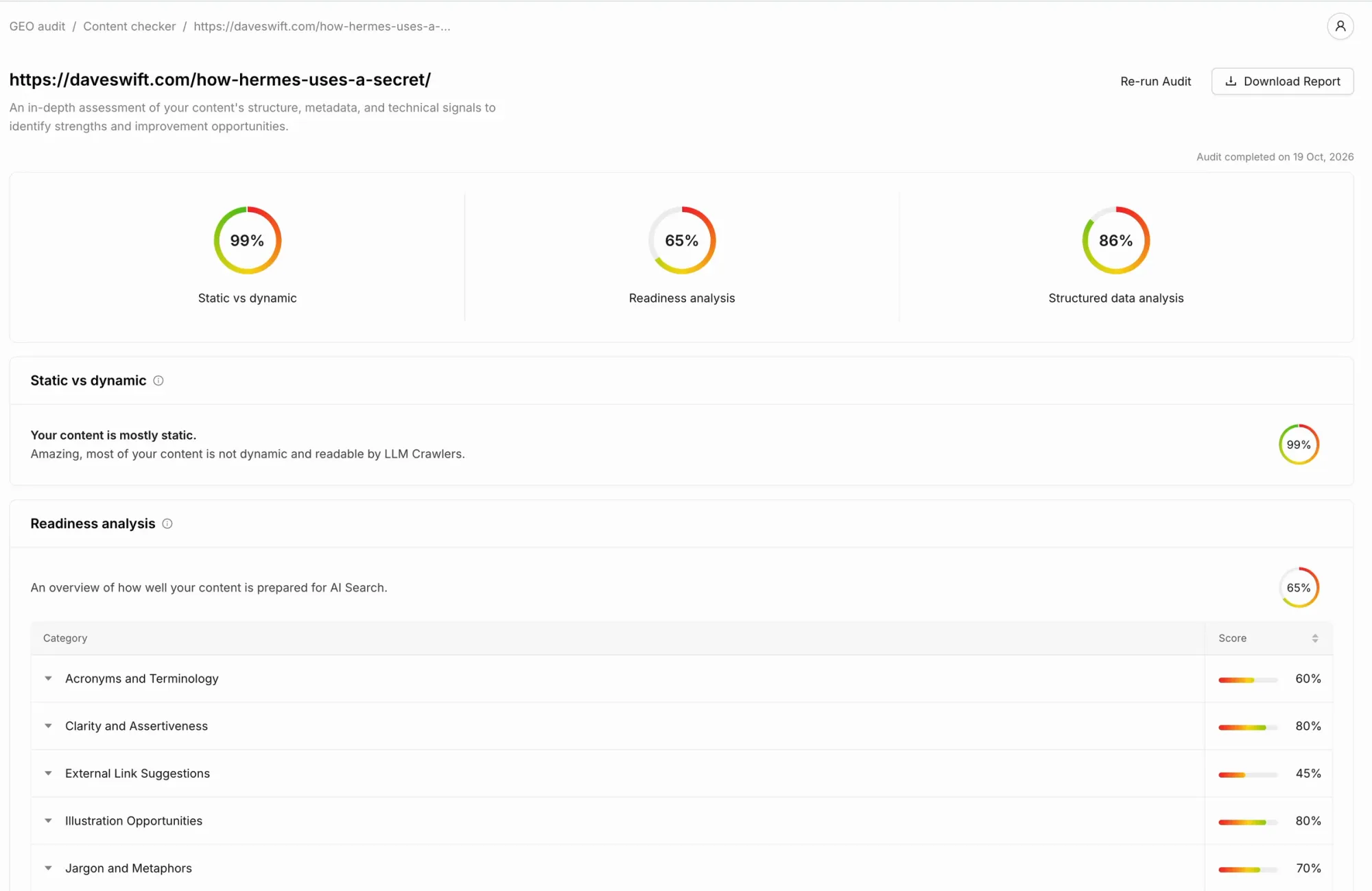
The report came back mostly positive. My content was readable by AI crawlers. The readiness part was middle of the road, though, with some clear areas to fix, like external link suggestions.
None of this is new magic. It's the same kind of work you used to do for SEO: changes that don't alter what your content means, but help AI understand it so it's the right page to recommend.
Connecting my AI agent
OtterlyAI has an API, and you can connect it to the AI agent you already use. I use Hermes Agent (my assistant is named Lloyd), but Claude Code and similar agents work too. Otterly also offers a hosted MCP connection for Claude and Cursor. MCP is a standard way for AI apps to plug into other tools.
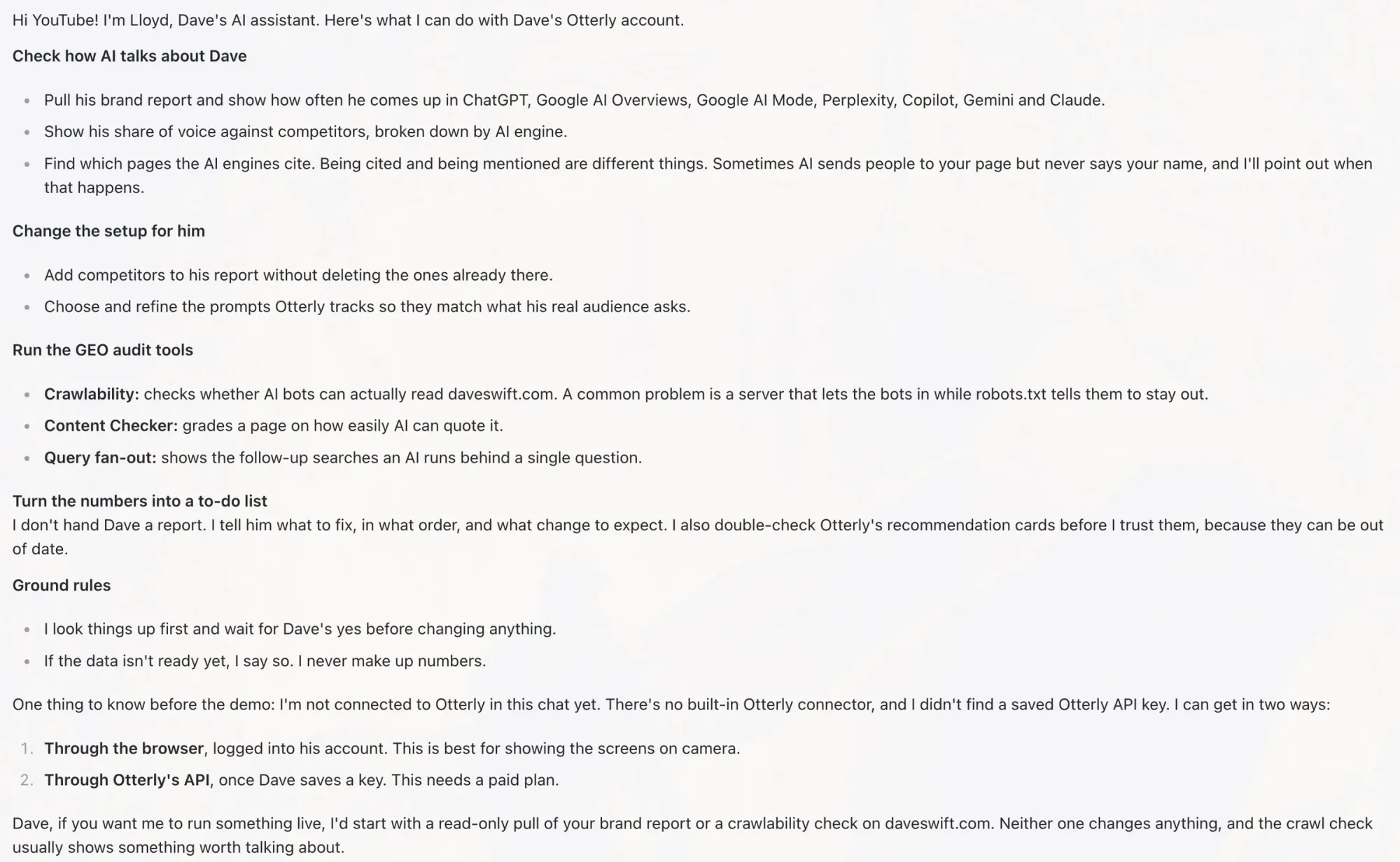
Plan note: API and MCP access come with the Standard, Premium, and Enterprise plans. They aren't on Lite.
You find your API key in the Otterly dashboard and share it with your agent the proper, secure way. (I set mine up off camera so I wouldn't show the key.) Then I asked my agent if it could see my Otterly account. It could. From the chat, it can:
- Tell you how AI talks about you, by pulling up the brand report. I don't even need to open Otterly to ask, "What's going on with the brand report today?"
- Add competitors and refine the prompts you're tracking
- Run the Crawlability Checker and Content Checker
- Run the Query Fan-out tool, which shows the follow-up searches an AI runs behind a single question
The most exciting part is what happens next. Your agent can turn that data into a to-do list. You decide which tasks matter and hand those to your agent, or to whoever handles your website.
What happened when I acted on the audit
I asked my agent if it could see the content check I'd run on that blog post, and to look for ways to improve the post based on the results.
It found the right audit, confirmed the time I ran it, and gave me six fixes. I could have run the entire audit from the chat and gotten Otterly's real data instead of an AI guessing and making things up.
Just as interesting, it also told me where it would ignore Otterly's advice. One suggestion was to remove the newsletter signup boxes from the post. If you only care about traffic from AI, maybe that helps a little. If you care about newsletter subscribers, it's probably harmful. You have to decide what you're optimizing for.
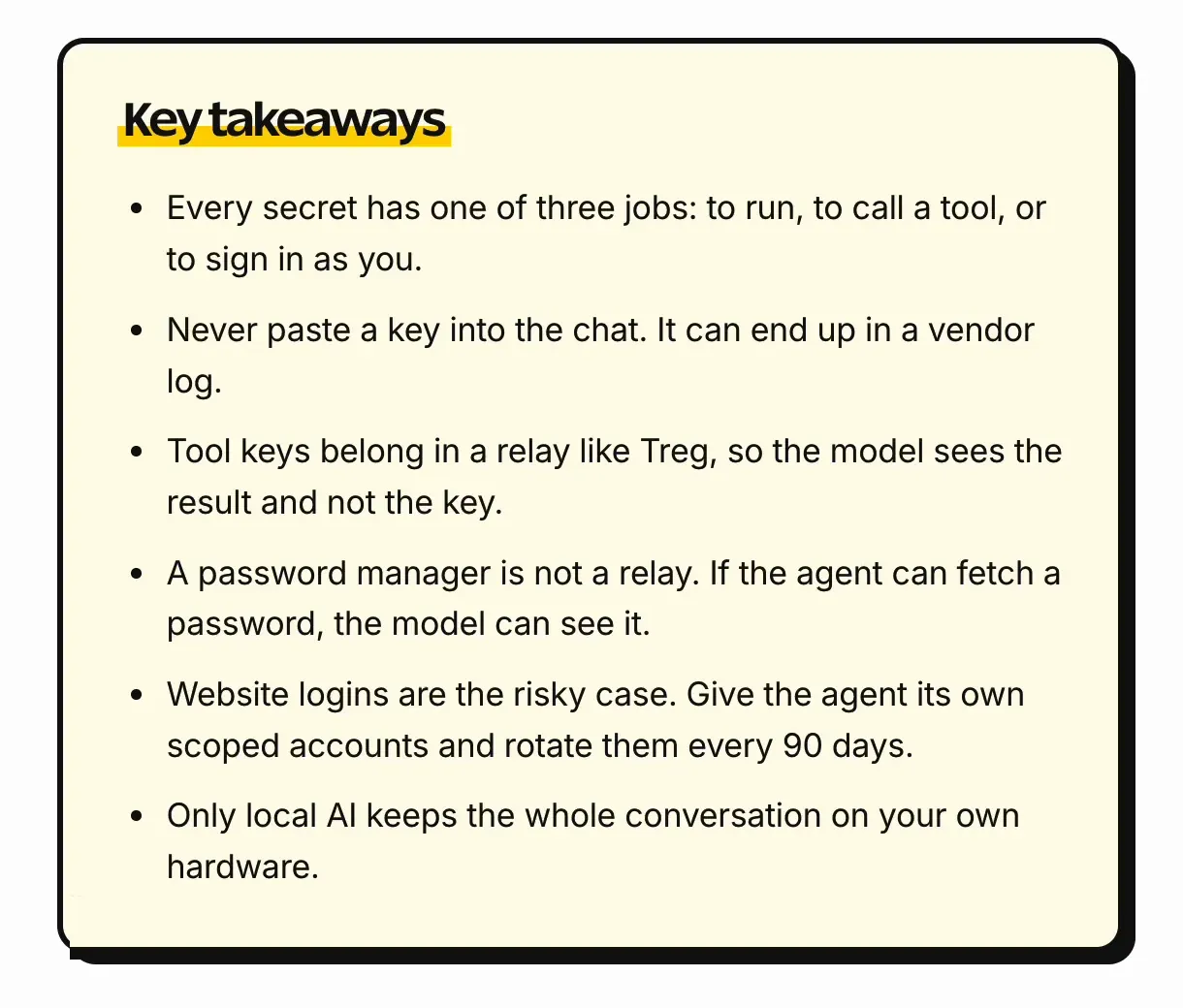
So I had it make the changes it recommended and skip the two it said to ignore. It added a key takeaways box, a short FAQ, and a simple table, then reran the audit.
To be clear: Otterly doesn't edit your website. That was a third step I added. Otterly recommended changes, and my agent (which I'd already given access to my site) made them for me. You can do them yourself or hand them to your website person.
And of course, I still had to read it and make sure everything was accurate. I'm not saying publish slop on your site. Give it the human touch.
The before and after
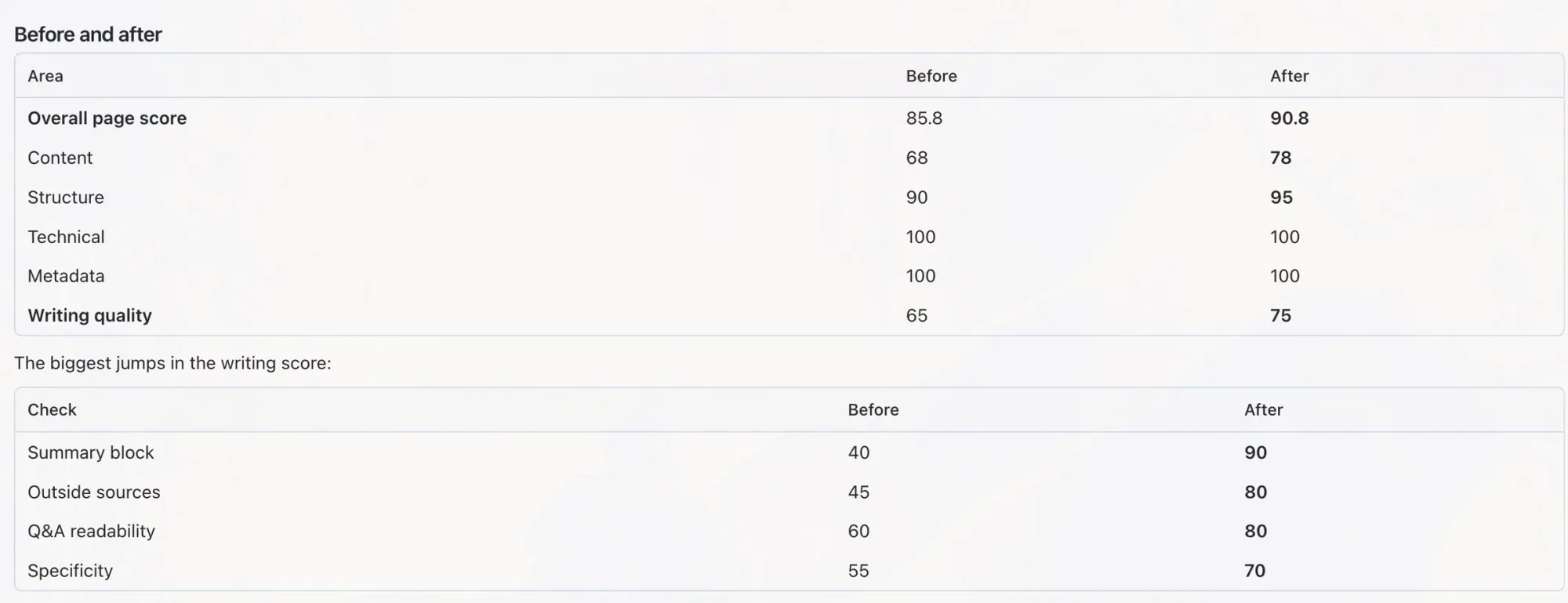
Here's what the rerun showed:
| Content Checker score | Before | After |
|---|---|---|
| Overall | 85.8 | 90.8 |
| Writing | 65 | 75 |
| Clarity | 80 | 75 |
| Jargon | 70 | 60 |
Overall and writing went up. Clarity and jargon went down, and I find that interesting. The checker had said the post never explained what MCP is, so we added a definition. My guess is that the extra words and terms made the post a little less clear. It's the same lesson as the newsletter box: you have to choose what you're optimizing for.
I had my agent do one more pass to style the takeaways box and pick up new suggestions from the second audit. The final audit showed a small improvement in almost every category.
That's the loop that works here, just like SEO: make a change, measure it, do more of what works and less of what doesn't. Changes take time, and sometimes they don't pan out. Revising content that's already doing well is a good place to start.
Who it's for, and what it costs
I'd say OtterlyAI fits best if you:
- Run a business or a site and want to know whether AI recommends you
- Do SEO or marketing and need to show clients how they appear in AI answers
- Run an agency and want separate workspaces for each client
Here's the pricing from otterly.ai/pricing when I checked on October 20, 2026:
- Lite: $29/month, 15 search prompts across ChatGPT, Google AI Overviews, Perplexity, and Copilot
- Standard: $189/month, 100 search prompts, plus API and MCP access
- Premium: $489/month, 400 search prompts
- Enterprise: custom pricing, starting from 1,000 prompts
Annual billing is 15% off. Prices change, so check the pricing page before you buy.
Try it on your own site
Start with OtterlyAI's free trial.
Before you sign up, write down three questions a customer asks right before they find you. Those are your first prompts. Then run the Crawlability Checker, see who AI recommends instead of you, and pick one page to improve.
So, does AI know who you are? Now you can find out. If you try it, tell me what surprised you.
Get Dave's Toolbox
The tools I actually use, every Tuesday. Free. No spam.
No cost. No spam. Unsubscribe anytime.