

Vibe App Scanner: What Its AppSumo Quick Scan Found
I planted a flaw in my vibe-coded to-do app and ran Vibe App Scanner against it. It reported the exposed Stripe key, gave me evidence and suggested fixes, and let me rescan after I passed findings to a coding agent. The AppSumo deal has useful quick scans, but it does not include deep scans.

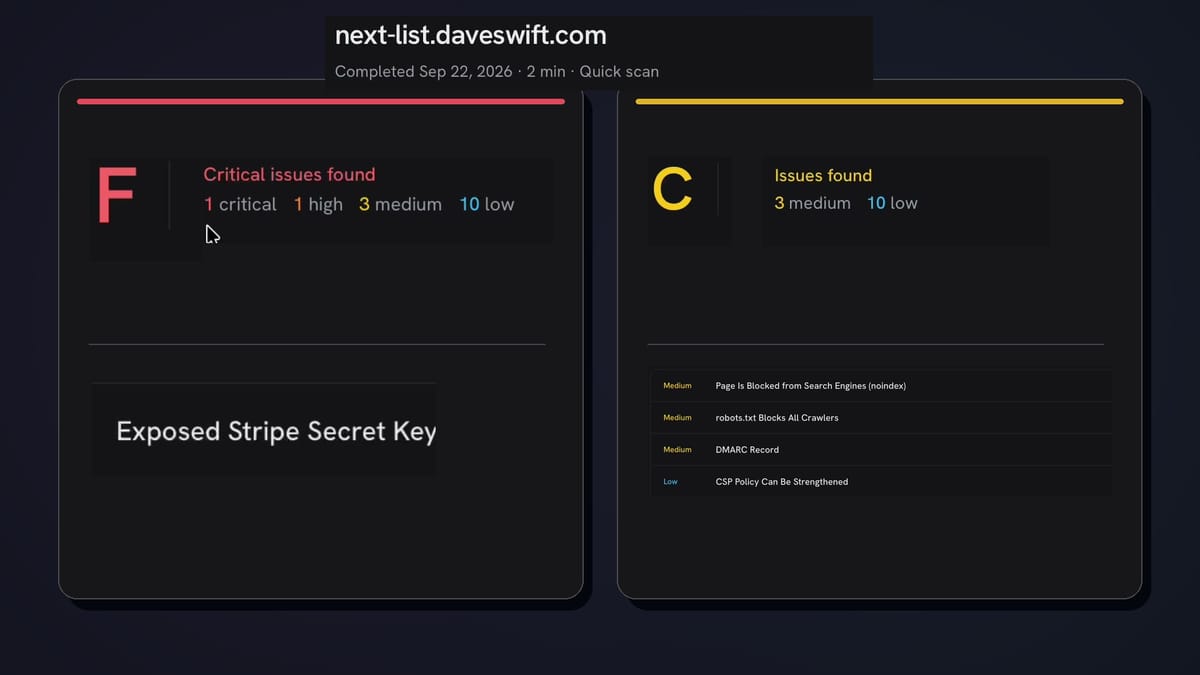
AppSumo sponsored my Vibe App Scanner video. The deal shown includes quick scans with monthly limits; deep scans and Spring Code human services are not included. I may earn a commission if you buy through my link, at no extra cost to you.
Vibe App Scanner
Quick URL-based scans for security, performance, SEO, and accessibility findings, with evidence and suggested fixes.
App builders who want recurring quick checks and findings to hand to a coding agent; not a replacement for a deep security review.
Asking a second AI model to inspect an AI-built app; no direct comparison was tested in this video.
Why I tested Vibe App Scanner
I would try Vibe App Scanner if I were putting a small app online and wanted a second look for obvious security mistakes. I planted a test key in my vibe-coded to-do list to give it something to find. The scanner flagged it. More interestingly, the report gave me something I could pass to my coding agent and check again afterward.
You enter an app URL, and the scanner reports findings across security, performance, SEO, and accessibility. I wanted to see the actual evidence and suggested fixes, not just a red warning badge. AppSumo sponsored the video behind this article. If you buy through my AppSumo link, I may earn a commission at no extra cost to you.
How I ran the scan
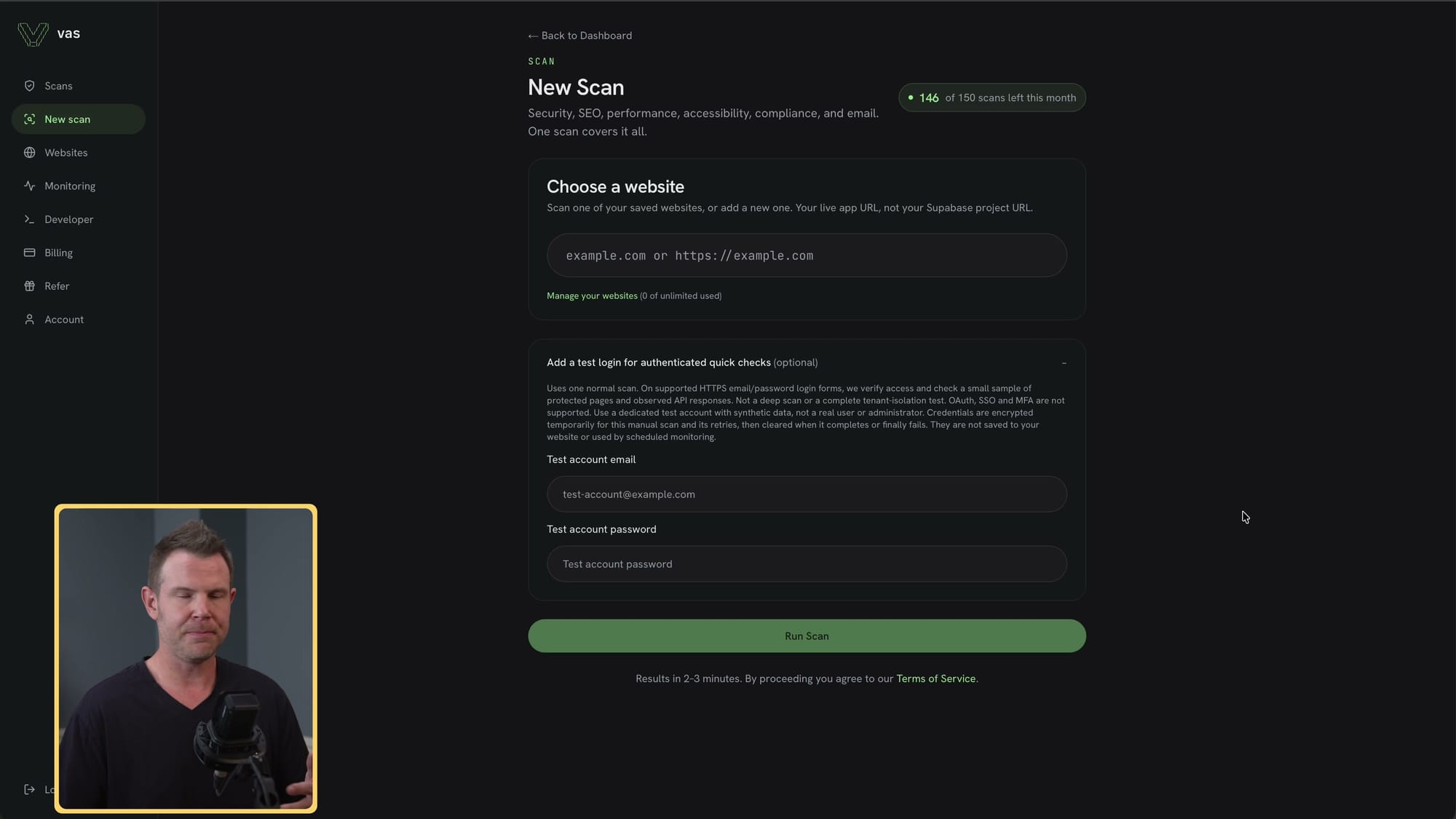
I opened New Scans, entered my to-do app’s URL, and ran a scan. You can check its public-facing pages without a login. The form also accepts test credentials if you want to scan behind a login, though I used the public URL here. If you try that option, use a dedicated test account rather than your personal login.
Mine finished in a couple of minutes. I said a larger app could take up to five. The report groups findings by critical, high, medium, and low severity, with category filters so you can focus on security instead of reading every SEO suggestion first. My performance, SEO, and accessibility results looked fine; security was another story. The URL entry and report are in the video.
The planted Stripe key was found
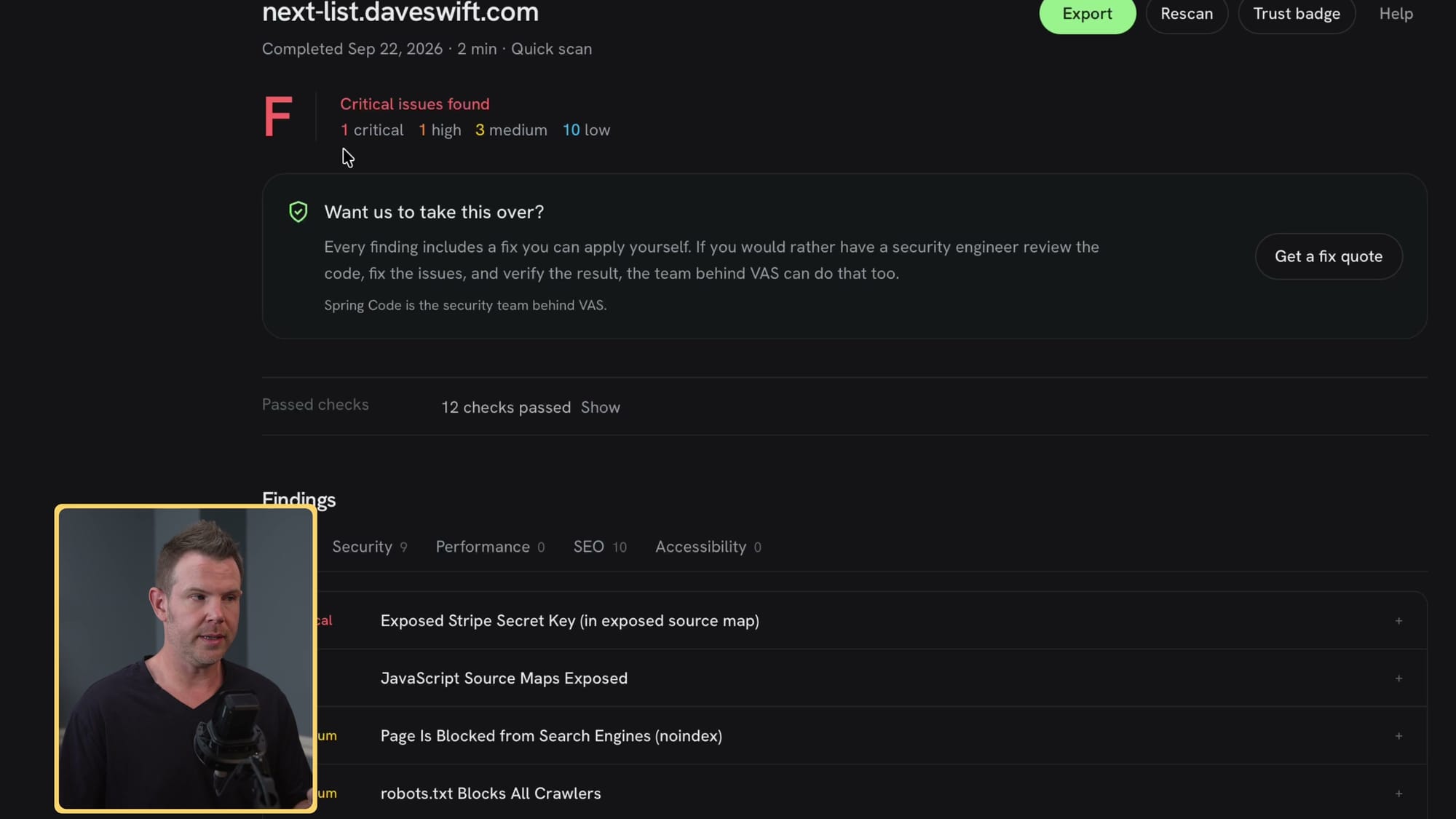
At 01:54, the report labeled my planted test key “Exposed Stripe Secret Key.” I did not test whether that key was live or usable. Still, if you are vibe coding an app, watch where your keys end up. This mistake predates AI, but having an agent write the code does not make it disappear.
The scanner marked it critical and recommended removing the key from source code and rotating it. I opened Evidence to see what triggered the alert. Those are two separate jobs: removing a key from public code does not revoke one that was exposed. In this test I showed the recommendation, not a completed rotation.
The source-map finding was more involved
At 03:05, I opened the scanner’s second security finding, which flagged JavaScript source maps. Source maps help connect shipped JavaScript back to its original source, which can reveal more of how an app was built. The scanner gave me a longer set of suggested steps for this one than for the key. I could copy those steps instead of trying to turn a severity label into a fix on my own.
The report’s details are useful handoff material, especially when you built the app with an agent. I would still inspect what the agent changes. The video shows what the scanner flagged and the steps it suggested; I did not independently inspect the source-map exposure.
What I handed to my coding agent
I copied the source-map finding into my coding agent and asked it to patch the problem. Then I noticed I had forgotten the key alert and added that too. Very human, even with two AI tools in the loop. Giving the agent the actual finding is more useful than asking it to “make this secure.” That handoff starts around 03:47.
If you do this often, there are less manual ways to work. MCP access starts at AppSumo Tier 2, and API access starts at Tier 3. I talked about connecting a coding agent through MCP or using the API to create tickets or pull requests, but I did not build either automation in this test. I copied and pasted. For an occasional scan, that may be plenty; if you scan several apps, the integration becomes more interesting.
Weekly monitoring and the optional human service
The Monitoring screen in the video showed a weekly-scan option and my to-do app listed with another scan due soon. I could also see email-security checks and views for unresolved and fixed issues. I like that setup for checking an app again after changes; I did not show a week of automatic scans actually running.
If a finding is beyond what you want to handle with an agent, the product points to Spring Code, a human security team. The screen in the video showed a manual authentication review starting at $700; that is not a current quote. That service is separate from the AppSumo deal; I did not hire the team. The monitoring and human-help screens are in the walkthrough.
What the AppSumo tiers include
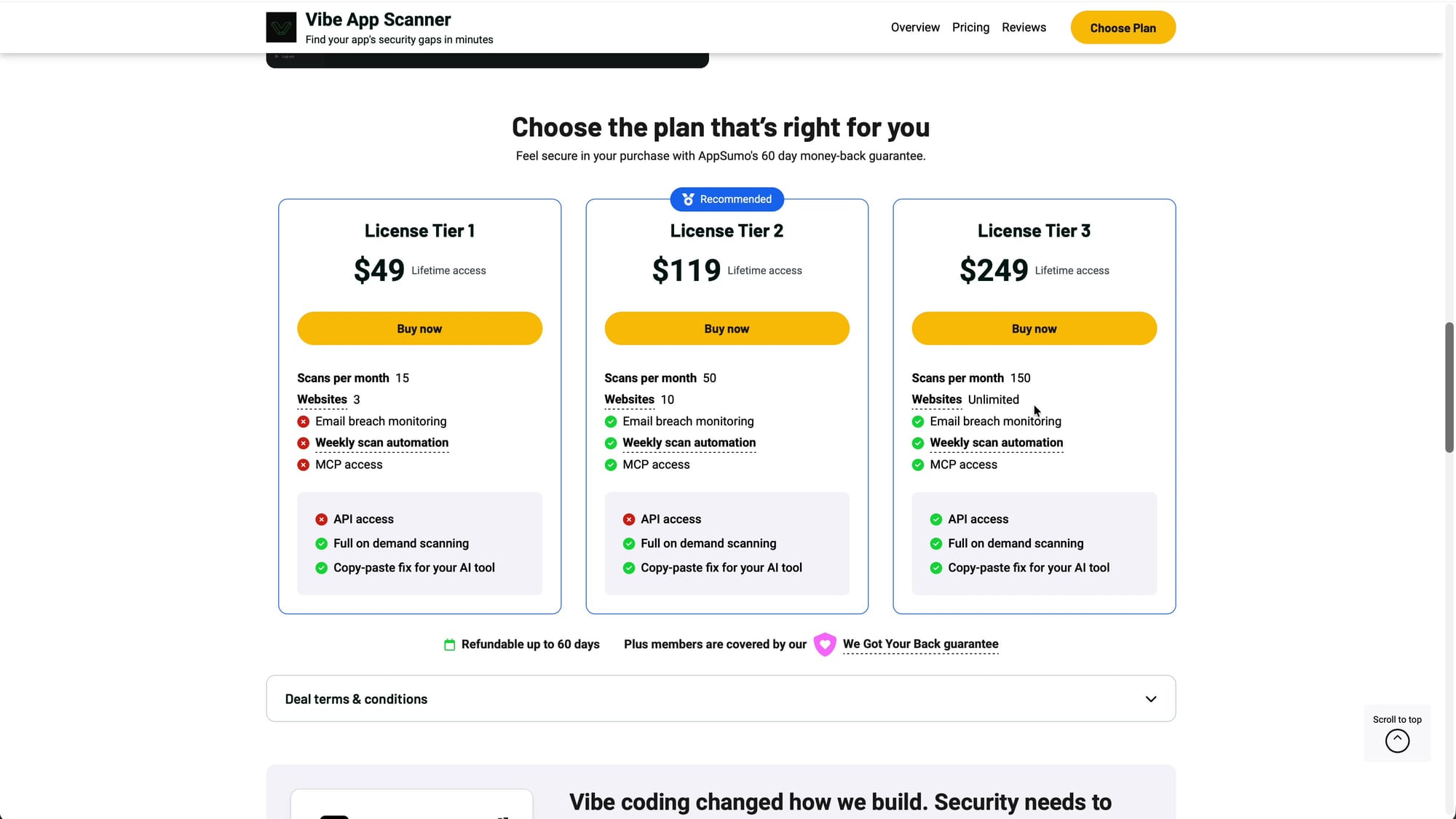
The AppSumo tiers shown in the video have monthly scan and tracked-site limits. Tier 1: 15 scans and three sites. Tier 2: 50 scans and ten sites, plus MCP. Tier 3: 150 scans, unlimited tracked sites, and API access. Check the current AppSumo listing before choosing a tier; the figures here are what I showed in the video.
“Unlimited websites” on Tier 3 sounds generous, but it does not mean unlimited scans. The listing showed a monthly scan allowance, so check how monitoring scans and rescans count against it before choosing a tier. If you only check one app now and then, Tier 1 may be enough. If you keep handing findings to a coding agent, compare the scan quota as carefully as the MCP or API access. I go through the tiers at 05:30.
The important limit: no deep scans in the LTD
This is the deal detail I would not skip. At 05:59, I compared the AppSumo listing with Vibe App Scanner’s own pricing page. The product page showed weekly automated deep scans; the AppSumo lifetime deal explicitly said deep scans were not included. It includes what the listing calls quick scans.
I was disappointed. The quick scan flagged the test key I planted and gave me a workable report, so I can see a use for it. But I would buy this deal for recurring quick checks, not because I thought it included the deeper scan advertised on another plan. If deep scans are the feature you need, this distinction decides the purchase.
What the rescan did and did not prove
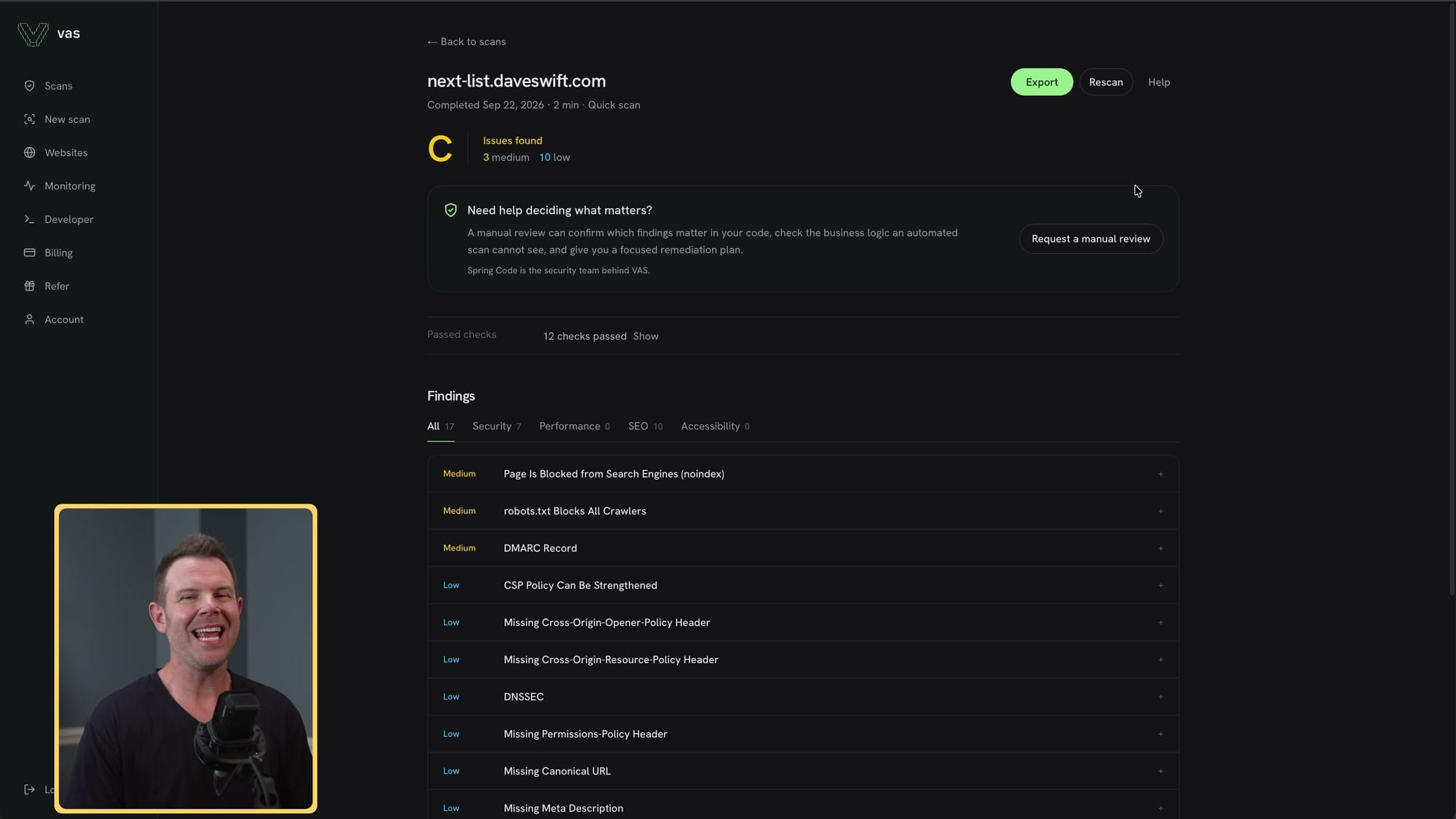
After the agent worked, I opened the old report and hit Rescan. At 06:32, the new scanner report no longer listed the critical and high findings I had passed along. That is the loop I wanted to test: find a problem, give the agent the details, and run the scanner again rather than taking its “done” at face value.
Other issues were still listed; I had not sent those to the agent. The rescan tells me what this scanner reported at that point, not what changed in the code or whether tests passed or a deployment happened. I also did not establish that my test key was live or usable, or verify a rotation. On a real app with an exposed live credential, I would rotate it separately.
Who should consider it
I think this fits someone who ships small apps and wants a repeatable check to put alongside their coding agent. The scan flagged my planted test key, showed me evidence and suggested steps, and gave me a second scanner result after the agent worked. I like the option to move from copying findings to MCP if that becomes a chore.
You could also ask a different AI model to review the app you built. I mentioned using OpenAI to check work made with Claude, but I did not compare that approach with Vibe App Scanner here. If you live that LTD life and quick scans fit your workflow, check the current AppSumo deal. If you are shopping for deep scans, this deal leaves them out.
My call on Vibe App Scanner
My call: Vibe App Scanner earned a place in a quick-check workflow, not a security sign-off. It flagged my planted test key and reported the source-map issue; after I handed those findings to my agent, the critical and high alerts were absent from the next scanner report. The remaining findings were a reminder to keep working through the report.
I gave it 7.2 out of 10. The missing deep scans in the AppSumo deal disappointed me, and the monthly quotas matter if you monitor several apps. If quick scans are what you need, check the terms through my AppSumo link. Start with one app and follow the evidence. If a live credential was exposed, rotate it as a separate step.
Frequently Asked Questions
Does Vibe App Scanner find exposed API keys?
In my test it flagged a planted test key as an “Exposed Stripe Secret Key.” I did not test whether it was usable or live. Treat the report as a lead to investigate, not proof that every exposed key will be found.
Does the AppSumo lifetime deal include deep scans?
No. The offer I showed includes quick scans, not the weekly automated deep scans shown on the product’s own pricing page. Check the current listing before you buy.
How many scans are included per month?
The plans shown in the video offered 15 scans on Tier 1, 50 on Tier 2, and 150 on Tier 3. Check the current listing for how rescans and monitoring count against that allowance.
Which tier includes MCP and API access?
The offer shown required Tier 2 or higher for MCP and Tier 3 for API access. In my test I copied findings into my coding agent; I did not demonstrate a live MCP or API automation.
Can it scan an app behind a login?
The New Scans form offered optional test credentials for logged-in pages. I demonstrated a URL scan; I did not measure how much of an authenticated app it covers.
Did the scanner fix the exposed Stripe key?
No. I gave the report findings to my coding agent, and the next scanner report no longer listed the critical and high alerts. I did not verify code changes, tests, deployment, or key rotation, and did not establish that the planted key was live.
Are human security fixes included in the lifetime deal?
No. The Spring Code screen in the video showed separate human work starting at $700 for a manual authentication review. That was a displayed starting price, not a current quote; I did not purchase the service.
Get Dave's Toolbox
The tools I actually use, every Tuesday. Free. No spam.
No cost. No spam. Unsubscribe anytime.


